80
Using the insert effects
Editing insert effect settings
If you wish to create a new effect sound, you should first
select an existing patch that is closest to the sound you want,
and then edit its settings. If you wish to save the effect
settings that you edited, save them as a user patch or song
patch.
1. Press [EFFECTS].
The Effect Settings screen appears.
fig.R18-02
2. Press PARAMETER [ ] [ ] to move the cursor to
the upper right side of the display and turn the TIME/
VALUE dial to select the effect patch bank and
number.
3. Press PARAMETER [ ] [ ] to move the cursor to
“EDIT,” and press [ENTER].
The Edit Effect screen appears and the algorithm (the
connection sequence for the effects being used) is
displayed.
fig.R18-03a
■ When effect patches in the SIMUL bank are selected,
“GTR” and “MIC” appear instead of “EDIT.”
Move the cursor to “GTR” to modify a guitar-use effect,
or to “MIC” to modify an effect for use with a mic, then
press [ENTER].
fig.R18-03b
By pressing [ENTER] while the cursor is at a bank or
number, you can display the Edit Effect screen directly.
4. Press PARAMETER [ ] [ ] to move the cursor to
each effect and turn the TIME/VALUE dial to turn each
effect on or off.
Blocks that are turned on are shown in uppercase letters,
while blocks that are turned off are shown in lowercase
letters.
Turn on the effects that you want to use.
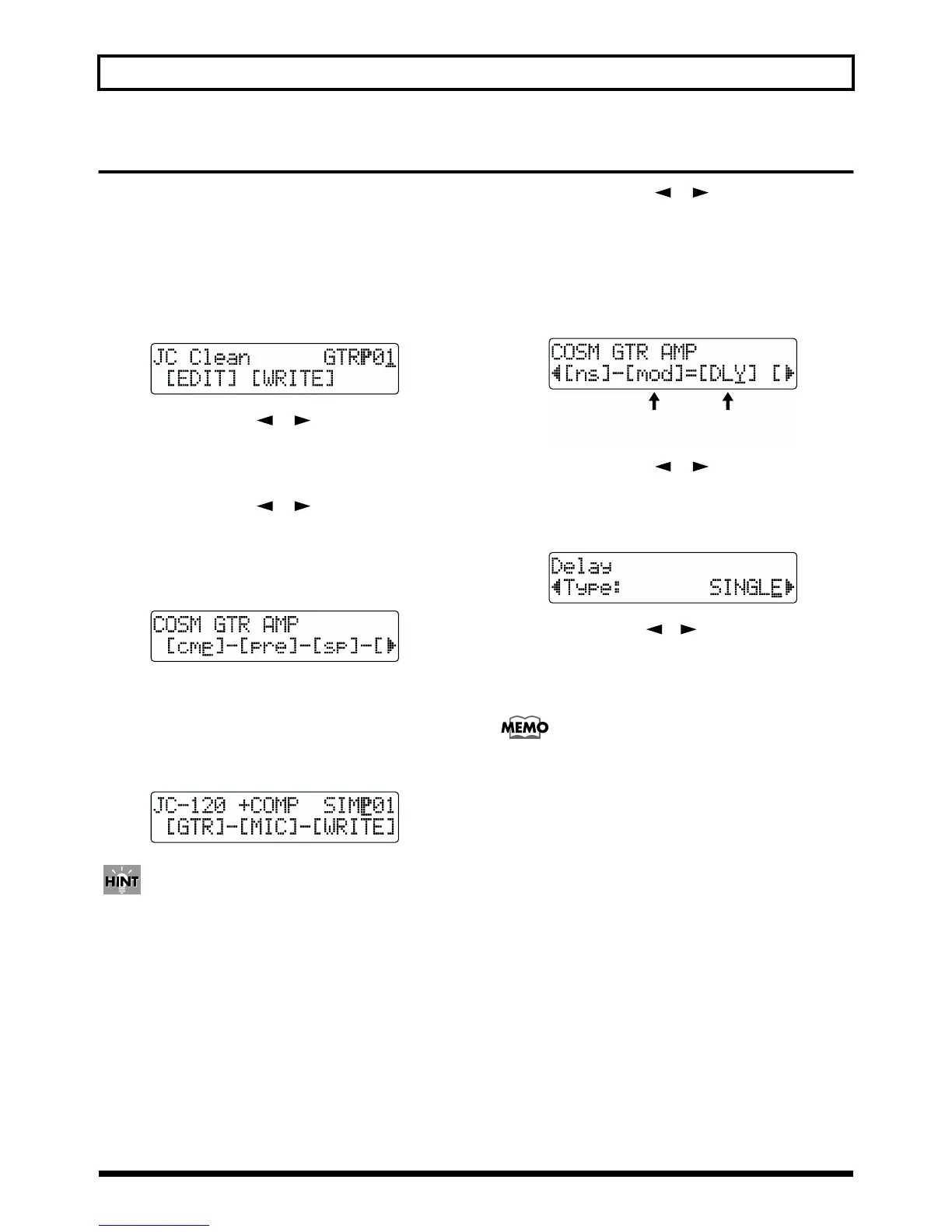
fig.R18-04
5. Press PARAMETER [ ] [ ] to move the cursor to
the effect with the parameter that you want to change
and press [ENTER].
The Parameter Setting screen for each effect appears.
fig.R18-05
6. Use PARAMETER [ ][ ] to select a parameter,
and turn the TIME/VALUE dial to edit the value.
7. If you would like to edit another effect, press [EXIT] to
return to the previous screen, and repeat steps 5–6.
If you wish to save the current effect settings, perform
the procedure described in “Saving insert effect
settings,” below.
* Edited effect settings are temporary. If you exit the Edit Effect
screen without saving the effect patch you changed, “TMP”
appears next to the indication of the bank. Press [ENTER] to
return to the Edit Effect screen. For how to save the changes,
refer to “Saving insert effects settings” in the next section.
Be aware that if you select a new effect patch while
“TMP” is displayed, the altered effect patch is
returned to its original settings and the changes are
lost.
(
Delay
)
ON
(
Modulation
)
OFF



 To Next Page