ICEfx™ Cryoablation System
4-5
4.5 Entering Case Information
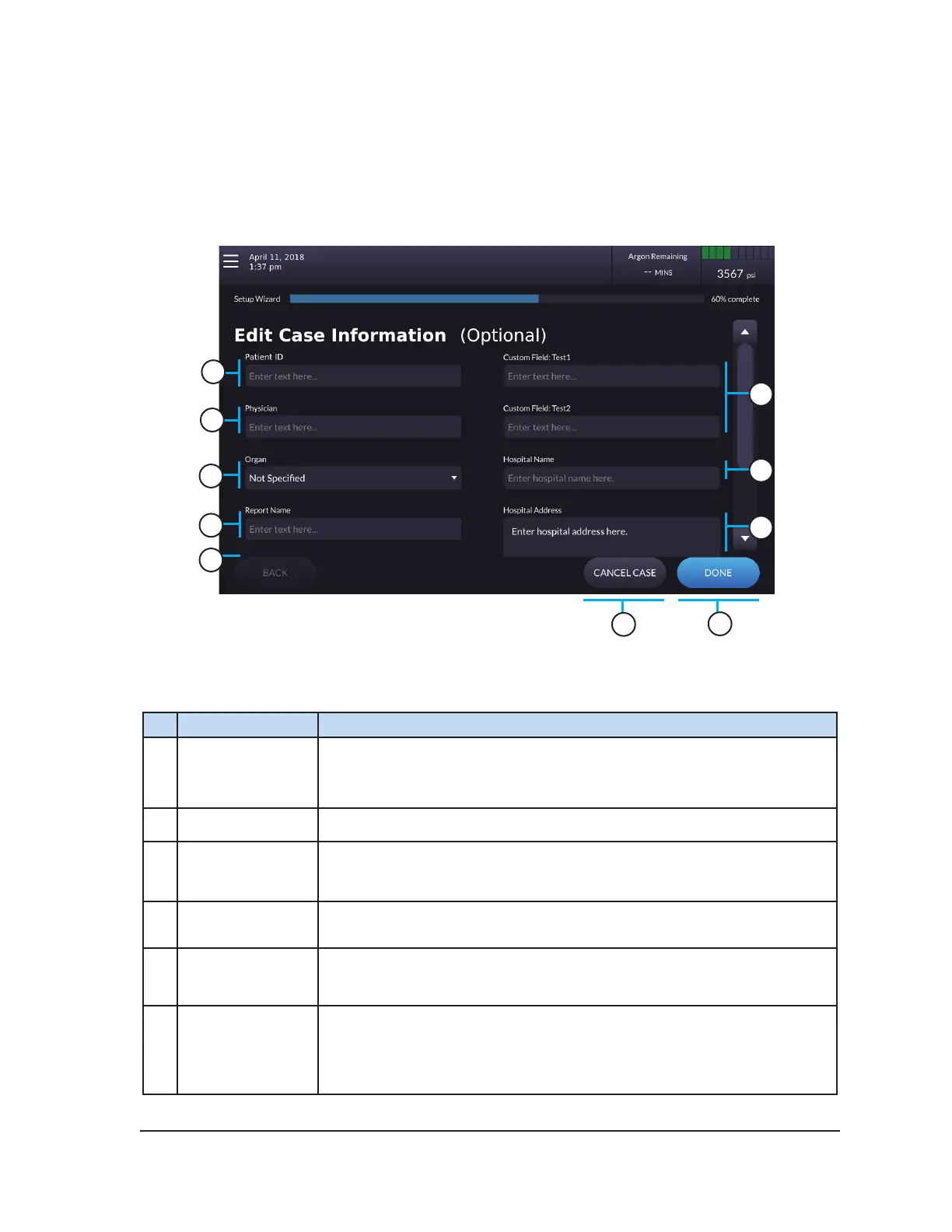
Use the Edit Case Information Screen to provide additional information on the cryoablation procedure.
This is an optional step.
The Edit Case Information Screen is displayed at the beginning and end of a cryoablation procedure.
At the end of the procedure, an option is provided to save the case information.
5
6
9
10
1
3
2
4
7
8
Screen 4-4. Edit Case Information Screen
Table 4-4. Edit Case Information Screen Controls
# Control Description
1 Patient ID
Type the ID for the patient in this eld.
CAUTION. Select a unique Patient ID that does not reveal the patient’s
identity to other system users.
2 Physician Type the name of the physician performing the procedure in this eld.
3 Organ Select the organ treated during the procedure from the list.
4 Report Name
Specify a name for the report. The report name will be displayed on the
Reports Screen.
5 Notes Enter notes about the procedure.
6 Custom Field
This is a unique eld designated on the Settings Screen. Dene up to two
Custom Fields on the Settings Screen.
NOTE: The Custom Fields are displayed if dened on the Settings
Screen.



 To Next Page