ICEfx™ Cryoablation System
8-9
8.6 Needles
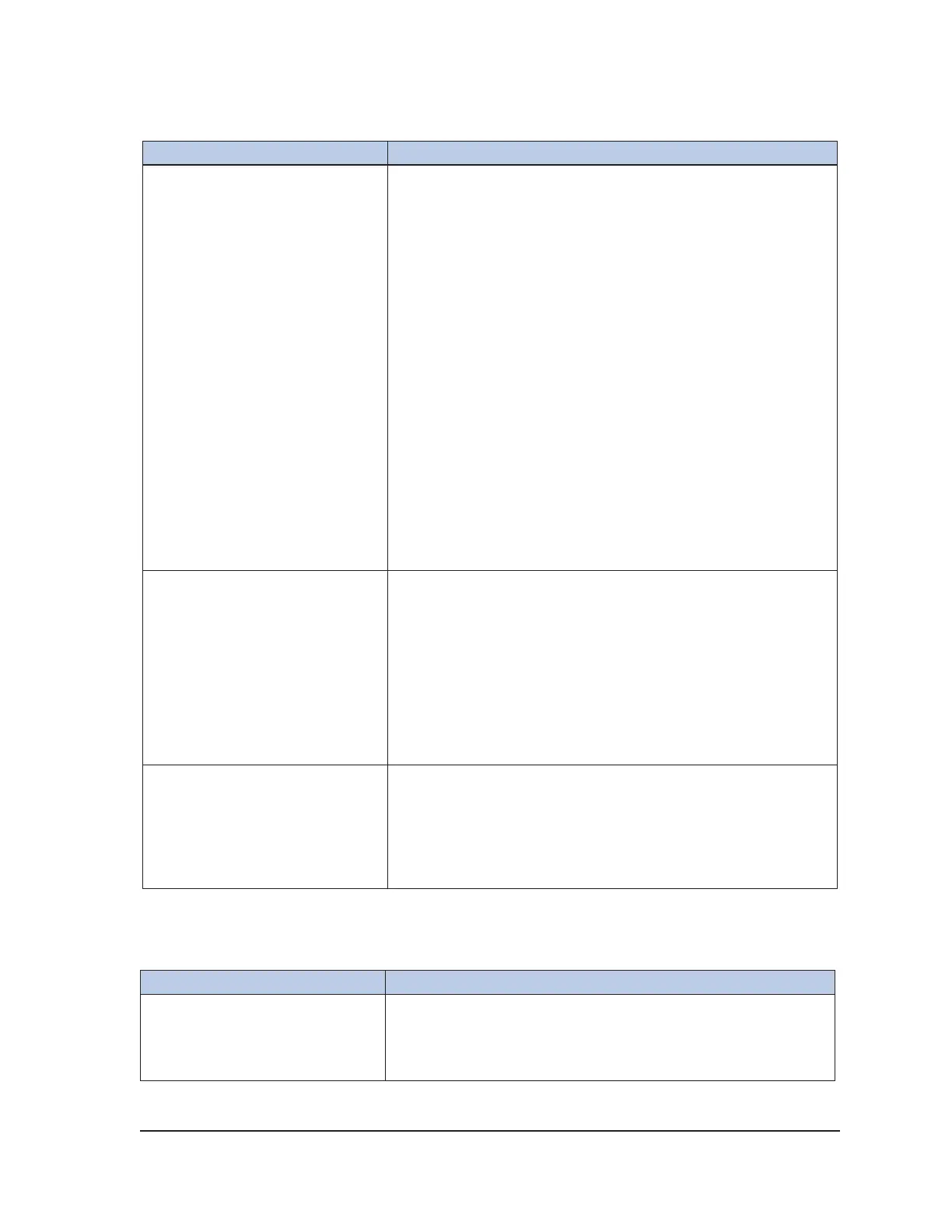
Symptom Potential Causes / Solutions
During the freeze phase or
following a thaw phase, no iceball
forms on the needle(s) in a given
channel
For CX needles:
1. Perform the following steps in the order in which they are
described:
• Stop freezing/thawing actions for all channels.
• Thaw the problematic needle(s) for at least one minute.
• Freeze the needle(s) to verify proper function.
2. If the problem persists, connect a new needle into a
dierent channel and test the needle. Continue the
procedure with the newly tested needle.
For non-CX needles:
1. Perform the following steps in the order in which they are
described:
• Stop freezing/thawing actions for all channels.
• Wait for any formed ice to passively thaw. Do not use
the needle.
2. Use a new needle to continue the procedure.
During the Needle Integrity and
Functionality test bubbles are
seen escaping from the needle
WARNING. Do not use the needle.
• Disconnect and segregate the needle.
• Return the needle to Galil Medical for evaluation.
• Use a new needle to continue the procedure.
• Test the new needle to conrm the integrity and
functionality of the new needle.
• Contact Galil Medical Customer Service for further
instructions upon completion of the procedure.
Needle was bent or damaged
while attempting to unpack or
use it
WARNING. Do not use the needle.
• Segregate the needle.
• Use a dierent needle to continue the procedure.
• Contact Galil Medical customer service for further
instructions upon completion of the procedure.
8.6.1 CX Needles
NOTE: The following troubleshooting symptom applies only to CX needles.
Symptom Potential Causes / Solutions
A needle is not recognized by the
system.
1. Move the needle to a dierent port.
2. If the system still does not recognize the needle, press the
Channel button to display the needle type drop-down list.
Select the needle type from the list.



 To Next Page