4-10 User Manual
4.6.3 Initiating Testing
CAUTION. If a needle needs to be added during a procedure, connect the needle to an open
channel. If there is no open channel available, reference Section 5.2.1 for the instructions for adding a
CX needle to a channel with an open port.
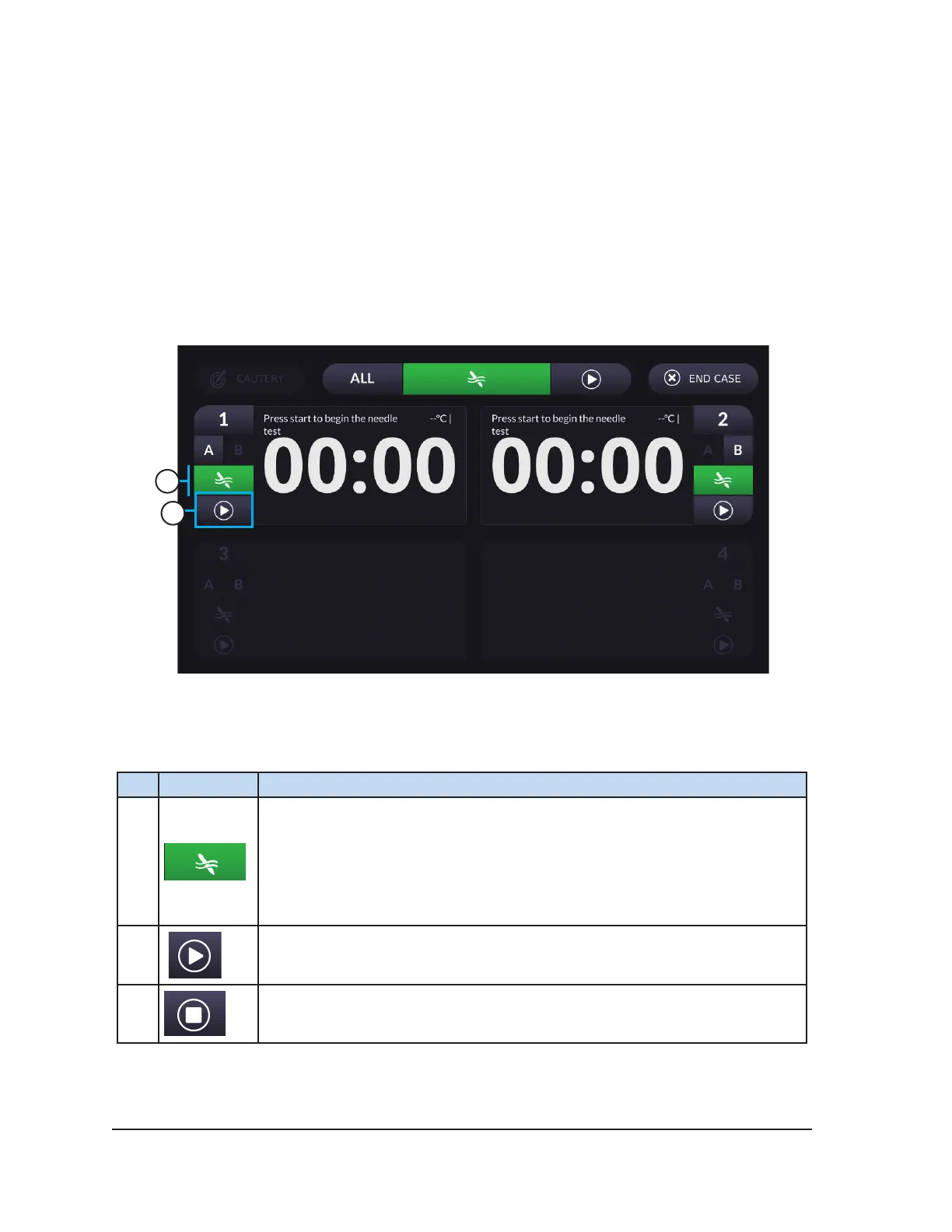
Press the Start button to initiate Needle Integrity and Functionality Testing. Testing can be initiated for
a single active channel or for ALL active channels simultaneously.
Needle Integrity and Functionality Testing is required prior to using any cryoablation needle.
Reference Section 5.1 for detailed information on how to conduct Needle Integrity and Functionality
Testing.
1
2
Screen 4-8. Procedure Screen during Testing
Table 4-8. Test Controls
# Control Description
1
Test button – Indicates the channel is ready for testing. No other controls on
a channel are enabled until needle testing is completed.
Upon completion of Needle Integrity and Functionality Testing, the procedure
controls for the channel become active.
2
Press Start to initiate testing. The timer counts down from two minutes when
testing is initiated.
Press Stop to stop testing.
NOTE: The test automatically stops upon successful completion.



 To Next Page