4-14 User Manual
4.6.5.1 Thaw Controls
1
2
3
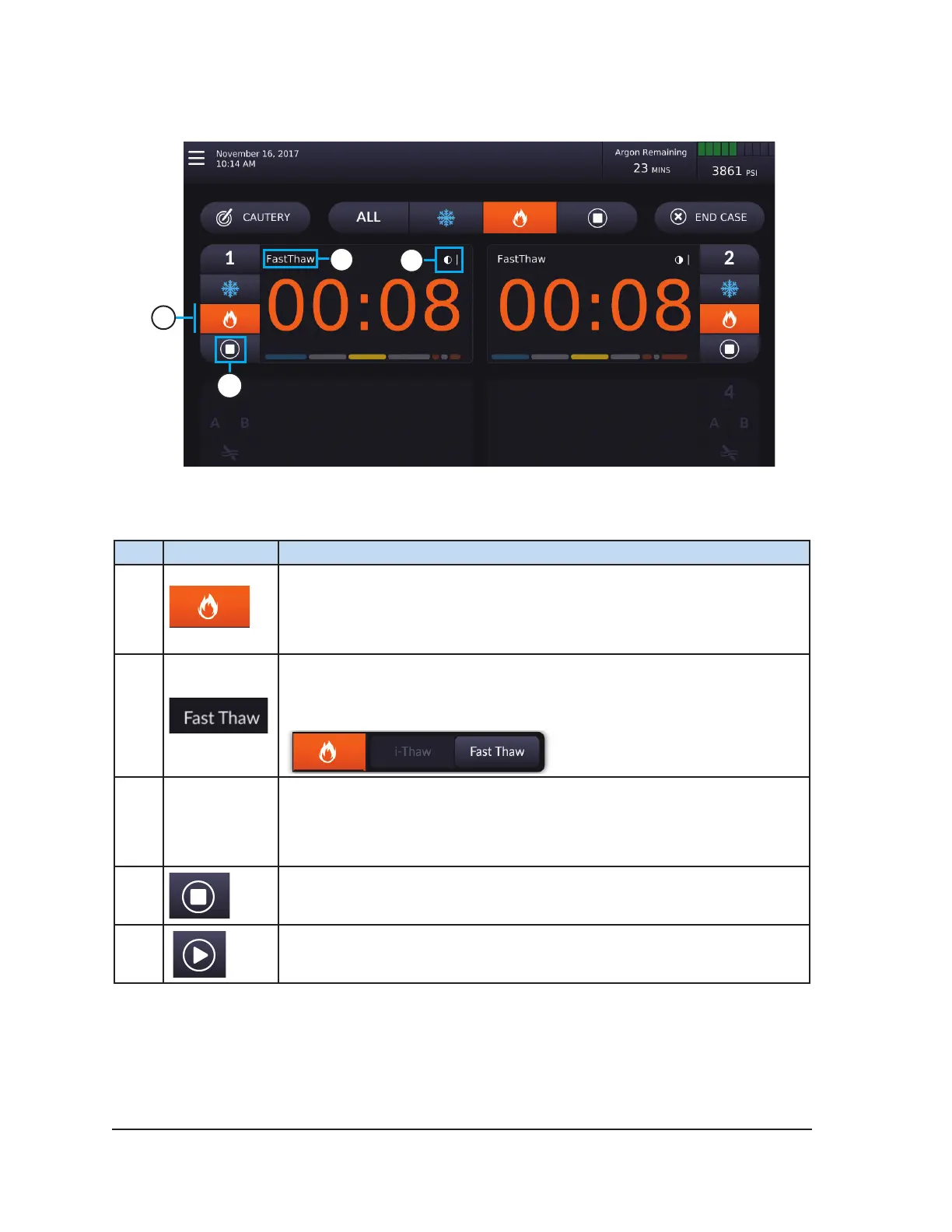
Screen 4-10. Procedure Screen during Thawing (FastThaw)
Table 4-10. Thaw Controls
# Control Description
1
Thaw button — Press the Thaw button to change from FastThaw to
i-Thaw.
The background color of the button is orange if FastThaw is selected and is
yellow if i-Thaw is selected.
2
Displays the currently selected thaw mode (i-Thaw or FastThaw).
NOTE: The FastThaw function generates a temperature that is higher than
that generated for i-Thaw, resulting in a faster thaw time.
3
Temperature
Indicator
Displays the estimated temperature range of the needle shaft during
thawing.
NOTE: During the needle warming phase, the timer displays a rotating
warming indicator.
4
Press Stop to stop thawing.
Press Start to initiate thawing.



 To Next Page