0F40-07E
If you cannot print when the printer is connected to the computer by a USB cable, check the problem following the
questions below.
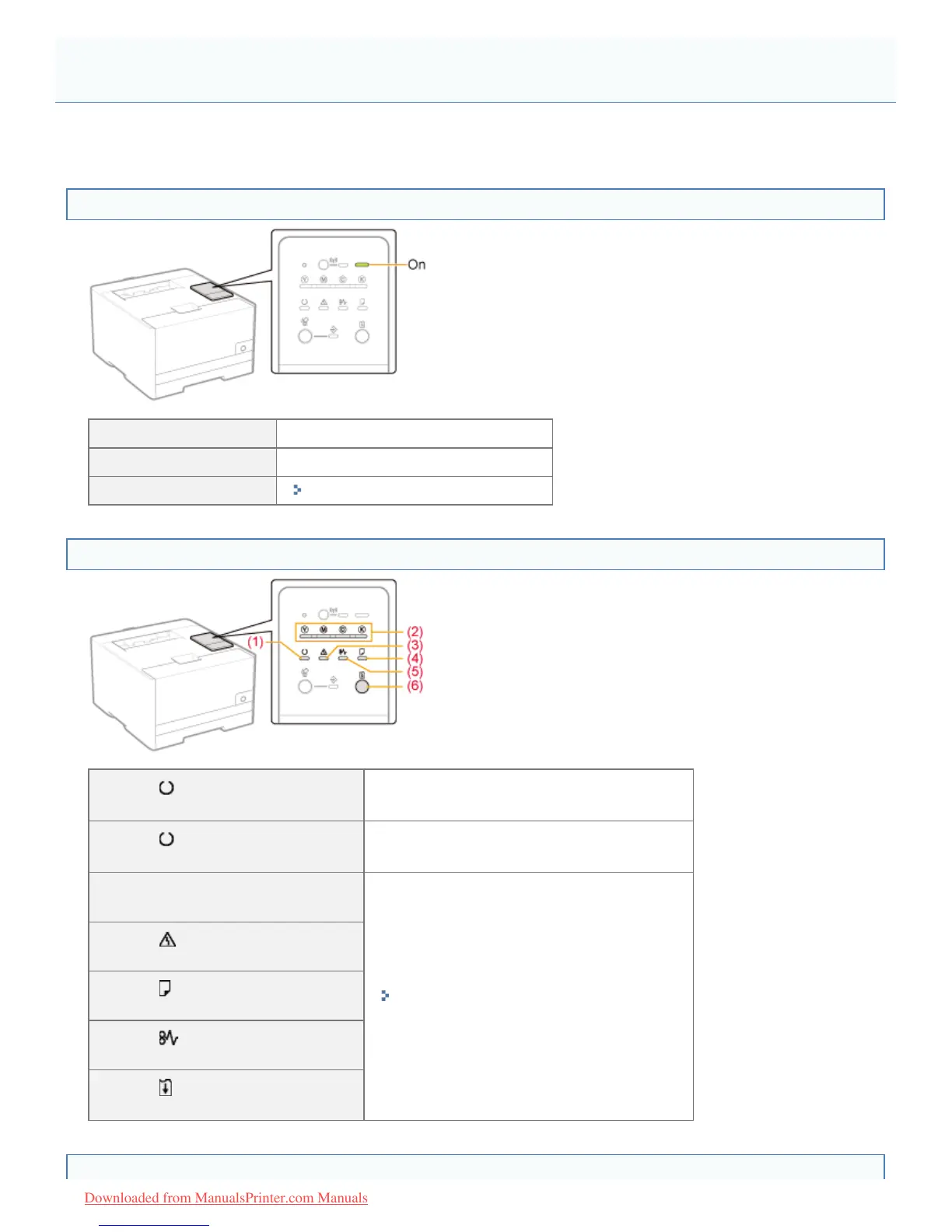
<Question 1> Is the printer turned ON? (Is the Main Power indicator on?)
ON To <Question 2>
OFF Turn the printer ON.
Cannot be turned ON
"You Cannot Turn the Printer ON"
<Question 2> Check the indicators on the printer unit.
(1) The (Ready) indicator
is on.
To <Question 3>
(1) The
(Ready) indicator
is blinking.
The printer is operating. Please wait a moment.
(2) The Toner indicator
is on or blinking.
"Indicators on the Printer Are On/Blinking"
(3) The
(Alarm) indicator
is on or blinking.
(4) The
(Load Paper) indicator
is blinking.
(5) The
(Paper Jam) indicator
is blinking.
(6) The
(Go) indicator
is blinking.
<Question 3> Is the USB cable connected properly?
Printing Cannot Be Performed (USB Connection)
㻠㻜㻡㻌㻛㻌㻡㻝㻠
Downloaded from ManualsPrinter.com Manuals




 To Next Page