0F40-01Y
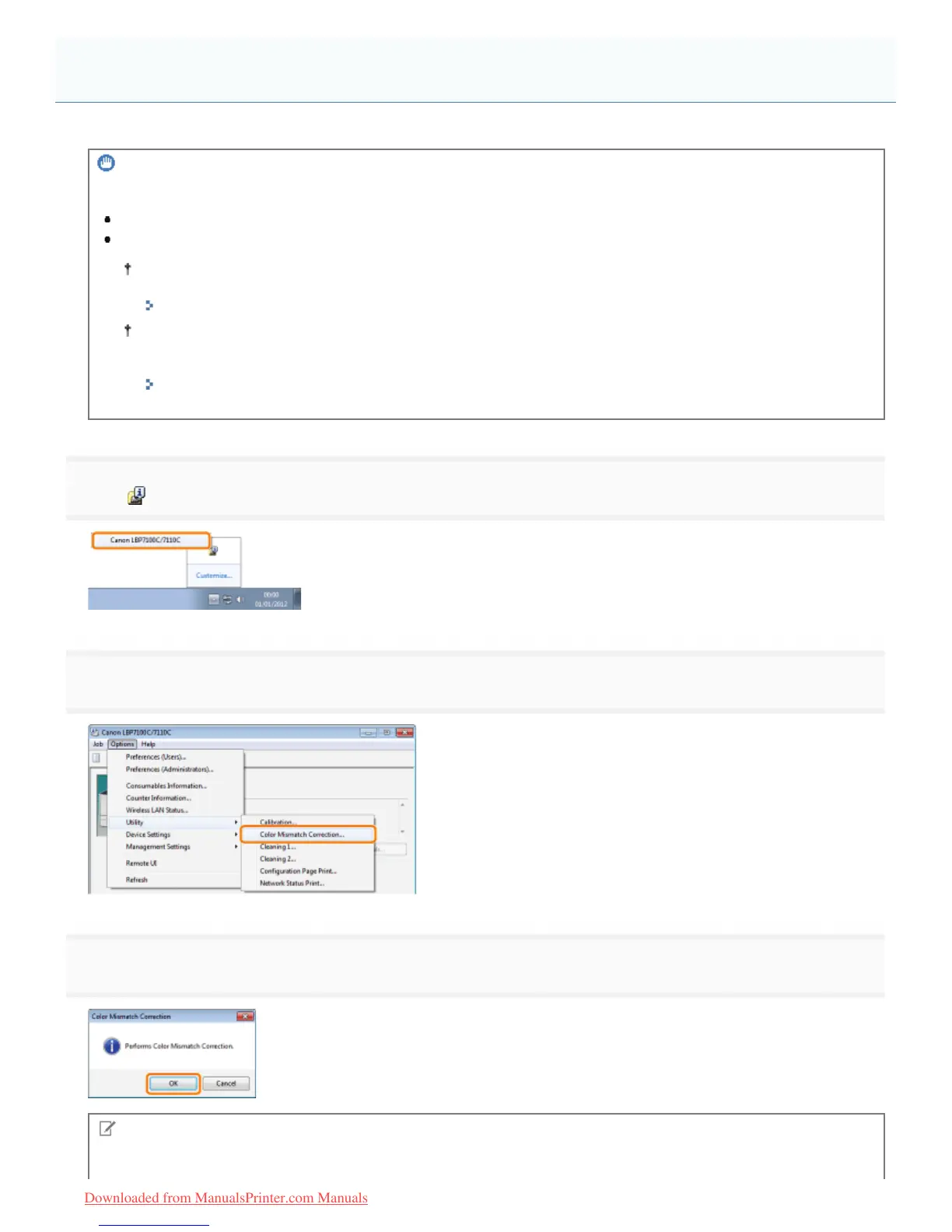
This section describes the procedure for performing color mismatch correction manually.
IMPORTANT
Precautions when correcting color mismatches
If you perform color mismatch correction frequently, this may affect the life of the toner cartridges.
Perform color mismatch correction after making sure that the toner remains in the toner cartridges.
You can check the current toner cartridges status of each color in the [Consumables Information] dialog box in
the Printer Status Window.
"Checking the Consumables Status"
If you perform color mismatch correction in the state where the toner cartridges have reached the end of their
life, color mismatch correction may not finish properly. In this case, replace the toner cartridges, and then
perform color mismatch correction again.
"Toner Cartridge Replacement"
1
Click [ ] displayed in the task tray, and then select a printer name.
2
3
Click [OK].
NOTE
Color mismatch correction time
Correcting Color Mismatches (Color Mismatch Correction)
㻤㻞㻌㻛㻌㻡㻝㻠
Downloaded from ManualsPrinter.com Manuals












 To Next Page