0F40-015
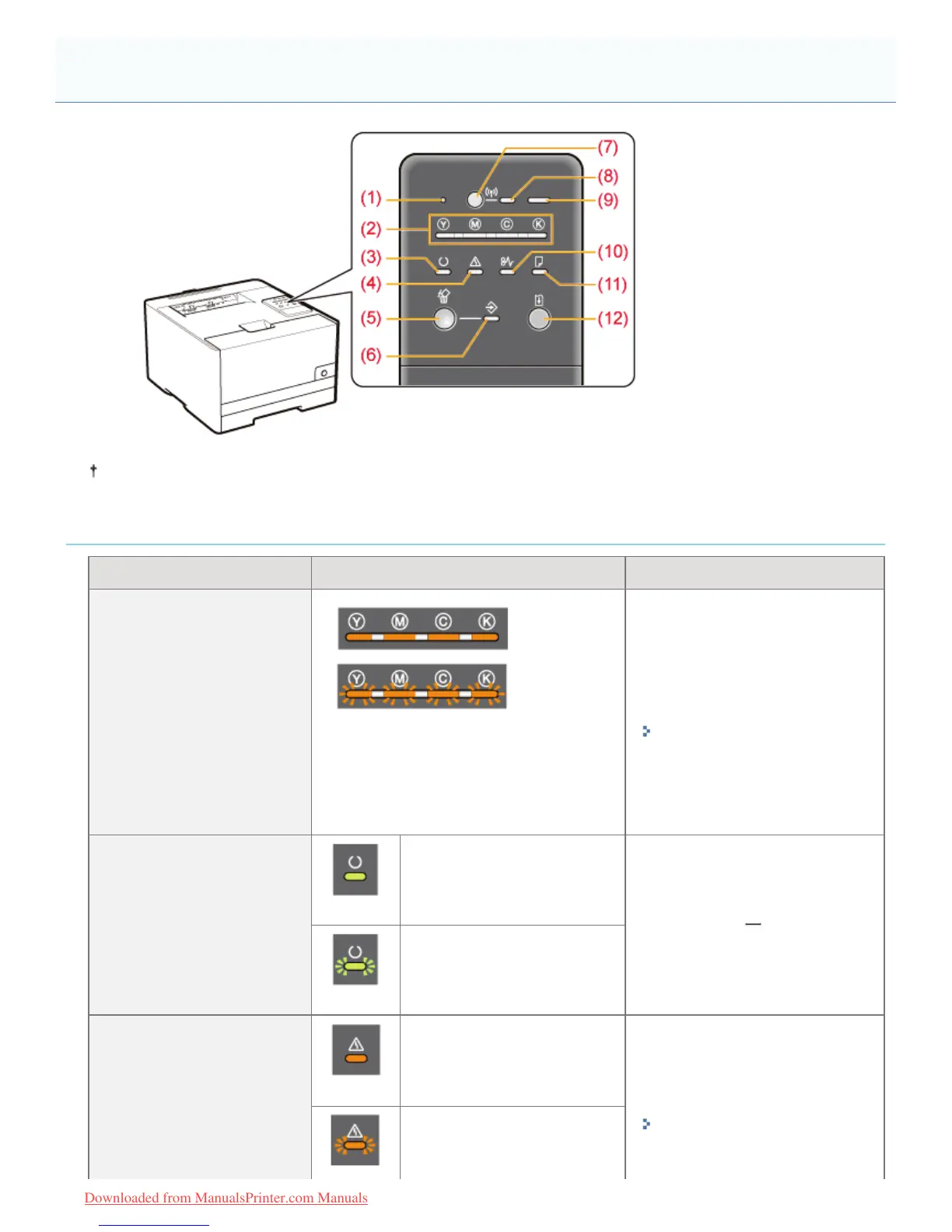
Unlike in the above illustration, the indicator names are indicated above the respective icons depending on the country
or region.
Indicators
Name Status Solution
(2) Toner Indicator
(On or Blinking)
An error is occurring for the toner
cartridges.
(Such as when the toner cartridges have
reached the end of their life)
Solve the problem following the
message displayed in the Printer
Status Window.
*1
"A Message Appears in the
Printer Status Window"
(3) Ready Indicator
(On)
The printer is ready to print.
(Blinking)
The printer is busy printing,
preparing to print, or cleaning.
(4) Alarm Indicator
(On)
A service error is occurring.
Solve the problem following the
message displayed in the Printer
Status Window.
*1
"A Message Appears in the
Printer Status Window"
An error is occurring.
Control Panel
㻡㻟㻌㻛㻌㻡㻝㻠
Downloaded from ManualsPrinter.com Manuals












 To Next Page