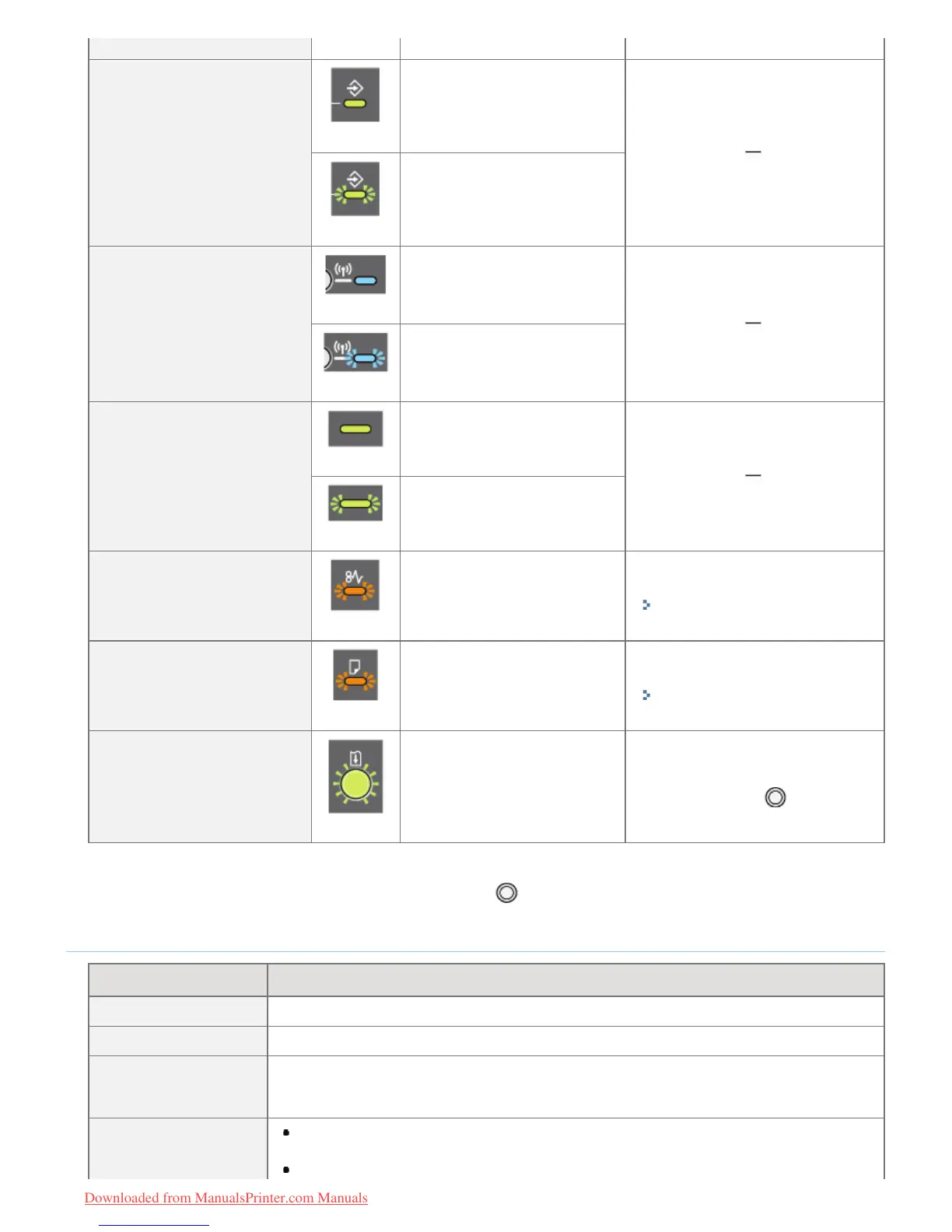
(Blinking)
(6) Job Indicator
(On)
A job is being printed or is
waiting to be printed.
(Blinking)
A job is being canceled.
(8) Wi-Fi Indicator
(LBP7110Cw Only)
(On)
The printer is connected by
wireless LAN.
(Blinking)
The wireless LAN is
configured.
(9) Main Power Indicator
(On)
The printer is turned ON.
(Blinking)
The printer is being turned
OFF.
(10) Paper Jam Indicator
(Blinking)
A paper jam is occurring.
Remove the paper jam.
"Paper Jams"
(11) Load Paper Indicator
(Blinking)
Paper needs to be checked.
(Such as when paper runs out
and when paper cannot be fed
properly)
Load the paper properly.
"Loading Paper"
(12) Go Indicator
(Blinking)
An error occurred, but you can
ignore the error and continue
printing.
To skip the error and continue
printing, press the [
] (Go) key.
*2
*1
For details on the procedure for displaying the Printer Status Window, see "Printer Status Window."
*2
Skipping the error and continuing printing (by pressing the [ ] (Go) key) may cause unexpected print results.
Button/Keys
Name Function
(1) Reset Button
Turning ON the printer while pressing this button initializes the system settings.
*1
(5) Cancel Job Key
Press this key to cancel the job that is currently being printed or a job with an error.
*2
(7) Wi-Fi Key
(LBP7110Cw Only)
Use this key when configuring the wireless LAN connection settings with the Button System
(WPS).
(12) Go Key
When the Go indicator is blinking:
Press this key to skip the error and continue printing.
When the Job indicator is off:
㻡㻠㻌㻛㻌㻡㻝㻠
Downloaded from ManualsPrinter.com Manuals












 To Next Page