0F40-020
You can use the following procedure to set the printer to automatically perform calibration at the designated time everyday
or to perform calibration or color mismatch correction immediately after the printer is turned ON.
1
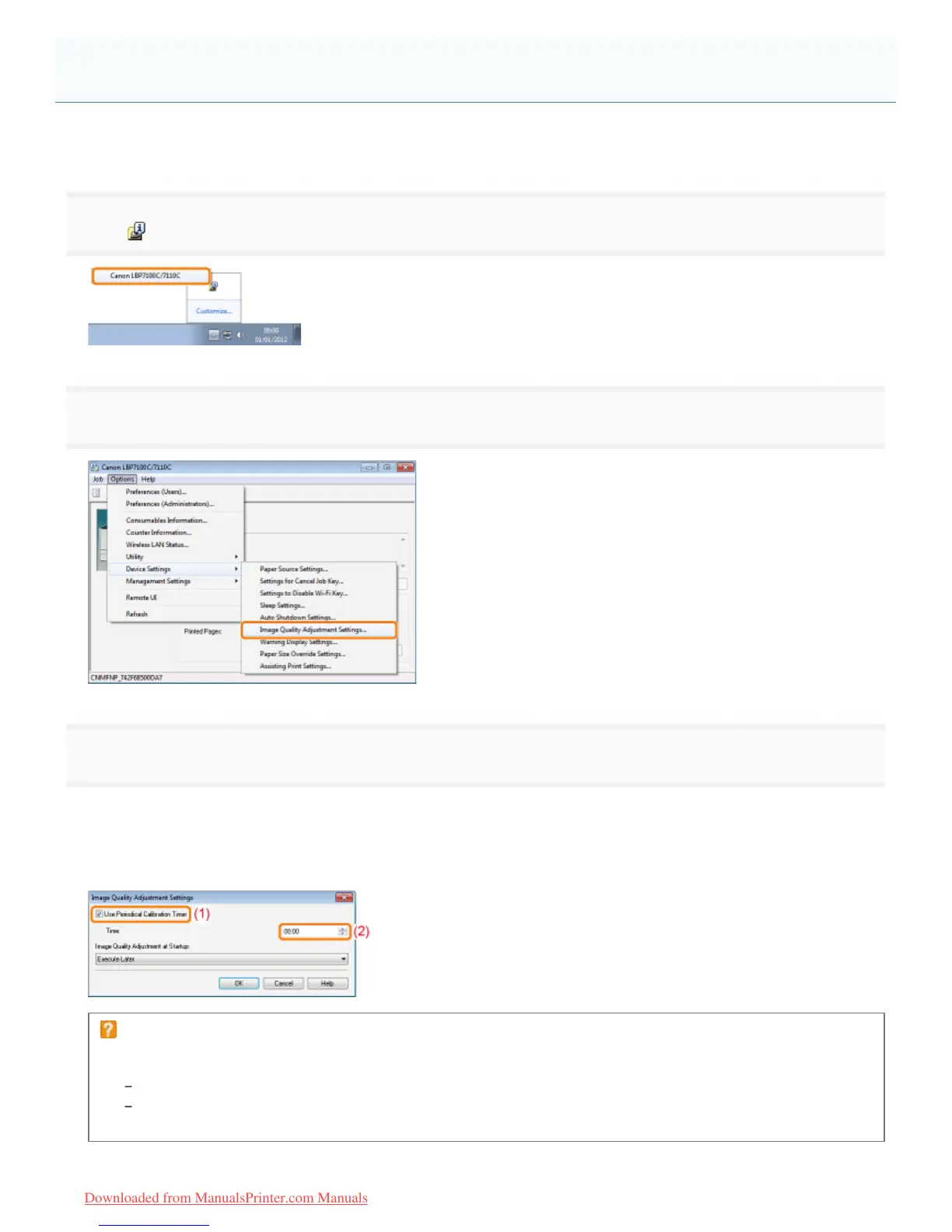
Click [ ] displayed in the task tray, and then select a printer name.
2
3
Specify the auto image quality adjustment settings.
When performing calibration automatically at the designated time everyday
(1) Select the [Use Periodical Calibration Timer] check box.
(2) Specify the time to perform calibration in [Time].
If calibration is not automatically performed
When the printer is under the following circumstances, calibration is not performed even if [Use Periodical Calibration
Timer] is specified.
When the printer is busy printing or an error is occurring
When the time specified in [Time] has come within 30 minutes after performing calibration last time
(Calibration is performed if the power of the printer is cycled before the specified time.)
Auto Image Quality Adjustment Settings
㻤㻠㻌㻛㻌㻡㻝㻠
Downloaded from ManualsPrinter.com Manuals












 To Next Page