Getting Started Guide
Arabic, Bulgarian, Croatian, Czech, Estonian, Greek, Hungarian, Latvian,
Lithuanian, Persian, Portuguese, Romanian, Slovakian, Slovenian, Turkish,
Ukrainian
To view the manual in PDF format, Adobe Reader/Adobe Acrobat Reader is required.
If Adobe Reader/Adobe Acrobat Reader is not installed on your system, download it from the Adobe Systems
Incorporated Web site.
Checking the Installation Location
In order to use this printer in a safe and trouble-free manner, install the printer in a place that fulfills the following
conditions.
Temperature and Humidity Conditions
Temperature range 10 to 30 °C (50 to 86 °F)
Humidity range 20 to 80 % RH (no condensation)
Power Supply Requirements
220 to 240 V (± 10 %), 50/60 Hz (± 2 Hz)
Installation Requirements
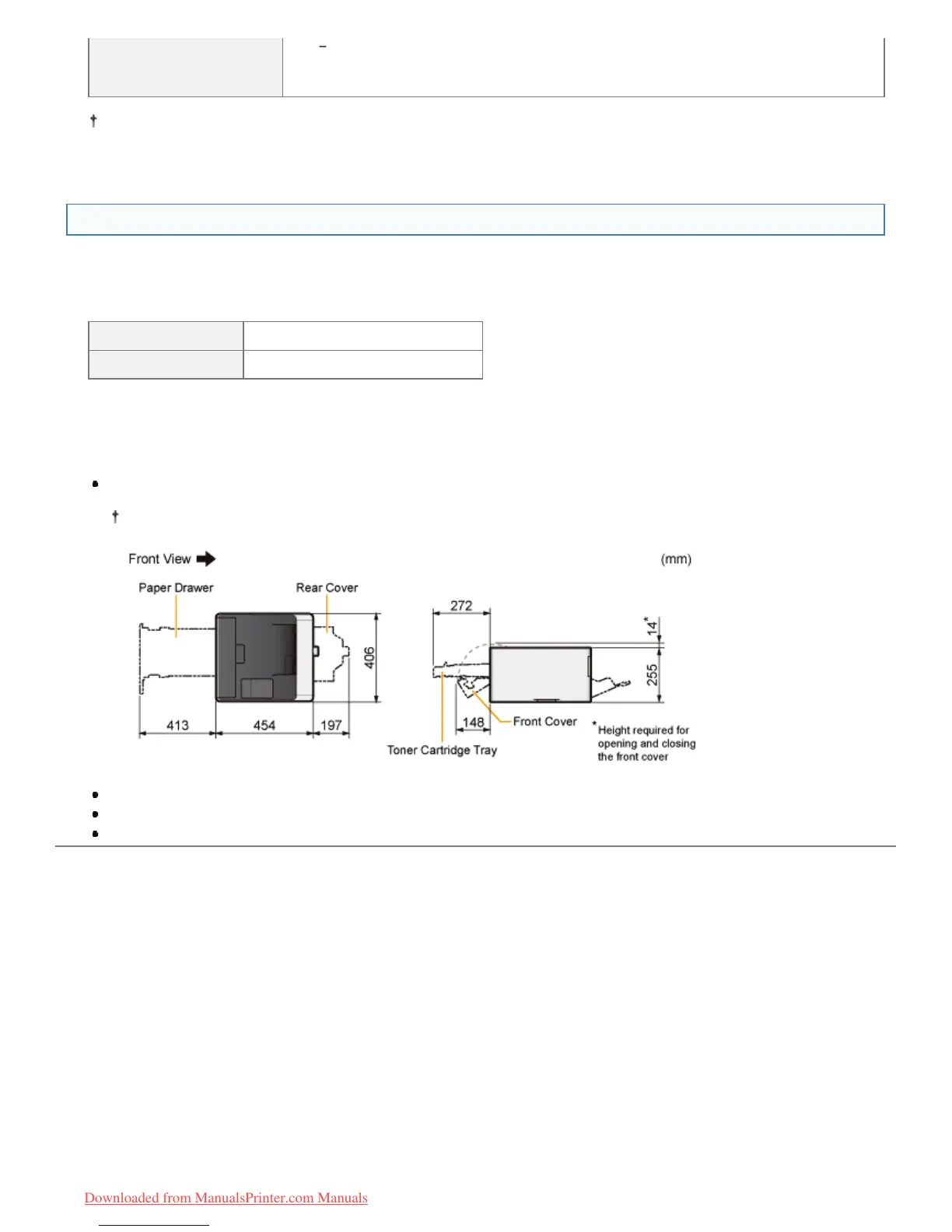
A location with sufficient space
Refer to the following dimensions of each part and ensure the installation space. (Secure space more than 100 mm
on the right side.)
A location with good ventilation
A location with a flat, even surface
A location able to fully support the weight of the printer
㻥㻤㻌㻛㻌㻡㻝㻠
Downloaded from ManualsPrinter.com Manuals












 To Next Page