Liberty
™
Automated Microwave Peptide Synthesizer
600178 • Revision 5 • October 2009
78
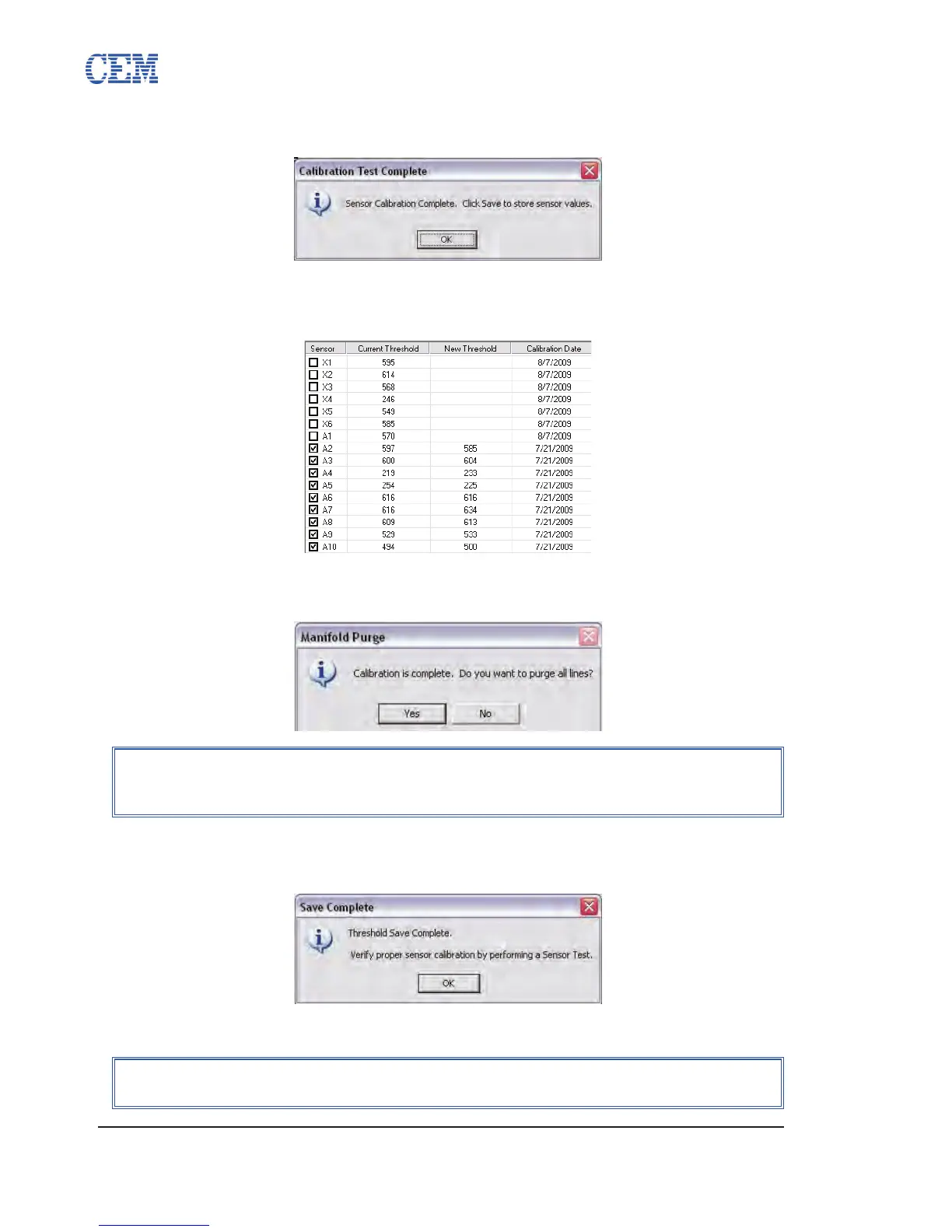
When calibration is complete, a window will pop up stating that the procedure is 6.
complete. Click OK to close the window.
Click Save to save the new calibration values. As each value is saved, the 7.
New Threshold column will be cleared and the Current Threshold values will be
updated with the new calibration value.
Once all the new calibration values are saved, a window will pop up to purge the 8.
lines of DMF. Click Yes to empty the lines, or click No to leave the lines lled.
A window will pop up suggesting running a 9. Sensor Test. Click OK to close the
window.
Click the Test Sensors button to begin a Sensor Test.10.
NOTE
The rst step of a Sensor Test is to ll the lines. To conserve DMF, click No
to leave the lines lled if a Sensor Test will be performed.
NOTE
For information on performing a Sensor Test, see Test Sensors, p. 91.


 To Next Page