CRS-300 1:10 Redundancy Switch MN/CRS300.IOM
Switch Connectors and Pinouts Revision 19
3–19
o Pull the holder straight out, and then swing the holder away from the module.
• Then, remove and replace the fuses as needed.
CAUTION – FOR CONTINUED OPERATOR SAFETY, ALWAYS REPLACE THE FUSES
WITH THE CORRECT TYPE AND RATING.
• Finally, reseat the fuse holder in the IEC power module.
3.3.2.2 48V Direct Current (DC) Power Interface
Press Fit Fuse Holder (NOT USED)
50 watts, 2 Amps maximum
48 volts DC (±20%) nominal (38-60 volts)
Corcom GA210 or Molex 03-12-1026
Fuse Protection
While this interface features a fuse holder that is press-fit into the body of the IEC
power module, the CRS-300 chassis features an internal electronic resettable fuse.
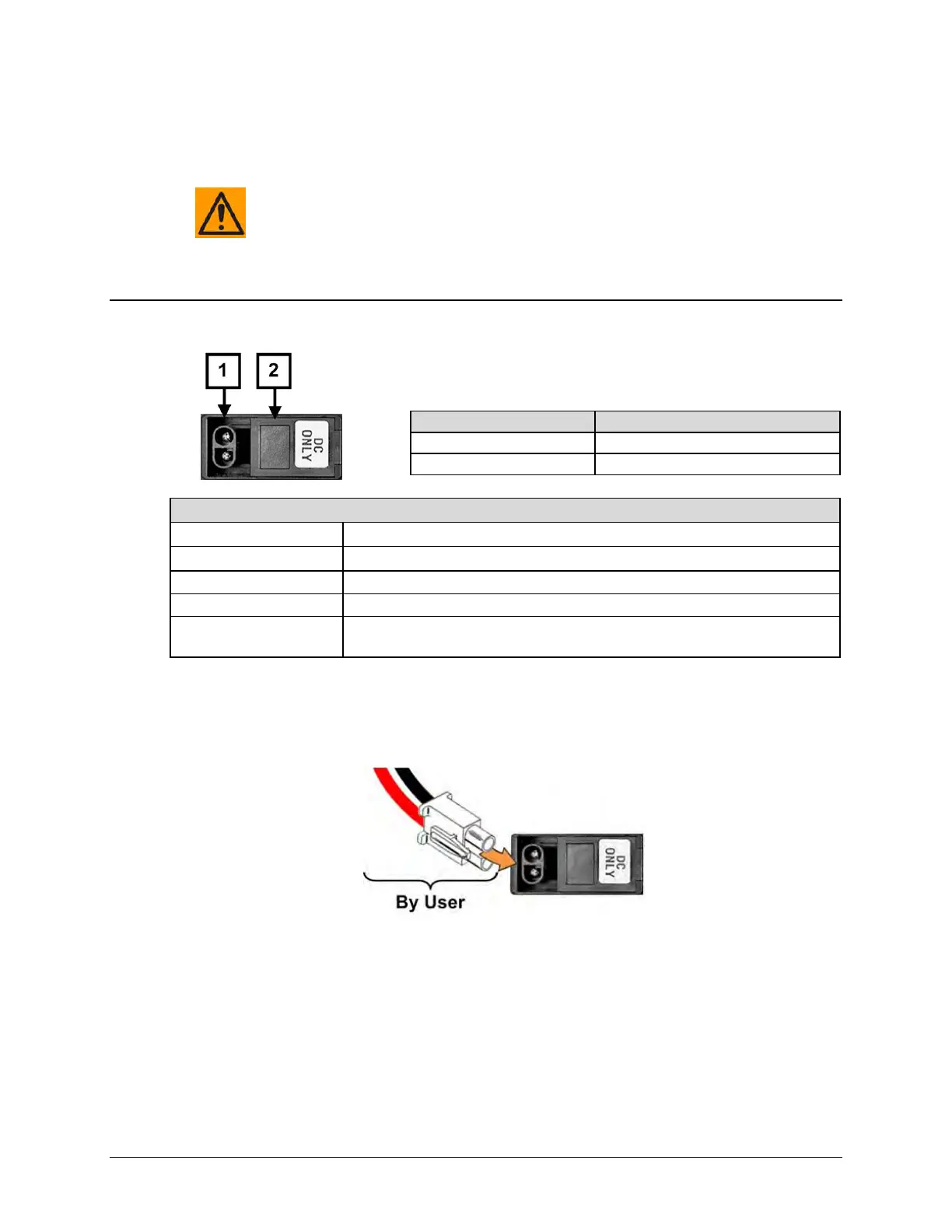
Figure 3-8. Chassis DC Power Interface (CRS-250 DC Power Supply Module)
3.3.2.2.1 48V DC Operation –Power Application
Figure 3-9. Apply DC Power
To apply DC power to the CRS-300 (typical for each module):
• First, plug the user-supplied, male keyed DC power lead connector into the mating female
connector until the lock tab engages. Number 18 AWG minimum wires are recommended.
• Then, connect the user-supplied DC power leads to the power source.



 To Next Page