EasyManua.ls Logo

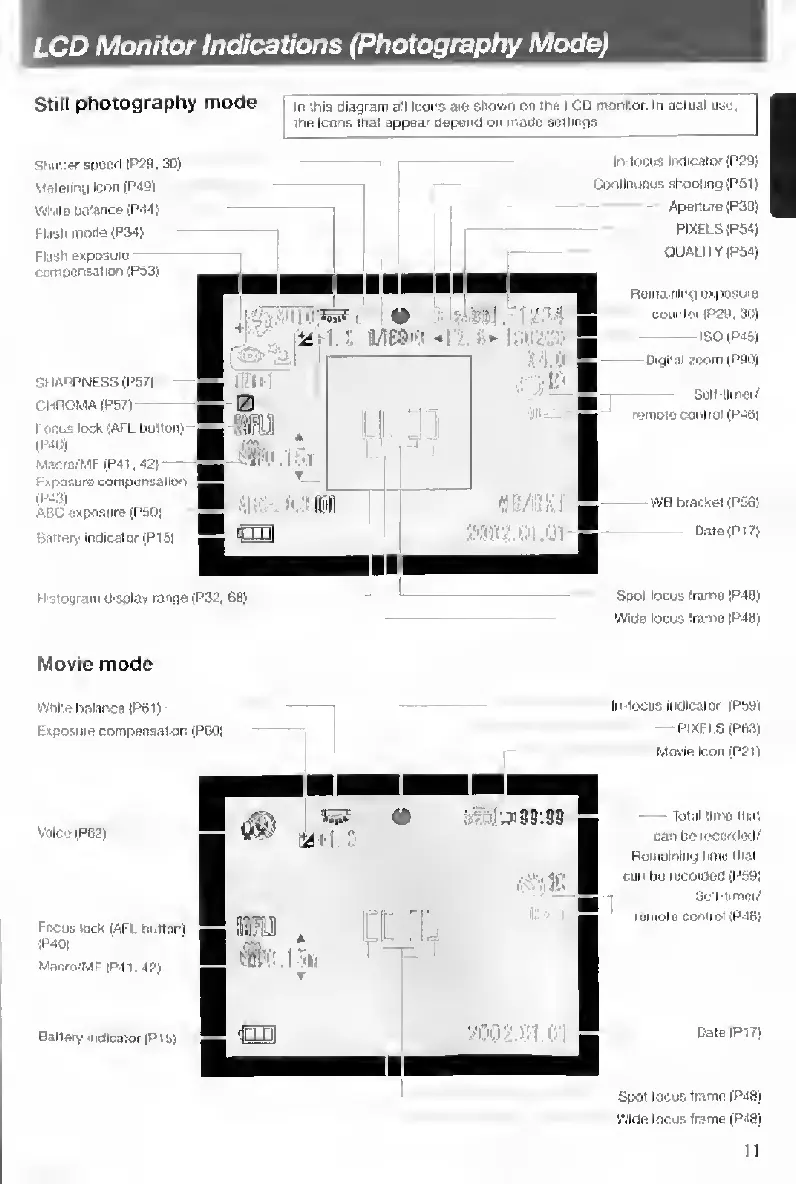
Contax TVS DIGITAL - LCD Monitor Indications (Photography Mode)

Contax TVS DIGITAL
109 pages
Print Icon
To Next Page IconTo Next Page
To Previous Page IconTo Previous Page
Loading...
LCD
Monitor
Indications
(Photography
Mode)
Still
photography
mode
In
!hi9
diagram
all
Icons
are
Shown
on
ths
LCD
monitor.
In
actual
use,
ina
Icons
that
appea’
aepend
on
mado
soilings
In-locus
IrxlicBlor
(P29)
SliutlarspoiKl
lP?a,3D)
Continuous
shooting
(P5t)
-
Aperture
(P30)
PIXELS
(P54)
QUALITY
IPO'S)
Meterlrty
Icon
(PaB)
White
Dttfance
(P'141
Tlash
moae(P34)
Flash
eipcQuiu
mosnsation
(PS3)
Ronid'iilng
exposure
counlor
|P2g.
3Ui
ISO
IP4&J
Digital
zoom
(PBO)
SI
lARPNESS
(P57|
r-HROMA
iPSTl
I
ocus
lock
'AFL
button)
iP4l))
M-TCiQiW
(P41,42)
r
iposure
compertsallon
iPsai
ABC
exposure
(PSOl
Battery
Indicator
(PI
51
Sail
tlmoi'
remote
control
(P46l
vVB
biacset
(PSfi;
Spot
locus
Irame
1P4B)
Wide
locus
Irame
|P4tl)
H
stoyram
display
range
(P32
68)
Movie
mode
In
locus
indicator
iPbBi
wniie
balance
IP61)
Exposure
compensation
(P60}
Movie
Icon
(P2I)
Total
iiiTHS
that
can
be
recorded/
Rumolrilng
hnie
that
can
bu
rDCOrOeO
(P59I
SoH-tmier/
leinolo
control
(P-MI!
Voice
(P62
1
Focus
Bek
lAFl
bi.tlon)
iP40|
Macro/MF
1P41,4?)
Battery
uidicaior
|P1S1
Spot
locos
Irame
|P48j
Wide
focus
frame
|P43)
11

Table of Contents

Other manuals for Contax TVS DIGITAL

Related product manuals