EasyManua.ls Logo

Contax TVS DIGITAL - The Memory Card

Contax TVS DIGITAL
109 pages
Print Icon
To Next Page IconTo Next Page
To Previous Page IconTo Previous Page
Loading...
4.
•‘FORMAT’
Initializing
the
memory
card
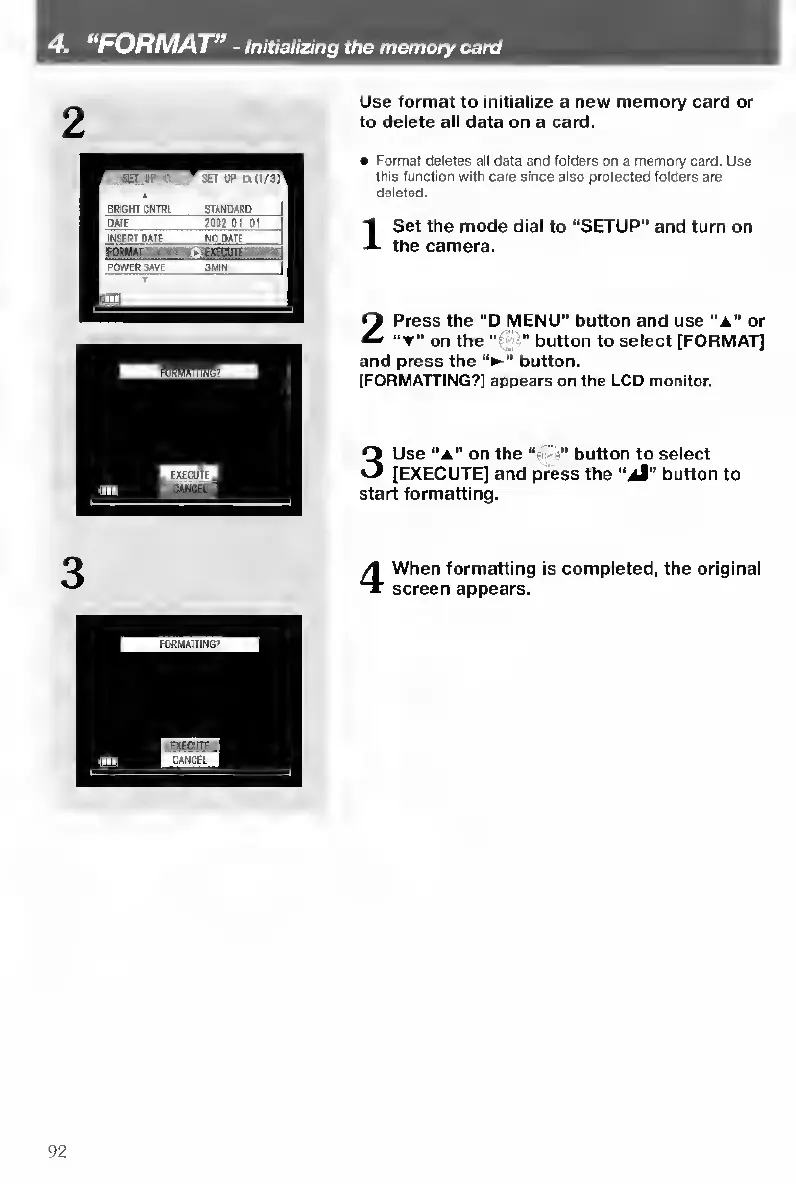
Use
format
to
initialize
a
new
memory
card
or
to
delete
all
data
on
a
card.
JET
St
ft
4
BRIGHT
CNTRL
SIANOAPD
DATE
20^7
Oi
0]
IN^RT
nAT?
Nfl
ftATF
1
POWIR&AVE
:thw
II
l:ui
1
Format
deletes
all
data
and
folders
on
a
memory
card.
Use
tlrrs
function
with
care
since
also
protected
folders
are
deleted.
I
S
et
the
mode
dial
to
“SETUP”
and
turn
on
the
camera.
2
Press
the
“D
MENU”
button
and
use
or
on
the
“t'
button
to
select
[FORMAT]
and
press
the
button.
[FORMATTING?]
appears
on
the
LCD
monitor.
3
Use
“a”
on
the
'
"
button
to
select
[EXECUTE]
and
press
the
“aI”
button
to
start
formatting.
4
When
formatting
is
completed,
the
original
screen
appears.
92

Table of Contents

Other manuals for Contax TVS DIGITAL

Related product manuals