EasyManua.ls Logo

Contax TVS DIGITAL - Flash Photography

Contax TVS DIGITAL
109 pages
Print Icon
To Next Page IconTo Next Page
To Previous Page IconTo Previous Page
Loading...
4.
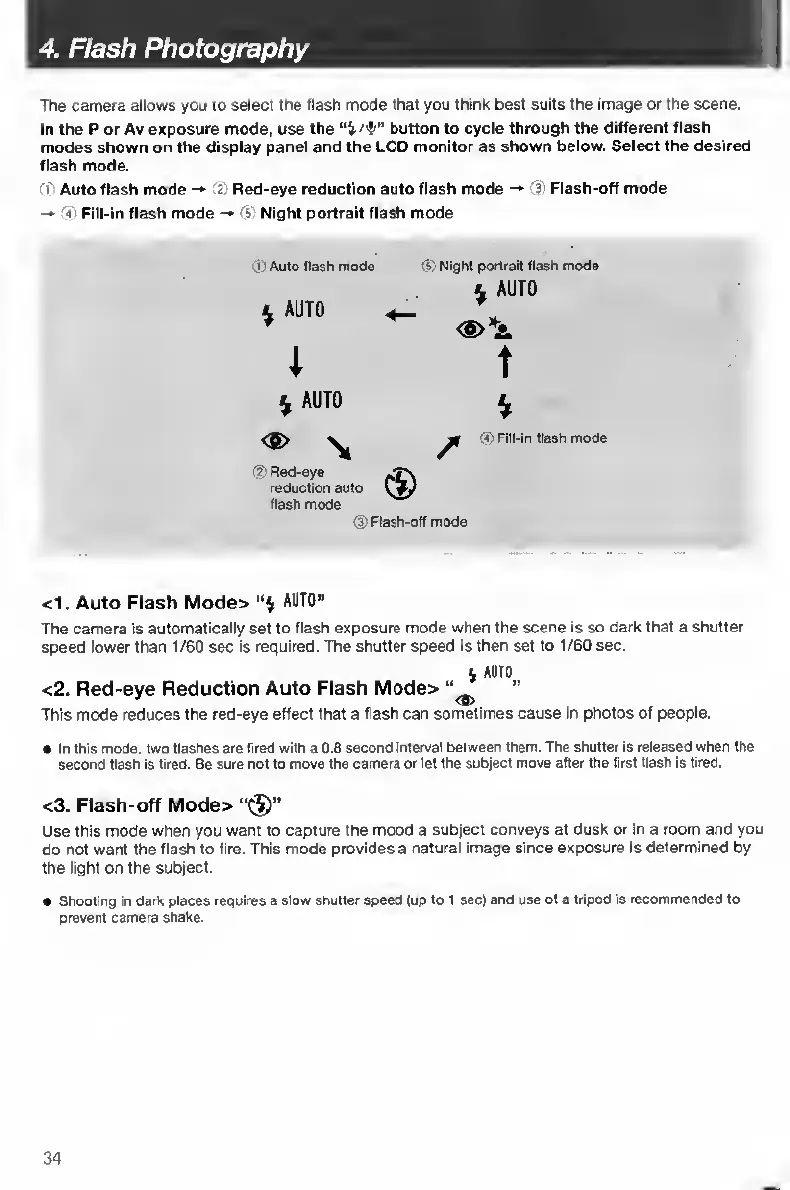
Flash
Photography
The
camera
allows
you
to
select
the
flash
mode
that
you
think
best
suits
the
Image
or
the
scene.
In
the
P
or
Av
exposure
mode,
use
the
button
to
cycle
through
the
different
flash
modes
shown
on
the
display
panel
and
the
LCD
monitor
as
shown
below.
Select
the
desired
flash
mode.
I
Auto
flash
mode
Red-eye
reduction
auto
flash
mode
->
Flash-off
mode
rC’
Fill-in
flash
mode
Cs!
Night
portrait
flash
mode
0
Auto
flash
mode
^
AUTO
1
0
Night
portrait
flash
mode
^
AUTO
<S>*A
T
^
AUTO
<5>
^
0
Red-eye
reduction
auto
flash
mode
0
Flash-off
mode
0
Fill-in
flash
mode
<1.
Auto
Flash
Mode>
AUTO”
The
camera
is
automatically
set
to
flash
exposure
mode
when
the
scene
Is
so
dark
that
a
shutter
speed
lower
than
1/60
sec
is
required.
The
shutter
speed
is
then
set
to
1/60
sec.
A
AUTO
<2.
Red-eye
Reduction
Auto
Flash
Mod6>
This
mode
reduces
the
red-eye
effect
that
a
flash
can
sometimes
cause
in
photos
of
people.
In
this
mode,
two
flashes
are
tired
with
a
0.8
second
interval
between
them.
The
shutter
Is
released
when
the
second
flash
is
fired.
Be
sure
not
to
move
the
camera
or
let
the
subject
move
after
the
first
flash
is
tired.
<3.
Flash-off
Mode>
“(J)”
Use
this
mode
when
you
want
to
capture
the
mood
a
subject
conveys
at
dusk
or
In
a
room
and
you
do
not
want
the
flash
to
fire.
This
mode
provides
a
natural
image
since
exposure
is
determined
by
the
light
on
the
subject.
Shooting
in
dark
places
requires
a
slow
shutter
speed
(up
to
1
sec)
and
use
of
a
tripod
is
recommended
to
prevent
camera
shake.
34

Table of Contents

Other manuals for Contax TVS DIGITAL

Related product manuals