EasyManua.ls Logo

Contax TVS DIGITAL - Self-Timer;Remote Control Photography

Contax TVS DIGITAL
109 pages
Print Icon
To Next Page IconTo Next Page
To Previous Page IconTo Previous Page
Loading...
7.
"C
MENU’’
Photography
1
S
elf-Timer/Remote
Control
Photography
Use
self-timer/remote
control
photography
to
perform
the
following
types
of
photography.
|10S]:
Use
this
mode
to
Include
yourself
in
the
photograph.
(It
can
also
be
used
with
a
remote
control.)
[28]:
Use
this
mode
when
taking
close-ups
and
making
copies
to
prevent
camera
shake.
(It
car
also
be
used
with
a
remote
control.)
[OS]:
Use
this
mode
to
release
the
shutter
remotely,
(remote
photography)
[OFF]:
Use
this
mode
to
cancel
self-timer/remote
control
photography
to
enable
use
of
the
shutter
release
button.
5
^
Place
the
camera
on
a
tripod.
2
S
et
the
mode
dial
to
“P"
or
“Av”
and
turn
on
the
camera.
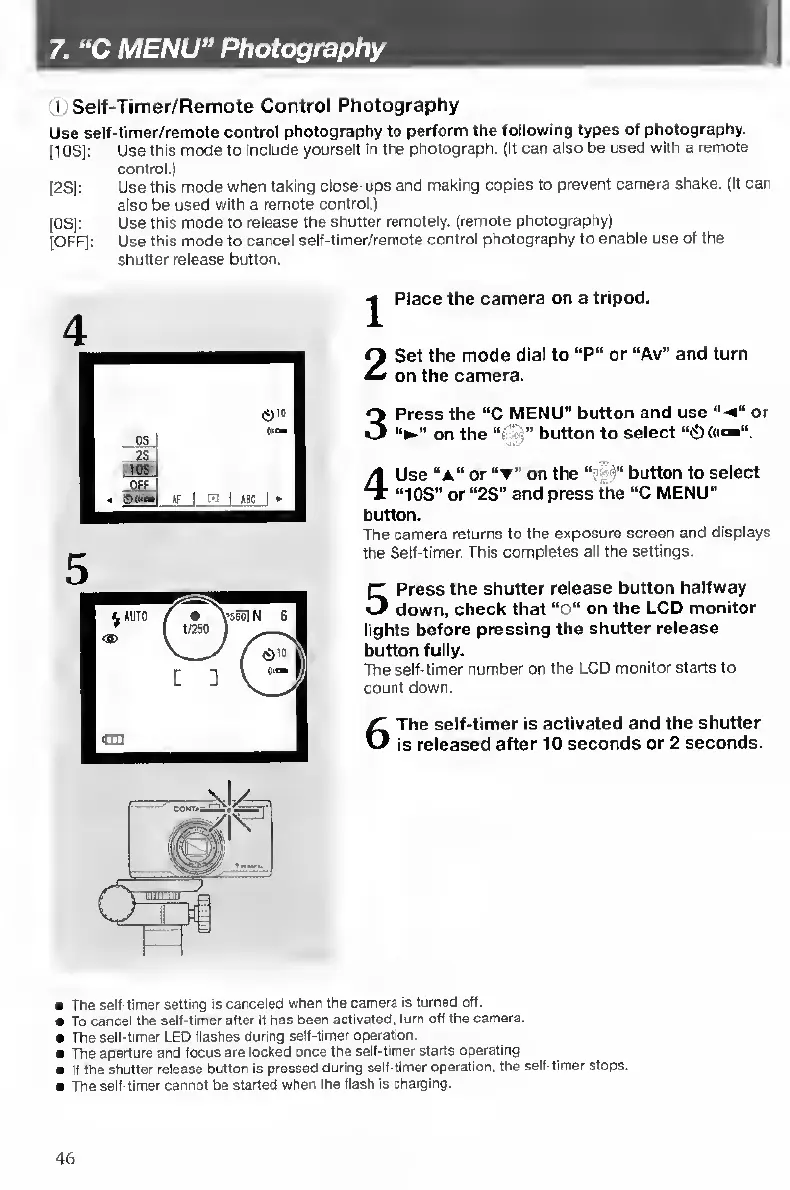
3
P
ress
the
“C
MENU”
button
and
use
or
on
the
“•
-
•”
button
to
select
“0
<«*»”.
4
U
se
“a”
or
“t”
on
the
button
to
select
“10S"
or
“2S"
and
press
^e
“C
MENU"
button.
The
camera
returns
to
the
exposure
screen
and
displays
the
Self-timer.
This
completes
all
the
settings.
5
P
ress
the
shutter
release
button
halfway
down,
check
that
“O”
on
the
LCD
monitor
lights
before
pressing
the
shutter
release
button
fully.
The
self-timer
number
on
the
LCD
monitor
starts
to
count
down.
6
T
he
self-timer
is
activated
and
the
shutter
is
released
after
10
seconds
or
2
seconds.
The
self-timer
setting
is
canceled
when
the
camera
is
turned
off.
To
cancel
the
self-timer
after
It
has
Beern
actrvaled,
turn
off
the
camera.
The
self-timer
LEO
flashes
during
self-timer
operation.
The
aperture
and
focus
are
locked
once
the
self-timer
starts
operating
If
the
shutter
release
Button
Is
pressed
during
seif-llmer
operation,
the
self-timer
stops.
The
self-timer
cannot
be
started
when
the
flash
is
charging.
46

Table of Contents

Other manuals for Contax TVS DIGITAL

Related product manuals