EasyManua.ls Logo

Contax TVS DIGITAL - DISPLAY Button

Contax TVS DIGITAL
109 pages
Print Icon
To Next Page IconTo Next Page
To Previous Page IconTo Previous Page
Loading...
12.
DISPLAY
Button
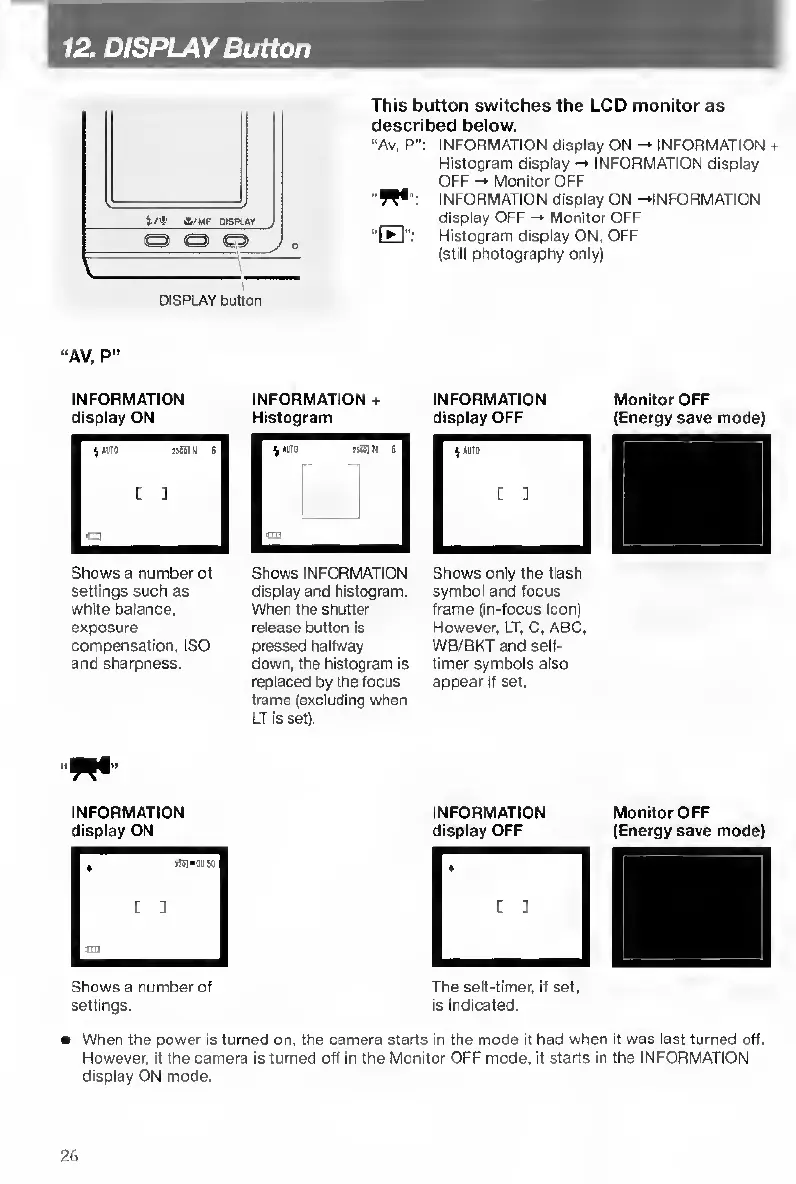
This
button
switches
the
LCD
monitor
as
described
below.
"Av,
P":
INFORMATION
display
ON
-*
INFORMATION
+
Histogram
display
INFORMATION
display
OFF
-•
Monitor
OFF
"W*":
INFORMATION
display
ON
-•INFORMATION
display
OFF
-•
Monitor
OFF
“H":
Histogram
display
ON,
OFF
(still
photography
only)
DISPLAY
bjtton
AV,
P”
INFORMATION
INFORMATION
+
INFORMATION
Monitor
OFF
display
ON
Histogram
display
OFF
(Energy
save
mode)
Shows
a
number
of
Shows
INFORMATION
Shows
only
the
fiash
settings
such
as
display
and
histogram,
symbol
and
focus
white
balance,
When
the
shutter
frame
(in-focus
icon)
exposure
release
button
is
However.
LT.
C.
ABC,
compensation,
ISO
pressed
halfway
WB/BKT
and
self-
and
sharpness.
down,
the
histogram
is
timer
symbols
also
replaced
by
the
focus
appear
if
set.
frame
(excluding
when
LT
is
set).
INFORMATION
display
ON
Shows
a
number
of
settings.
When
the
power
is
turned
on.
the
camera
starts
in
the
mode
it
had
when
it
was
last
turned
off.
However,
if
the
camera
is
turned
off
in
the
Monitor
OFF
mode,
it
starts
in
the
INFORMATION
display
ON
mode.
INFORMATION
Monitor
OFF
display
OFF
(Energy
save
mode)
The
self-timer,
if
set,
is
Indicated.
26

Table of Contents

Other manuals for Contax TVS DIGITAL

Related product manuals