EasyManua.ls Logo

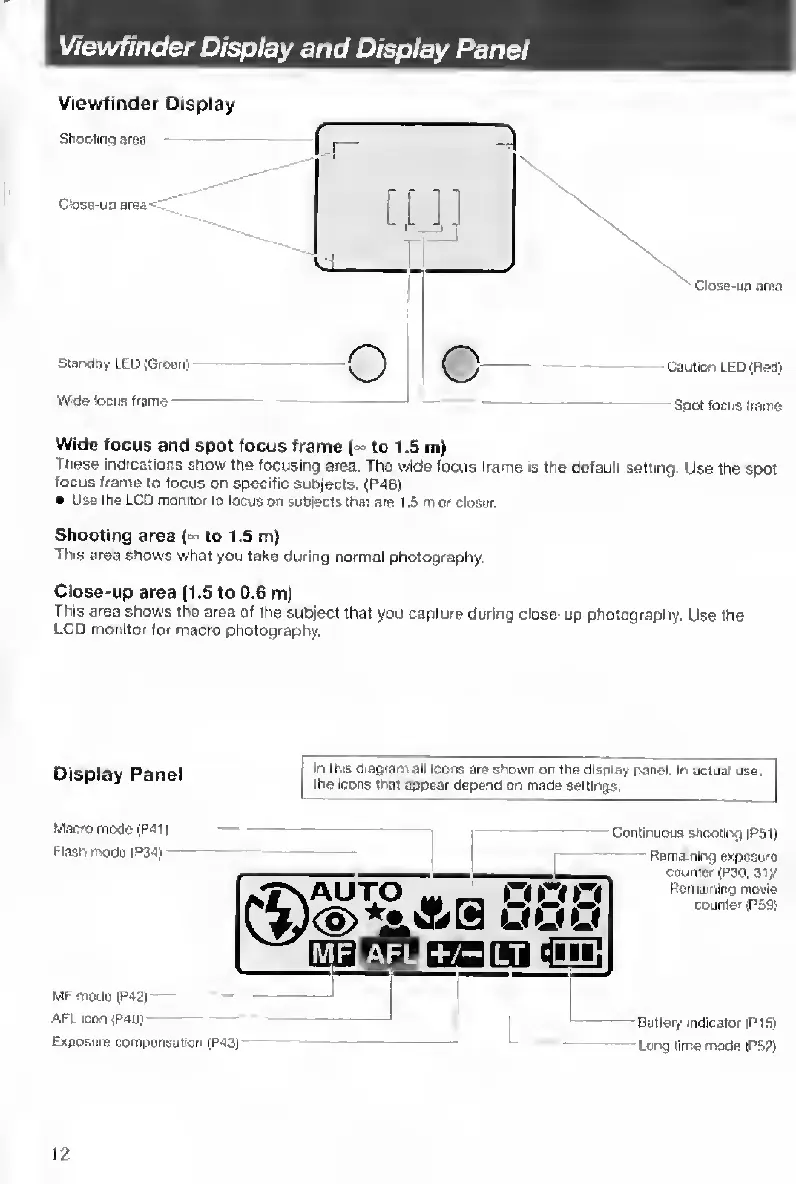
Contax TVS DIGITAL - Viewfinder Display and Display Panel

Contax TVS DIGITAL
109 pages
Print Icon
To Next Page IconTo Next Page
To Previous Page IconTo Previous Page
Loading...
Viewfinder
Display
and
Display
Panel
Viewfinder
Display
Shooting
aiea
C>ase-uo
area'i-'..
StanclQy
LED
{GrMnl
Wide
feoua
trama
Qoae-up
area
-Caution
LED
(Red)
Spot
focua
tiame
Wide
focus
and
spot
focus
frame
('^
to
1.5
m)
These
indications
show
tne
focusing
area.
The
wide
focus
frame
is
the
default
setting.
Use
the
spot
focus
frame
to
focus
on
specific
subjects,
(P4B)
Use
the
LCD
monitor
to
focus
on
suhiecfs
that
are
1
,S
m
or
closer.
Shooting
area
H
to
1.5
m)
Tins
area
shows
what
you
take
during
normal
photography.
Close-up
area
(1.5
to
0.6
m)
This
area
shows
the
area
of
the
subject
that
you
capture
during
close-up
photography.
Use
the
LC
mailtor
for
macro
photography.
Display
Panel
In
this
diagram
all
icons
ere
shown
or
the
diaoiay
panel
In
acljal
use.
the
Icons
that
appear
depend
on
made
settings
Macro
mode(Pai|
Flash
modepas)
-
MFmod9lP42|
--
AFL
icon|P40)
Exposure
compwisalKjn
tP43)
Continuous
shootlr^g
|PS1|
Remaining
exposure
ooumer(P30,
Jty
Remaining
movie
counter
(P69!
Battery
indicator
IP1S1
-
Long
tlrrw
moda
IPS?)
12

Table of Contents

Other manuals for Contax TVS DIGITAL

Related product manuals