EasyManua.ls Logo

Contax TVS DIGITAL - Functions for Enhancing Movie Recording

Contax TVS DIGITAL
109 pages
Print Icon
To Next Page IconTo Next Page
To Previous Page IconTo Previous Page
Loading...
2.
Functions
for
Enhancing
Movie
Recording
The
following
functions
are
available
during
a
movie
recording.
Use
them
as
required
by
the
recording.
I
F
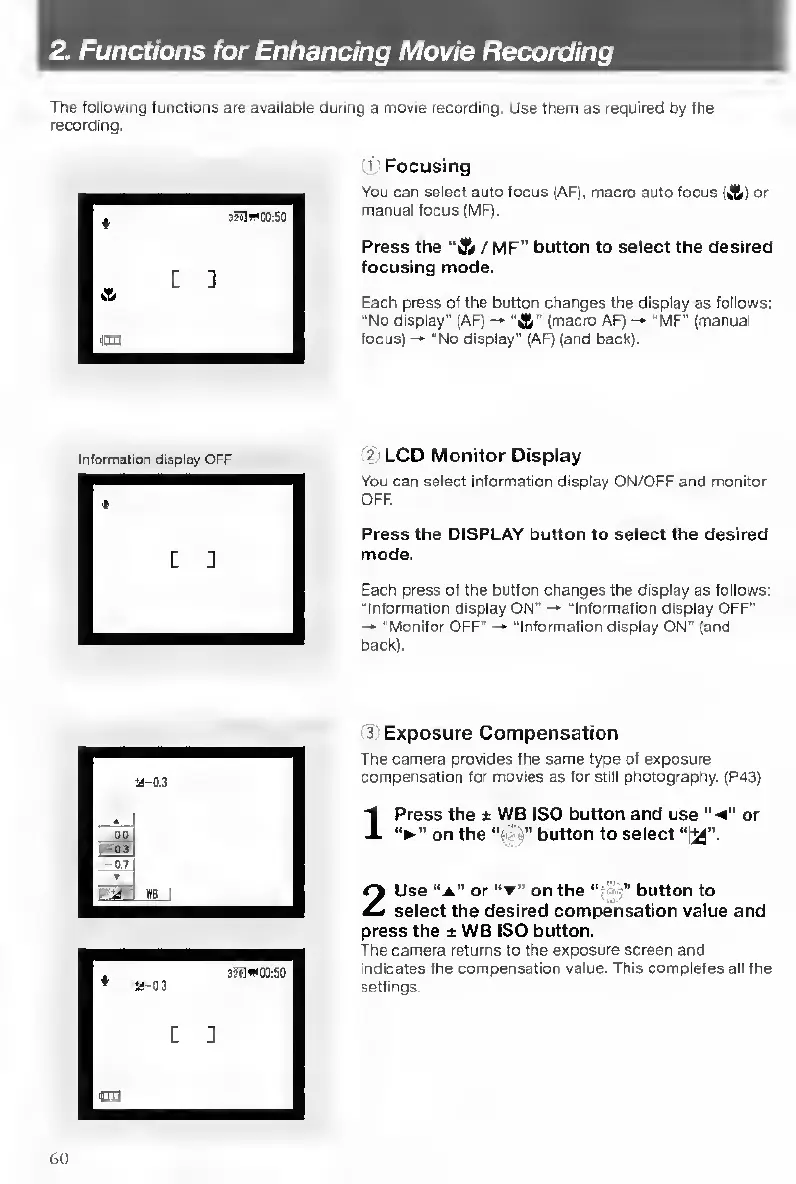
ocusing
You
can
select
auto
focus
(AF),
macro
auto
focus
(4)
or
manual
focus
(MF).
Press
the
“lA
/
M
F”
button
to
select
the
desired
focusing
mode.
Each
press
of
the
button
changes
the
display
as
follows:
"No
display"
(AF)
"A”
(macro
AF)
-•
“MF"
(manual
focus)
“No
display"
(AF)
(and
back).
Information
display
OFF
2
L
CD
Monitor
Display
You
can
select
information
display
ON/OFF
and
monitor
OFF.
Press
the
DISPLAY
button
to
select
the
desired
mode.
Each
press
of
the
button
changes
the
display
as
follows:
“Information
display
ON”
-•
“Information
display
OFF"
-•
"Monitor
OFF”
“Information
display
ON”
(and
back).
3
E
xposure
Compensation
The
camera
provides
the
same
type
of
exposure
compensation
for
movies
as
for
still
photography.
(P43)
1
Press
the
*
WB
ISO
button
and
use
or
on
the
“•'
i”
button
to
select
“i^”.
2
Use
“a"
or
“t”
on
the
button
to
select
the
desired
compensation
value
and
press
the
±
WB
ISO
button.
The
camera
returns
to
the
exposure
screen
and
indicates
the
compensation
value.
This
completes
all
the
settings-
60

Table of Contents

Other manuals for Contax TVS DIGITAL

Related product manuals