EasyManua.ls Logo

Contax TVS DIGITAL - Macro Photography

Contax TVS DIGITAL
109 pages
Print Icon
To Next Page IconTo Next Page
To Previous Page IconTo Previous Page
Loading...
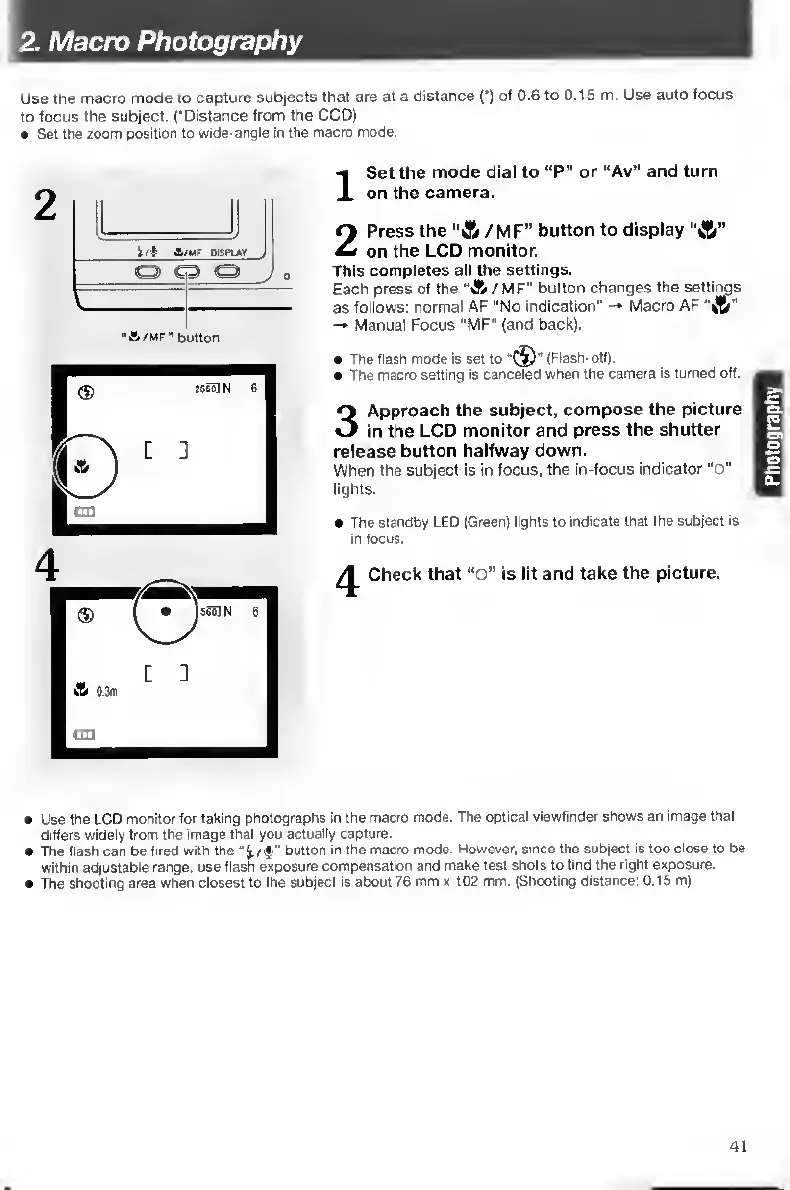
2.
Macro
Photography
Use
the
macro
mode
to
capture
subjects
that
are
at
a
distance
(')
of
0.6
to
0.15
m.
Use
auto
focus
to
focus
the
subject.
('Distance
from
the
CCD)
Set
the
zoom
position
to
wide-angle
in
the
macro
mode.
I
S
et
the
mode
dial
to
“P"
or
“Av"
and
turn
on
the
camera.
2
Press
the
“A
/MF”
button
to
display
“A"
on
the
LCD
monitor.
This
completes
all
the
settings.
Each
press
of
the
"A
/MF”
button
changes
the
settings
as
follows:
normal
AF
"No
indication"
-•
Macro
AF
''ij5"
Manual
Focus
"MF"
(and
back).
The
flash
mode
Is
set
to
(Flash-off).
The
macro
setting
is
canceled
when
the
camera
is
turned
off.
3
Approach
the
subject,
compose
the
picture
in
the
LCD
monitor
and
press
the
shutter
release
button
halfway
down.
When
the
subject
is
in
focus,
the
in-focus
indicator
“o"
lighis-
The
standby
LED
(Greer)
lights
to
indicate
that
the
subject
is
in
focus.
Check
that
“o”
is
lit
and
take
the
picture.
Use
the
LCD
monitor
for
taking
photographs
in
the
macro
mode.
The
optical
viewfinder
shows
an
image
that
differs
widely
from
the
image
that
you
actually
capture.
The
flash
can
be
fired
with
the
"
button
in
the
macro
mode.
However,
smoe
the
subject
is
too
close
to
be
within
adjustable
range,
use
flash
exposure
compensation
and
make
test
shots
to
find
the
right
exjyosure.
The
shooting
area
when
closest
to
the
subject
is
about
76
mm
x
t02
mm.
(Shooting
distance:
0.15
m)
41

Table of Contents

Other manuals for Contax TVS DIGITAL

Related product manuals