EasyManua.ls Logo

Contax TVS DIGITAL - AUTO PLAY] Playing Back Images Sequentially.77

Contax TVS DIGITAL
109 pages
Print Icon
To Next Page IconTo Next Page
To Previous Page IconTo Previous Page
Loading...
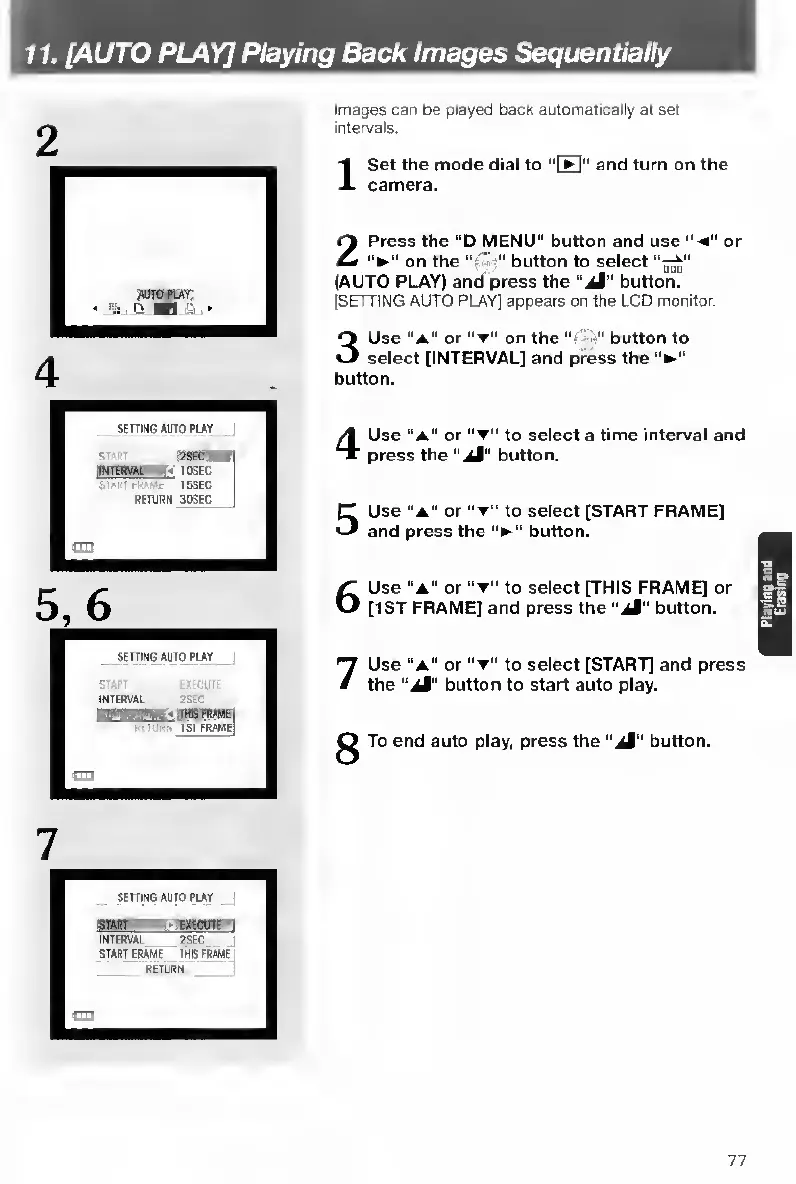
11.
[AUTO
PLAY]
Playing
Back
Images
Sequentially
2
5
,
6
Images
can
be
played
back
automatically
at
set
intervals-
I
S
et
the
mode
dial
to
"[Ht”
and
turn
on
the
camera.
2
P
ress
the
“D
MENU”
buttort
and
use
"-4"
or
on
the
'
button
to
select
(AUTO
PLAY)
and
press
the
“jM"
button.
[SETTING
AUTO
PLAY]
appears
on
the
LCD
monitor.
3
U
se
“A”
or
on
the
-s"
button
to
select
[INTERVAL]
and
press
the
button.
4
U
se
“a”
or
to
select
a
time
interval
and
press
the
"aM"
button.
5
U
se
"A"
or
“T”
to
select
[START
FRAME]
and
press
the
'V”
button.
6
U
se
"A"
or
to
select
[THIS
FRAME]
or
[1ST
FRAME]
and
press
the
“aJ"
button.
7
U
se
"a"
or
to
select
[START]
and
press
the
“aM"
button
to
start
auto
play.
^
To
end
auto
play,
press
the
“aM"
button.
77

Table of Contents

Other manuals for Contax TVS DIGITAL

Related product manuals