EasyManua.ls Logo

Contax TVS DIGITAL - PRINT] Using DPOF to Prepare for Pnnting.78

Contax TVS DIGITAL
109 pages
Print Icon
To Next Page IconTo Next Page
To Previous Page IconTo Previous Page
Loading...
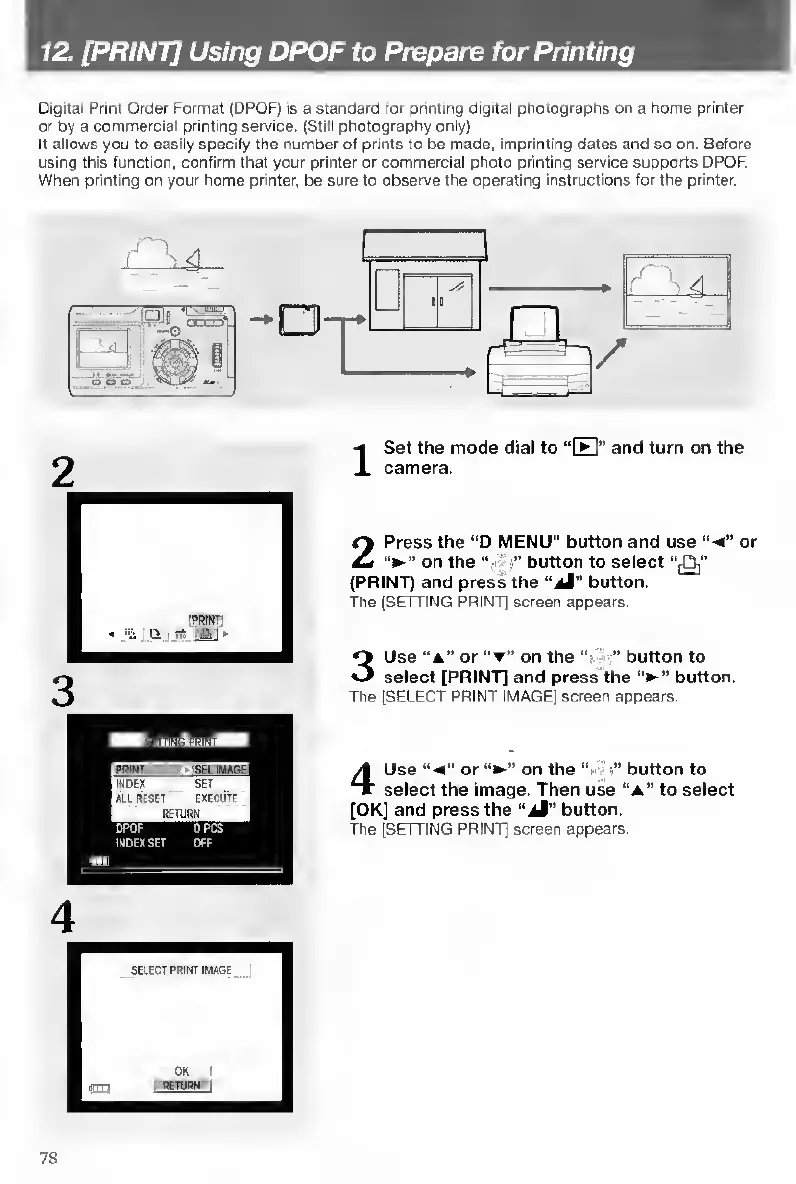
12.
[PRINT]
Using
DPOF
to
Prepare
for
Printing
Digital
Print
Order
Format
(DPOF)
is
a
standard
for
printing
digital
photographs
on
a
home
printer
or
by
a
commercial
printing
service.
(Still
photography
only)
It
allows
you
to
easily
specify
the
number
of
prints
to
be
made,
imprinting
dates
and
so
on.
Before
using
this
function,
confirm
that
your
printer
or
commercial
photo
printing
service
supports
DPOF.
When
printing
on
your
home
printer,
be
sure
to
observe
the
operating
instructions
for
the
printer.
I
S
et
the
mode
dial
to
“fFI”
and
turn
on
the
camera.
2
P
ress
the
“D
MENU”
button
and
use
“-4"
or
on
the
“•
button
to
select
‘'fOi”
(PRINT)
and
press
the
button.
The
(SETTING
PRINT]
screen
appears.
3
U
se
“a”
or
on
the
"
"
button
to
select
[PRINT]
and
press
the
‘V
button.
The
[SELECT
PRINT
IMAGE]
screen
appears.
4
U
se
or
on
the
button
to
select
the
Image.
Then
use
“a”
to
select
[OK]
and
press
the
“aM”
button.
The
[SETTING
PRINT]
screen
appears.
78

Table of Contents

Other manuals for Contax TVS DIGITAL

Related product manuals