EasyManua.ls Logo

Contax TVS DIGITAL - Confirming and Erasing Images (REC REVIEW button)

Contax TVS DIGITAL
109 pages
Print Icon
To Next Page IconTo Next Page
To Previous Page IconTo Previous Page
Loading...
3
.
Confirming
and
Erasing
Images
(REC
REVIEW
button)
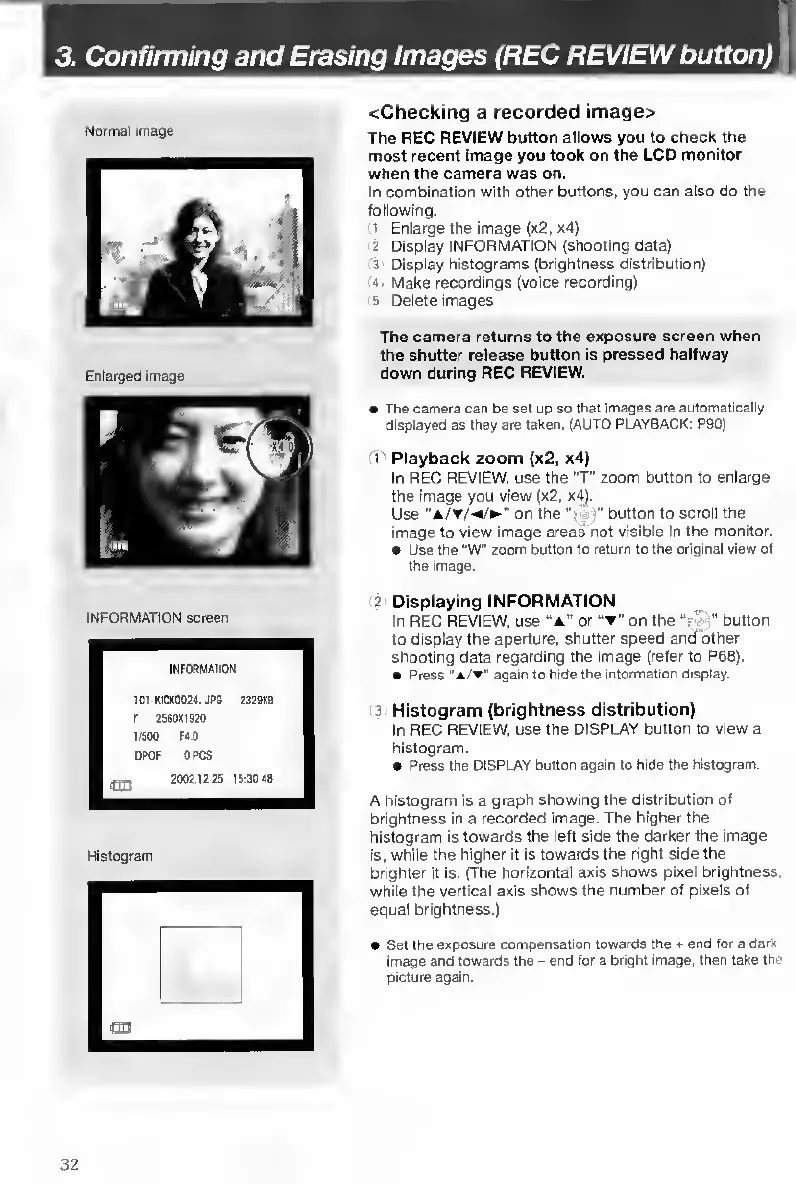
Normal
image
Enlarged
image
<Checking
a
recorded
image>
The
REC
REVIEW
button
allows
you
to
check
the
most
recent
image
you
took
on
the
LCD
monitor
when
the
camera
was
on.
In
combination
with
other
buttons,
you
can
also
do
the
following.
1
Enlarge
the
image
(x2,
x4)
2
Display
INFORMATION
(shooting
data)
3
Display
histograms
(brightness
distribution)
">
Make
recordings
(voice
recording)
s
Delete
images
The
camera
returns
to
the
exposure
screen
when
the
shutter
release
button
is
pressed
halfway
down
during
REC
REVIEW.
INFORMATION
screen
The
camera
can
be
set
up
so
that
jmages
are
automatically
displayed
as
they
are
taken.
(AUTO
PLAYBACK:
P90)
1
Playback
zoom
(x2,
x4)
In
REC
REVIEW,
use
the
"T"
zoom
button
to
enlarge
the
image
you
view
(x2,
x4).
Use
on
the
"•
b
utton
to
scroll
the
image
to
view
image
areas’
not
visible
in
the
monitor,
e
Use
the
"W"
zoom
button
to
return
to
the
original
view
of
the
image.
2
Displaying
INFORMATION
In
REC
REVIEW,
use
“A"
or
"T"
on
the
“r
';
button
to
display
the
aperture,
shutter
speed
and'bther
shooting
data
regarding
the
image
(refer
to
P68).
Press
“*/
"
again
to
hide
the
information
display.
3
Histogram
(brightness
distribution)
In
REC
REVIEW,
use
the
DISPLAY
button
to
view
a
histogram.
e
Press
the
DISPLAY
button
again
to
hide
the
histogram.
A
histogram
is
a
graph
showing
the
distribution
of
brightness
in
a
recorded
image.
The
higher
the
histogram
Is
towards
the
left
side
the
darker
the
image
is,
while
the
higher
it
Is
towards
the
right
side
the
brighter
it
is.
(The
horizontal
axis
shows
pixel
brightness,
while
the
vertical
axis
shows
the
number
of
pixels
of
equal
brightness.)
Set
the
exposure
compensation
towards
the
*
end
for
a
dark
Image
and
towards
the
-
end
for
a
bright
image,
then
take
the
picture
again.
32

Table of Contents

Other manuals for Contax TVS DIGITAL

Related product manuals