EasyManua.ls Logo

Contax TVS DIGITAL - LT Longtime Exposure

Contax TVS DIGITAL
109 pages
Print Icon
To Next Page IconTo Next Page
To Previous Page IconTo Previous Page
Loading...
6
'“LT"
Longtime
Exposure
Long
exposures
from
1
to
8
seconds
can
be
made,
whtch
is
convenient
for
taking
photos
of
fireworks
or
the
night
sky.
The
toiiowing
time
settings
are
avaiiabie:
1
sec,
2
sec,
4
sec,
8
sec.
I
I
S
et
the
mode
dial
to
“P"
or
“Av”
and
turn
on
the
camera.
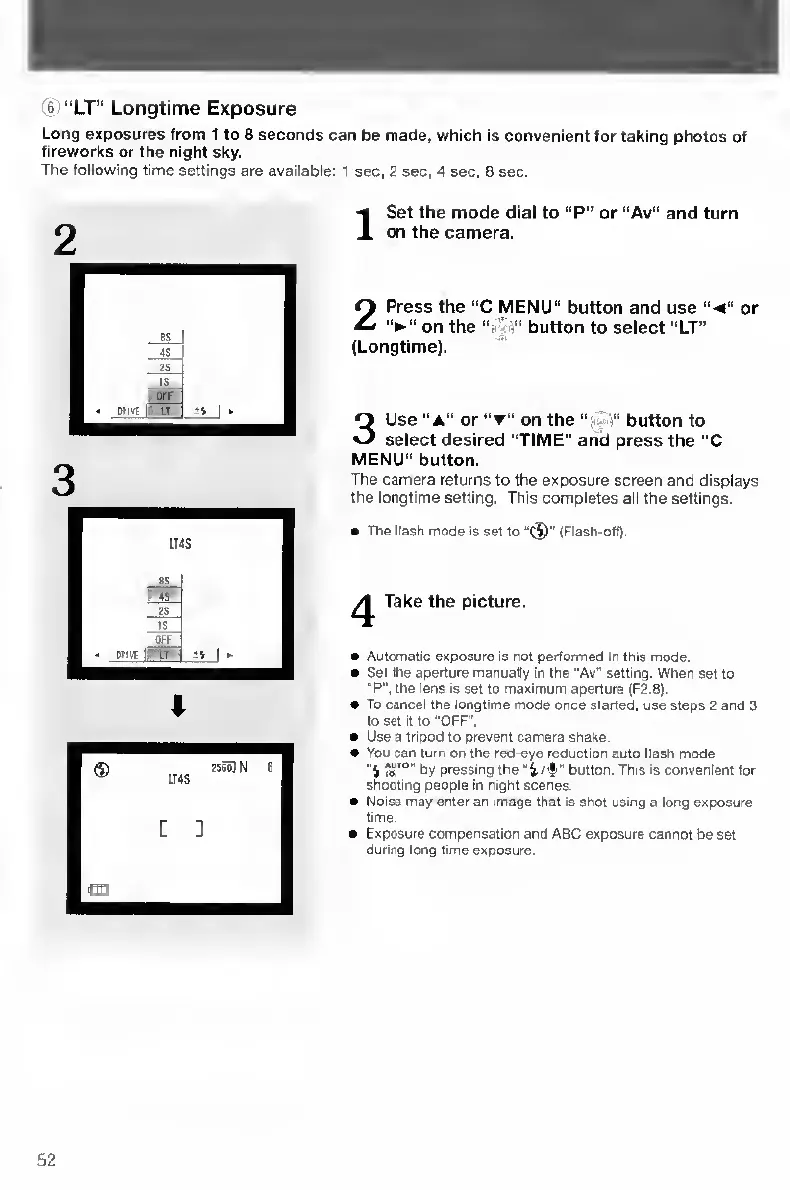
2
Press
the
“C
MENU"
button
and
use
“•«”
or
on
the
“n^
button
to
select
"LT”
(Longtime).
3
Use
“A"
or
"T”
on
the
button
to
select
desired
“TIME"
and
press
the
“C
MENU”
button.
The
camera
returns
to
the
exposure
screen
and
displays
the
longtime
setting.
This
completes
all
the
settings.
The
(lasn
moCe
is
set
to
(Flash-off)
Take
the
picture.
Automatic
exposure
is
not
performed
in
this
mode.
Set
the
aperture
manually
in
the
"Av"
setting.
When
set
to
"P",
the
lens
is
set
to
maximum
aperture
(F2.8).
To
cancel
the
longtime
mode
once
started,
use
steps
2
and
3
to
set
it
to
"OFF".
Use
a
tripod
to
prevent
camera
shake.
You
can
turn
on
the
red-eye
reduction
auto
flash
mode
"4
by
pressing
the
"i/lr"
button.
This
Is
convenient
for
shooting
people
in
night
scenes.
Noise
may
enter
an
image
that
1$
shot
using
a
long
exposure
time.
Exposure
compensation
and
ABC
exposure
cannot
be
set
during
long
time
exposure.
52

Table of Contents

Other manuals for Contax TVS DIGITAL

Related product manuals