EasyManua.ls Logo

Contax TVS DIGITAL - Av Aperture-Priority Auto

Contax TVS DIGITAL
109 pages
Print Icon
To Next Page IconTo Next Page
To Previous Page IconTo Previous Page
Loading...
2
.
“Av”
Aperture-Priority
Auto
It
is
a
characteristic
of
the
lens
that
when
a
subject
is
in
focus
not
only
the
subject
itself
but
also
an
area
behind
and
in
front
of
the
subject
are
sharp.
This
is
referred
to
as
depth
of
field.
The
area
that
Is
sharp
increases
with
smaller
apertures
and
decreases
with
larger
apertures.
You
can
use
this
either
to
make
sure
that
both
the
subject
and
the
background
are
in
focus
or
that
only
the
subject
is
sharp
while
the
background
is
blurred.
Set
the
aperture
that
suits
the
purpose
of
the
picture
you
are
composing.
In
aperture-priority
auto,
you
set
the
aperture
and
the
camera
automatically
selects
the
shutter
speed
according
to
the
brightness
of
the
subject.
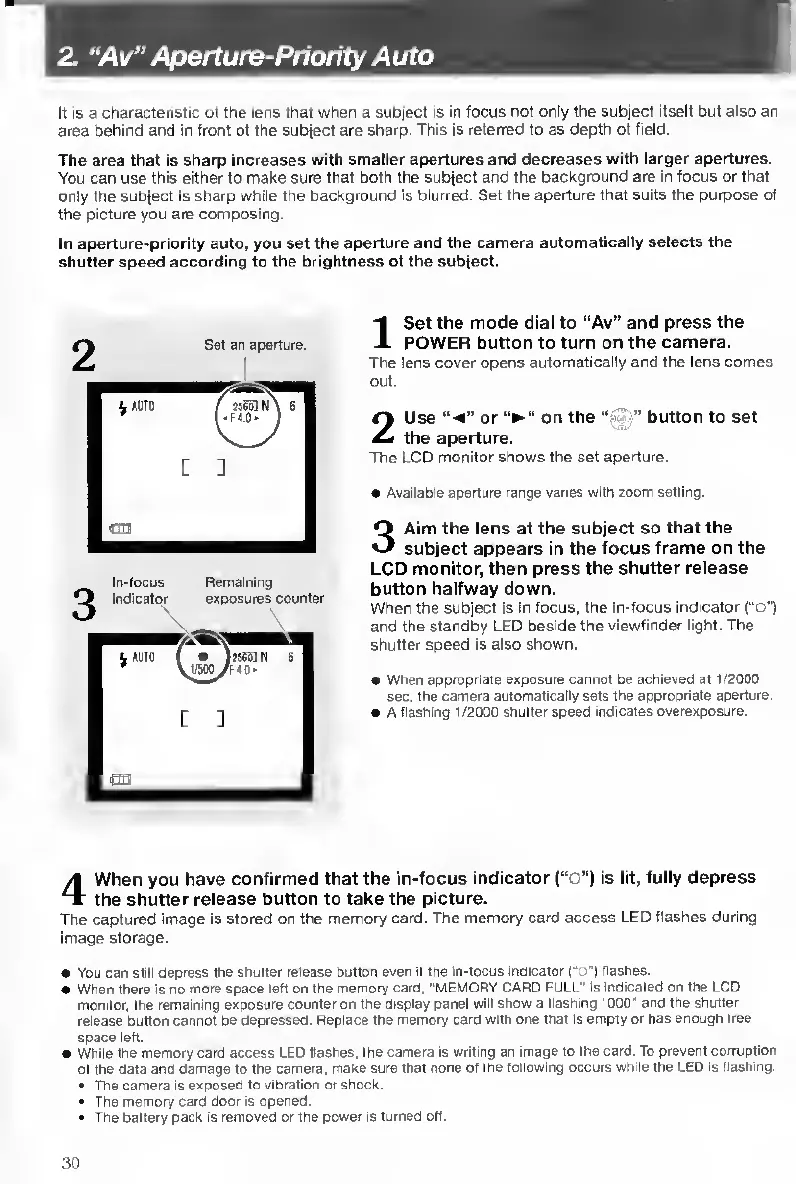
In-focus
Remaining
indicator
exposures
counter
I
S
et
the
mode
dial
to
“Av”
and
press
the
POWER
button
to
turn
on
the
camera.
The
lens
cover
opens
automatically
and
the
lens
comes
out.
2
U
se
or
on
the
“tMi”
button
to
set
the
aperture.
The
LCD
monitor
shows
the
set
aperture.
Available
aperture
range
varies
with
zoom
setting.
3
A
im
the
lens
at
the
subject
so
that
the
subject
appears
in
the
focus
frame
on
the
LCD
monitor,
then
press
the
shutter
release
button
halfway
down.
When
the
subject
is
in
focus,
the
in-focus
indicator
(“o")
and
the
standby
LED
beside
the
viewfinder
light.
The
shutter
speed
is
also
shown.
When
appropriate
exposure
cannot
be
achieved
at
1/2000
sec.
the
camera
automatically
sets
the
appropriate
aperture.
A
Hashing
1/2000
shutter
speed
indicates
overexposure.
4
W
hen
you
have
confirmed
that
the
in-focus
indicator
(“o")
is
lit,
fully
depress
the
shutter
release
button
to
take
the
picture.
The
captured
image
is
stored
on
the
memory
card.
The
memory
card
access
LED
flashes
during
image
storage.
You
can
still
depress
the
shutter
release
button
even
if
the
in-locus
indicator
(“o'l
flashes.
When
there
is
no
more
space
left
on
the
memory
card.
"MEMORY
CARO
FULL"
Is
indicated
on
the
LCD
monitor,
the
remaining
exposure
counter
on
the
display
panel
will
show
a
flashing
’OOO'
and
the
shutter
release
button
cannot
be
depressed.
Replace
the
memory
card
with
one
that
is
empty
or
has
enough
tree
space
left.
While
the
memory
card
access
LED
Hashes,
the
camera
is
writing
an
image
to
the
card.
To
prevent
corruption
of
the
data
and
damage
to
the
camera,
make
sure
that
none
of
the
following
occurs
while
the
LED
is
flashing.
The
camera
is
exposed
to
vibration
or
shock.
The
memory
card
door
is
opened.
The
battery
pack
is
removed
or
the
power
is
turned
off.
30

Table of Contents

Other manuals for Contax TVS DIGITAL

Related product manuals