EasyManua.ls Logo

Contax TVS DIGITAL - Viewing Images on a

Contax TVS DIGITAL
109 pages
Print Icon
To Next Page IconTo Next Page
To Previous Page IconTo Previous Page
Loading...
1.
Viewing
Images
on
a
TV
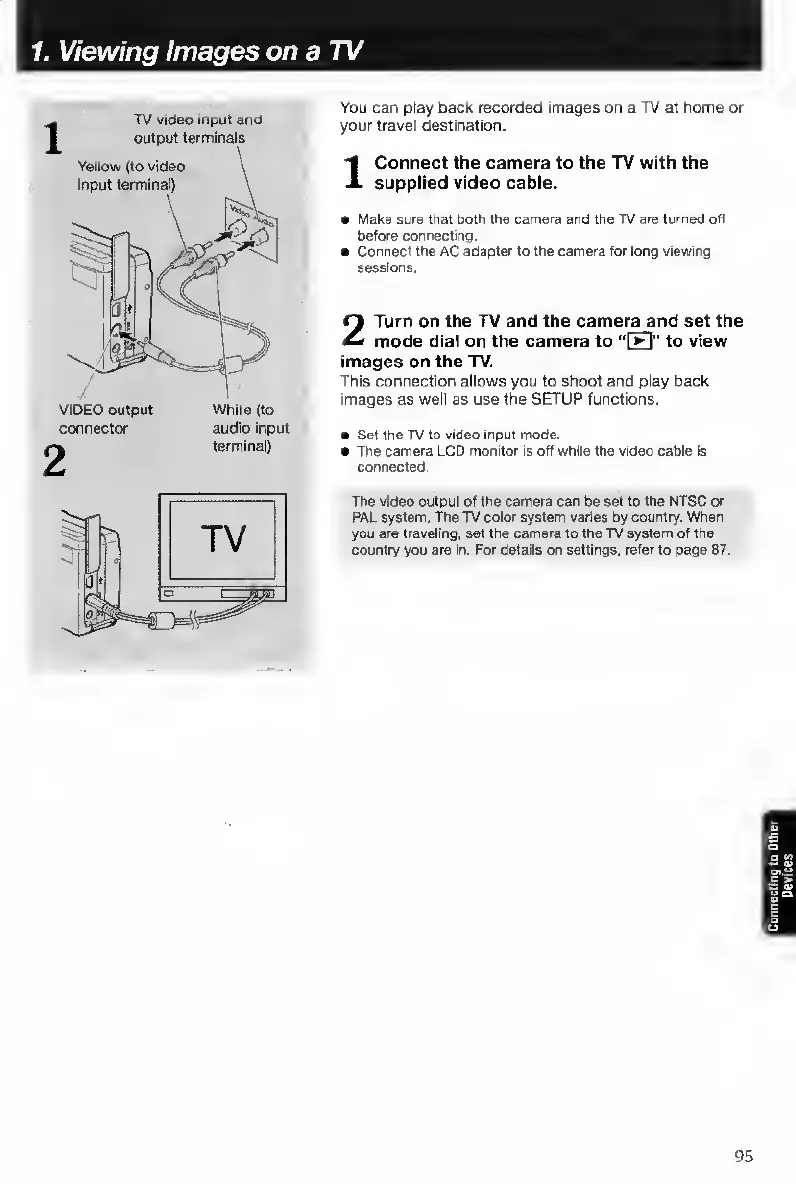
TV
video
input
and
output
terminals
Yeliow
(to
video
input
terminal)
VIDEO
output
connector
White
(to
audio
input
terminal)
You
can
play
back
recorded
images
on
a
TV
at
home
or
your
travel
destination.
1
Connect
the
camera
to
the
TV
with
the
supplied
video
cable.
a
Maks
sure
that
both
the
camera
and
the
TV
are
turned
oti
before
connecting.
Connect
the
AC
adapter
to
the
camera
for
long
viewrng
sessions.
2
Turn
on
the
TV
and
the
camera
and
set
the
mode
dial
on
the
camera
to
“[H]"
to
view
images
on
the
TV.
This
connection
allows
you
to
shoot
and
play
back
images
as
well
as
use
the
SETUP
functions.
Set
the
TV
to
video
input
mode.
The
camera
LCD
monitor
is
off
while
the
video
cable
is
connected.
The
video
output
of
the
camera
can
be
set
to
the
NTSC
or
PAL
system.
The
TV
color
system
varies
by
country.
When
you
are
traveling,
set
the
camera
to
the
TV
system
of
the
country
you
are
in.
For
details
on
settings,
r^r
to
page
87.
95

Table of Contents

Other manuals for Contax TVS DIGITAL

Related product manuals