EasyManua.ls Logo

Contax TVS DIGITAL - Connecting the USB cable to the PC

Contax TVS DIGITAL
109 pages
Print Icon
To Next Page IconTo Next Page
To Previous Page IconTo Previous Page
Loading...
<2.
Connecting
the
USB
cable
to
the
PC>
Windows
Me,
Windows
2000.
Windows
XR
Mac
OS
9.0
to
9.2
and
Mac
OS
X
10.0
to
10.2
come
with
a
USB
driver
installed.
Perform
the
following
steps
to
connect
a
USB
cable.
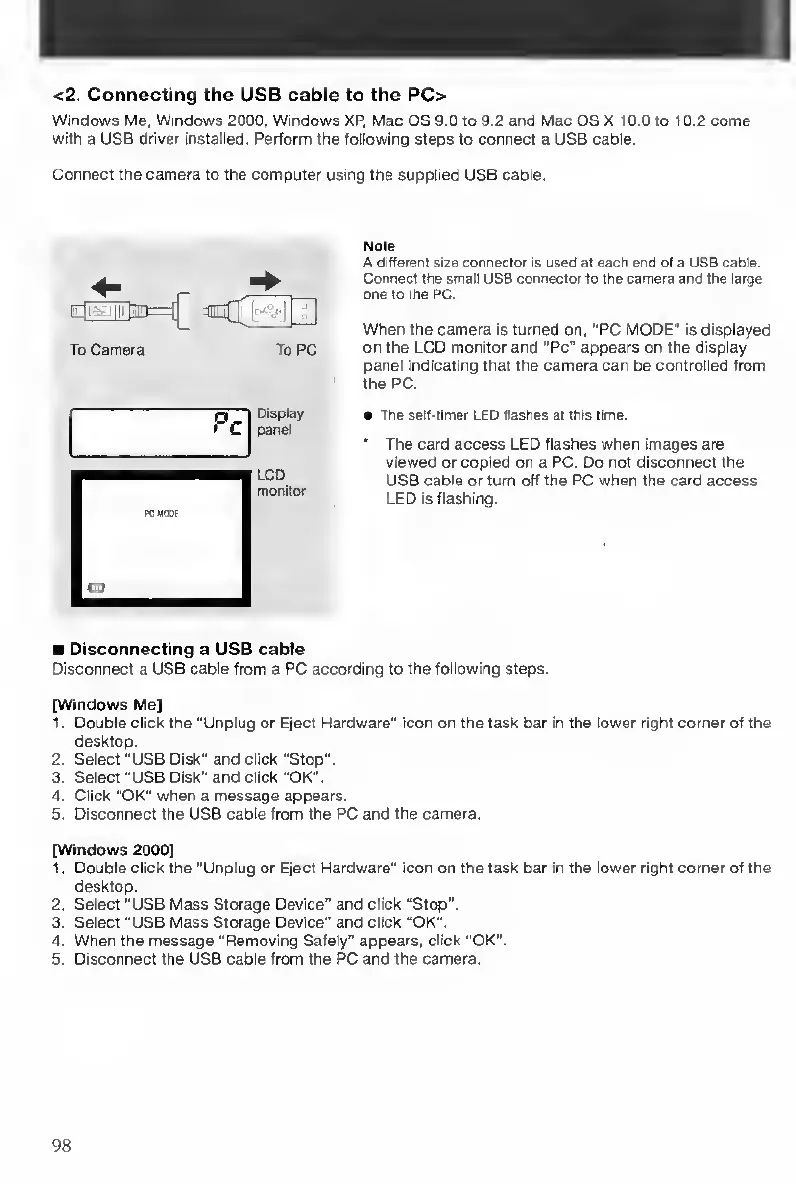
Connect
the
camera
to
the
computer
using
the
supplied
USB
cable.
Note
A
different
size
connector
is
used
at
each
end
of
a
US8
cable.
Connect
the
small
USB
connector
to
the
camera
and
the
large
one
to
the
PC.
When
the
camera
is
turned
on,
"PC
MODE"
is
displayed
on
the
LCD
monitor
and
"Pc”
appears
on
the
display
panel
indicating
that
the
camera
can
be
controlled
from
the
PC.
The
self-timer
LED
flashes
at
this
lime.
The
card
access
LED
flashes
when
images
are
viewed
or
copied
on
a
PC.
Do
not
disconnect
the
USB
cable
or
turn
off
the
PC
when
the
card
access
LED
is
flashing.
Disconnect
a
USB
cable
from
a
PC
according
to
the
following
steps.
[Windows
Me]
1.
Double
click
the
“Unplug
or
Eject
Hardware"
icon
on
the
task
bar
in
the
lower
right
corner
of
the
desktop.
2.
Select
"USB
Disk"
and
click
"Stop".
3.
Select
"USB
Disk”
and
click
“OK".
4.
Click
“OK"
when
a
message
appears.
5.
Disconnect
the
USB
cable
from
the
PC
and
the
camera.
[Windows
2000]
1.
Double
click
the
“Unplug
or
Eject
Hardware"
icon
on
the
task
bar
in
the
lower
right
corner
of
the
desktop.
2.
Select
"USB
Mass
Storage
Device"
and
click
“Stop".
3.
Select
"USB
Mass
Storage
Device"
and
click
“OK".
4.
When
the
message
"Removing
Safely"
appears,
click
"OK".
5.
Disconnect
the
USB
cable
from
the
PC
and
the
camera.
To
Camera
To
PC
Pc
CD
Display
panel
LCD
monitor
I
Disconnecting
a
USB
cabie
98

Table of Contents

Other manuals for Contax TVS DIGITAL

Related product manuals