EasyManua.ls Logo

Contax TVS DIGITAL - How to Change Setup Settings

Contax TVS DIGITAL
109 pages
Print Icon
To Next Page IconTo Next Page
To Previous Page IconTo Previous Page
Loading...
2.
How
to
Change
Setup
Settings
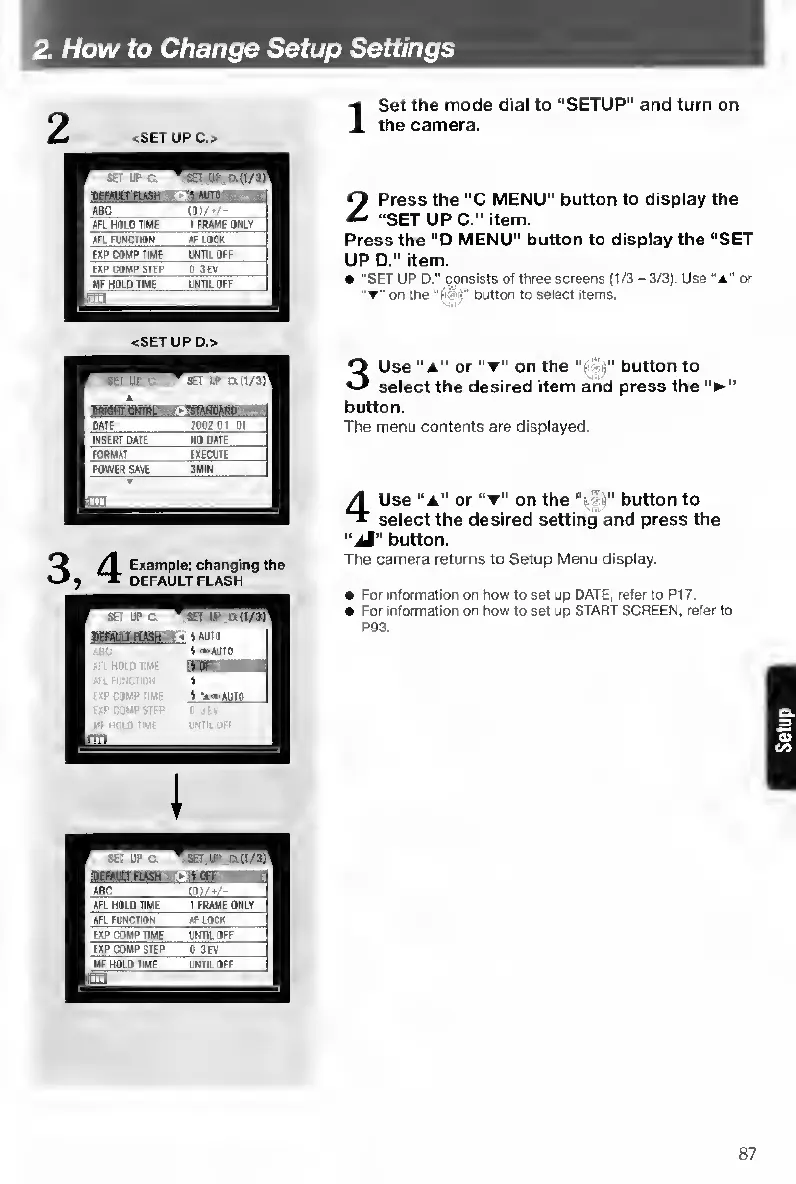
2
<SET
UPC.>
'
ST
IF
C
AdC
tfli
.
-
AFL
HOlOTiMe
1
FAAME
ONLY
AFl
n
INCHON
AFLOCK
EXP
COMP
T1M(
IWTII
Off
EXP
COMP
STEP
0
3€V
Uf
NOLO
IIUF
LWm
Off
m
-II
<SET
UP
D.>
3
/
^
Example:
changing
the
)
DEFAULT
FLASH
I
S
et
the
mode
dial
to
“SETUP"
and
turn
on
the
camera.
2
P
ress
the
“C
MENU”
button
to
display
the
“SETUPC.”
item.
Press
the
“D
MENU"
button
to
display
the
“SET
UP
D.”
item.
"SET
UP
D."
consists
of
three
screens
(t/3
-
3/3).
Use
“a"
or
on
the
button
to
select
items.
3
U
se
or
“T”
on
the
“f
'lj”
button
to
select
the
desired
item
and
press
the
button.
The
menu
contents
are
displayed.
4
U
se
“a"
or
on
the
button
to
select
the
desired
setting
and
press
the
“jM”
button.
The
camera
returns
to
Setup
Menu
display.
For
information
on
how
to
set
up
DATE,
refer
to
PI
7.
For
information
on
how
to
set
up
STAFIT
SCREEN,
refer
to
P93.
87

Table of Contents

Other manuals for Contax TVS DIGITAL

Related product manuals