EasyManua.ls Logo

Contax TVS DIGITAL - Mode Dial

Contax TVS DIGITAL
109 pages
Print Icon
To Next Page IconTo Next Page
To Previous Page IconTo Previous Page
Loading...
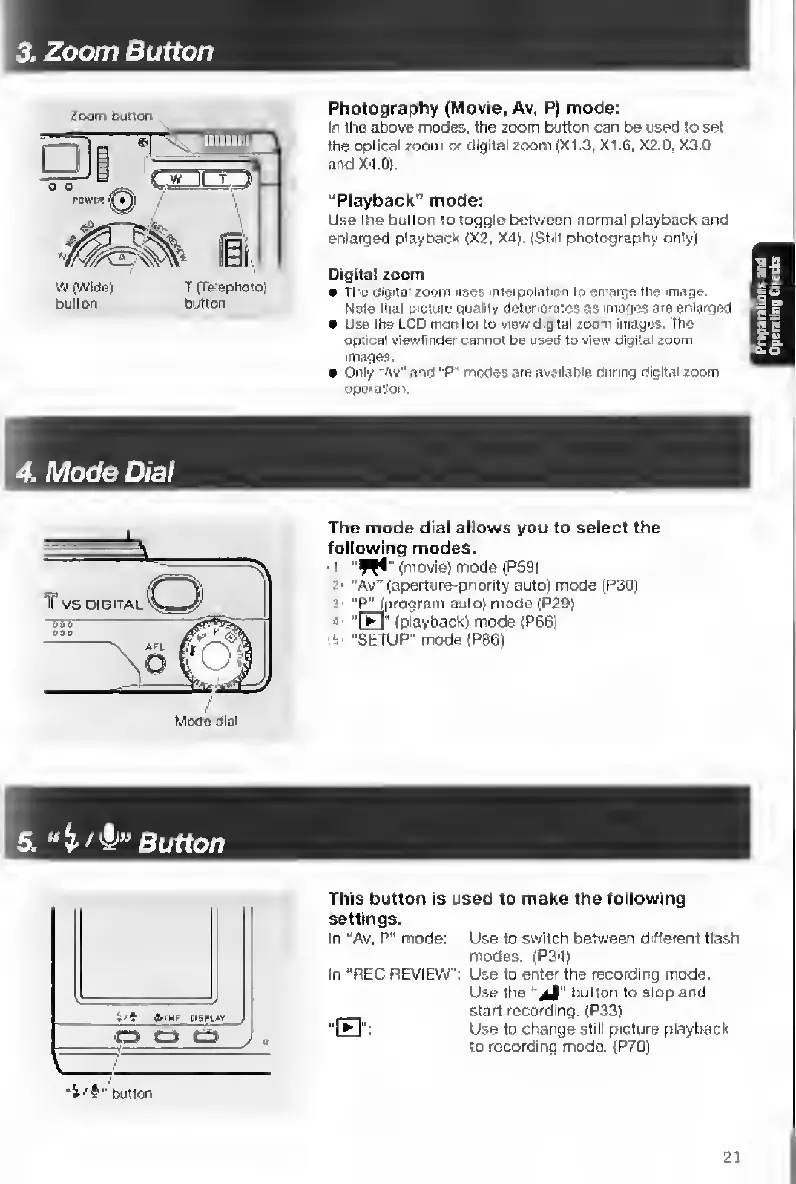
3.
Zoom
Button
Zoom
bution
Vi
(Wide)
T
(Tetephoto)
butter
Dijnon
Photography
(Movie,
Av.
P|
mode:
In
the
above
modes,
the
zoom
button
can
be
used
to
set
the
optical
zoom
w
digital
zoom
(X1.3,
X1.6.
X2.D.
X3.0
and
X4.0).
“Playback”
mode:
Use
the
button
to
toggle
between
normal
playback
and
enlarged
playback
(X2,
X4).
(StiH
photography
oniyi
Digital
zoom
the
uigita'
zoom
uses
nlerpt^ation
to
en
arge
the
image.
Noie
that
picture
Quaiiiy
deteriCKsies
as
mtages
are
enlarged
Use
the
LCD
monitor
to
view
dig-tal
zoom
images.
The
optical
viewH
nder
cannot
be
used
to
vietv
digital
zoom
images.
Only
"Av"
and
"P"
modes
are
available
during
digital
zoom
operation.
4.
Mode
Dial
The
mode
dial
allows
you
to
select
the
following
modes.
I
(movie)
mode
(P59}
2'
"Av"
(aperture-pnority
auto)
mode
|P30)
3
''^pragram
auto)
mode
(P29)
!
Im
"(
playback)modeiP66)
5
"SETUP"
mode
(P861
5
.
Button
button
This
buttorr
is
used
to
make
the
following
settings.
In
"Av.
P"
mode:
Use
to
switch
between
diderent
flash
modes.
(P34)
In
“REC
REVIEW
':
Use
to
enter
the
recording
mode.
Use
the
button
to
stop
and
start
recording.
(P33)
"B":
Use
to
charyge
still
picture
playback
to
recordiftg
mode.
(P70)
21

Table of Contents

Other manuals for Contax TVS DIGITAL

Related product manuals