EasyManua.ls Logo

Contax TVS DIGITAL - FORMAT (memory card Initialization)

Contax TVS DIGITAL
109 pages
Print Icon
To Next Page IconTo Next Page
To Previous Page IconTo Previous Page
Loading...
7.
MF
HOLD
TIME
You
can
change
the
time
that
manual
focus
and
the
distance
setting
are
held.
CD
UNTIL
OFF.the
setting
remains
in
effect
while
the
camera
is
on
and
is
canceled
when
the
camera
Is
turned
off.
®
UNTIL
CANCEL...
Until
MF
setting
is
canceled
with
the
button
(turning
the
camera
off
does
not
cancel
the
setting).
<SET
UP
D.>
1.
BRIGHT
CNTRL
(LCD
brightness
control)
The
LCD
monitor
can
be
set
to
one
of
five
brightness
levels.
Darker
Brighter
-4
-
(-2.-1,STANDARD,+1.+2)
2.
DATE
This
function
sets
camera
date
and
time.
For
details
on
settings,
refer
to
PI
7.
3.
INSERT
DATE
You
can
determine
whether
the
"DATE"
is
to
be
imprinted
on
the
recorded
image
or
not.
2)
NO
DATE.
WITH
DATE
(A
date
imprint
once
made
cannot
be
erased.)
4.
FORMAT
(memory
card
Initialization)
This
function
erases
all
Images
and
sound
recorded
on
a
memory
card.
Use
this
function
with
care
since
even
protected
images
are
erased.
For
details
on
'FORMAT',
see
page
P92.
5.
POWER
SAVE
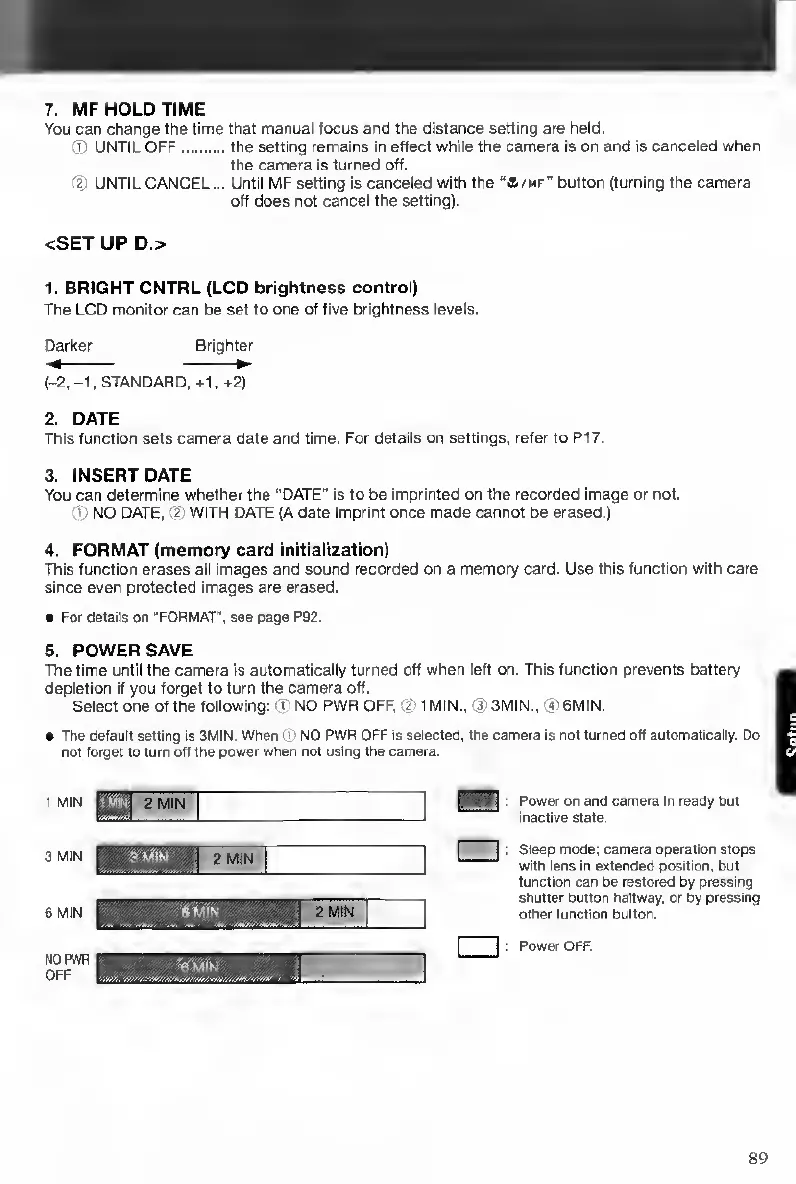
The
time
until
the
camera
is
automatically
turned
off
when
left
on.
This
function
prevents
battery
depletion
if
you
forget
to
turn
the
camera
off.
Select
one
of
the
following;
NO
PWR
OFF,
2
1
MIN.,
0)
3MIN..
(?
6MIN.
The
default
setting
is
3MIN.
When
(D
NO
PWR
OFF
«
selected,
the
camera
is
rtot
turned
off
automatically.
Oo
not
forget
to
turn
oft
the
power
when
not
using
the
camera.
1
MIN
3
MIN
6
MIN
ffOPWP
OFF
Power
on
and
camera
In
ready
but
inactive
state.
Sleep
mode;
camera
operation
stops
with
lens
in
extended
position,
but
function
can
be
restored
by
pressing
shutter
button
halfway,
or
by
pressing
other
function
button.
Power
OFF.
89

Table of Contents

Other manuals for Contax TVS DIGITAL

Related product manuals