EasyManua.ls Logo

Contax TVS DIGITAL - Troubleshooting

Contax TVS DIGITAL
109 pages
Print Icon
To Next Page IconTo Next Page
To Previous Page IconTo Previous Page
Loading...
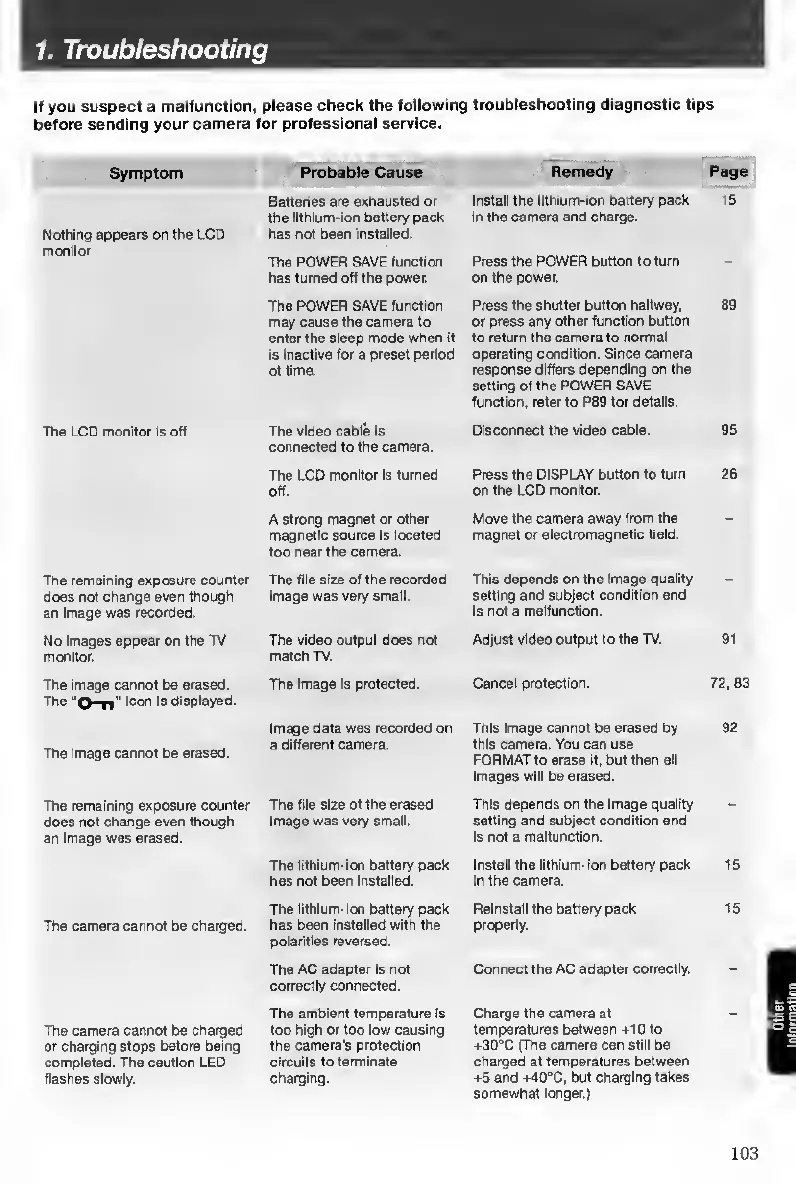
1.
Troubleshooting
If
you
suspect
a
malfunction,
please
check
the
following
troubleshooting
diagnostic
tips
before
sending
your
camera
for
professional
service.
Symptom
Probable
Cause
Remedy
Page
Nothing
appears
on
the
LCD
monitor
Batteries
are
exhausted
or
the
llthium-lon
battery
pack
has
not
been
Installed.
Install
the
lithium-ion
battery
padi
in
the
camera
and
charge.
15
The
POWER
SAVE
function
has
turned
off
the
power.
Press
the
POWER
button
to
turn
on
the
power.
-
The
POWER
SAVE
function
may
cause
the
camera
to
enter
the
sleep
mode
when
it
is
inactive
for
a
preset
period
of
time.
Press
the
shutter
button
halfway,
or
press
any
other
function
button
to
return
the
camera
to
normal
operating
condition.
Since
camera
response
differs
depending
on
the
setting
of
the
POWER
SAVE
function,
refer
to
P89
for
details.
89
The
LCD
monitor
is
off
The
video
cable
Is
connected
to
the
camera.
Disconnect
the
video
cable.
95
The
LCD
monitor
Is
turned
off.
Press
the
DISPLAY
button
to
turn
on
the
LCD
monitor.
26
A
Strong
magnet
or
other
magnetic
source
Is
located
too
rear
the
camera.
Move
the
camera
away
from
the
magnet
or
electromagnetic
field.
The
remaining
exposure
counter
Poes
not
change
even
though
an
Image
was
recorded.
The
file
size
of
the
recorded
imege
was
very
small.
This
depends
on
the
Image
quality
setting
and
subject
condition
and
Is
not
a
malfunction.
No
images
appear
on
the
TV
monitor.
The
video
output
does
not
metch
TV.
Adjust
video
output
to
the
TV.
91
The
image
cannot
be
erased.
The
ioort
Is
displayed.
The
Image
Is
protected.
Cancel
protection.
72,83
The
Image
cannot
be
erased.
Image
data
was
recorded
on
a
different
camera.
This
Image
cannot
be
erased
by
this
camera.
You
can
use
FORMAT
to
erase
it,
but
then
all
Images
will
be
erased.
92
The
remaining
exposure
counter
does
not
change
even
though
an
Image
was
erased.
The
file
size
of
the
erased
Image
was
very
small.
This
depends
on
the
image
quality
setting
and
subject
condition
and
is
not
a
malfuni^lon.
The
lithium-ion
battery
pack
has
not
been
Installed.
Install
the
lithium-ion
battery
pack
In
the
camera.
15
The
camera
cannot
be
charged.
The
llthlum-ion
battery
pack
has
been
Installed
with
the
polarities
reversed.
Reinstall
the
battery
pack
properly.
15
The
AC
adapter
is
not
correctty
connected.
Connect
the
AC
adapter
correctly.
The
camera
cannot
be
charged
or
charging
stops
before
being
completed.
The
caution
LED
flashes
slowly.
The
ambient
temperature
Is
too
high
or
too
low
causing
the
camera's
protection
circuits
to
terminate
charging.
Charge
the
camera
at
temperatures
between
+10
to
+30°C
(The
camera
can
still
be
charged
at
temperatures
between
+5
and
+40°C,
but
charging
takes
somewhat
longer.)
103

Table of Contents

Other manuals for Contax TVS DIGITAL

Related product manuals