EasyManua.ls Logo

Contax TVS DIGITAL - Displaying Exposure Information; Displaying Histogram

Contax TVS DIGITAL
109 pages
Print Icon
To Next Page IconTo Next Page
To Previous Page IconTo Previous Page
Loading...
(N|
CO
3.
Displaying
Exposure
Information
(Information
Display)
The
exposure
information
of
an
image
such
as
exposure,
shutter
speed,
exposure
compensation,
etc.
can
he
displayed
in
an
information
display.
Select
and
display
the
image
whose
information
you
want
to
see.
Press
“A”
or
on
the
button,
image
and
the
exposure
information
is
displayed.
Press
“A”
or
to
return
to
the
previous
screen.
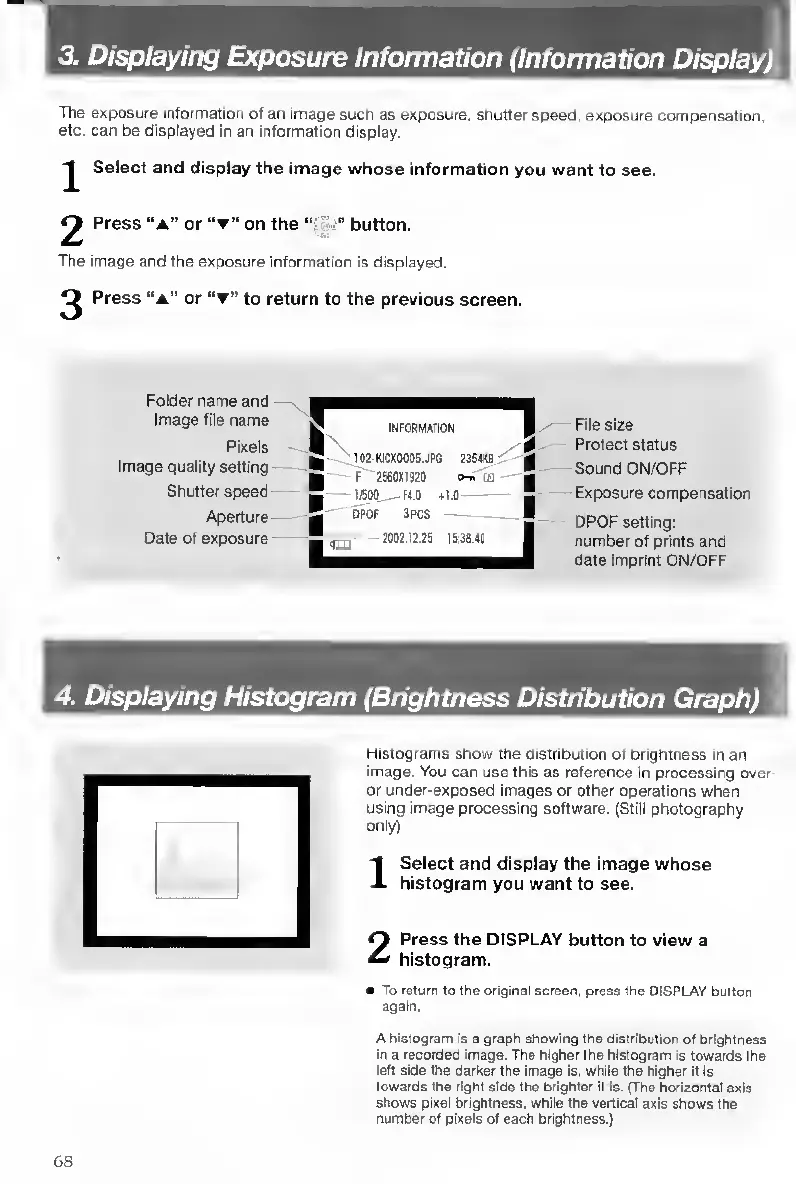
Folder
name
and
Image
file
name
Pixels
Image
quality
setting
Shutter
speed
Aperture
Date
of
exposure
r
INFORMATION
1
s
I02-KICX0005.JR6
23S4IQ
g
!
F
2560tl92Q
e-n
(D
g
1
i;
bPOF
3PCS
1
,
2002.12.25
15:30.40
|
File
size
Protect
status
Sound
ON/OFF
Exposure
compensation
DPOF
setting:
number
of
prints
and
date
imprint
ON/OFF
4.
Displaying
Histogram
(Brightness
Distribution
Graph)
Histograms
show
the
distribution
of
brightness
in
an
image.
You
can
use
this
as
reference
in
processing
over-
or
under-exposed
images
or
other
operations
when
using
image
processing
software.
(Still
photography
only)
1
Select
and
display
the
Image
whose
histogram
you
want
to
see.
2
Press
the
DISPLAY
button
to
view
a
histogram.
To
return
to
the
original
screen,
press
the
DISPLAY
button
again.
A
histogram
is
a
graph
showing
the
distribution
of
brightness
in
a
recorded
image.
The
higher
the
histogram
is
towards
the
left
side
the
darker
the
Image
is,
while
the
higher
it
Is
towards
the
right
side
the
brighter
It
is.
(The
horizontal
axis
shows
pixel
bhghtness,
while
the
vertical
axis
shows
the
number
of
pixels
of
each
brightness.)
68

Table of Contents

Other manuals for Contax TVS DIGITAL

Related product manuals