EasyManua.ls Logo

Contax TVS DIGITAL - Installing and Removing the Memory Card

Contax TVS DIGITAL
109 pages
Print Icon
To Next Page IconTo Next Page
To Previous Page IconTo Previous Page
Loading...
2
.
Installing
and
Removing
the
Memory
Card
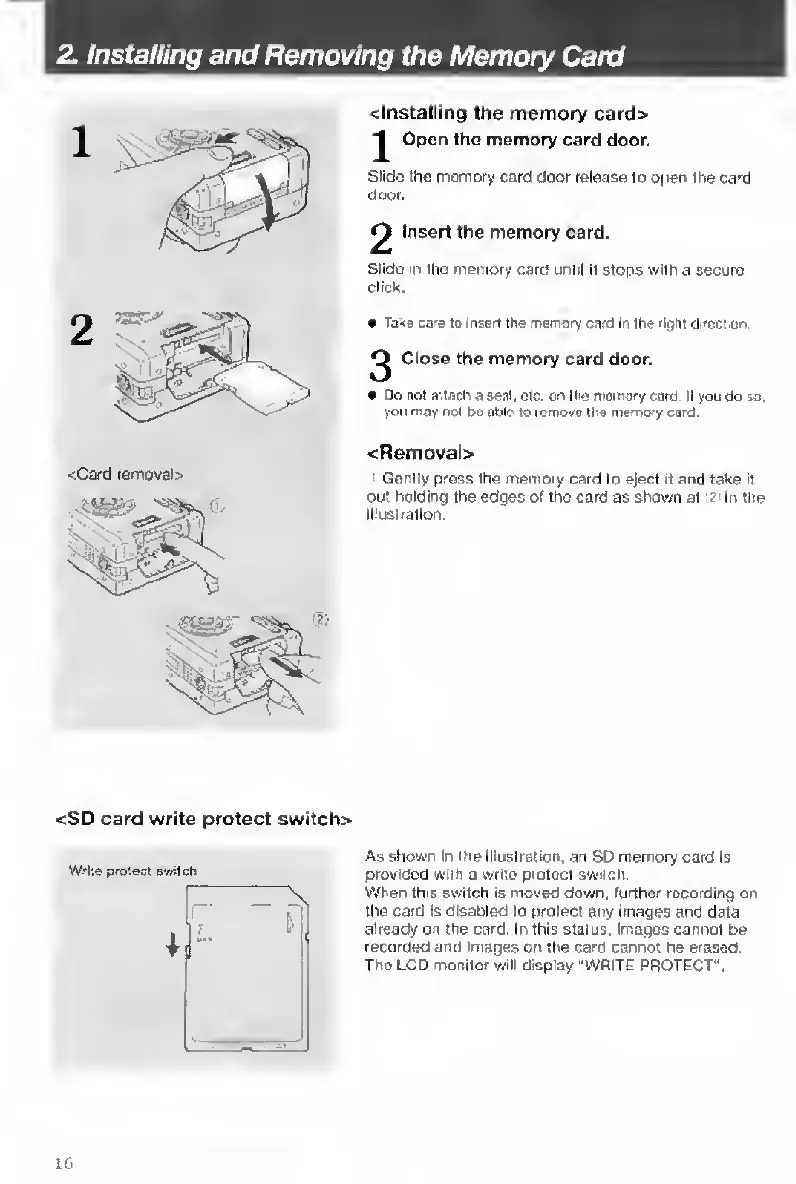
<Card
removal>
<lnstalling
the
memory
card>
1
Open
the
memory
card
door.
Slide
the
memory
card
door
release
to
open
the
card
door.
2
Insert
the
memory
card.
Slide
in
the
memory
card
until
It
stops
with
a
secure
click
e
Tails
cars
to
insert
the
Tierrory
card
In
ths'lpht
direction
^
Close
the
memory
card
door.
Do
not
attach
a
seal,
etc.
on
ihe
memory
card
II
you
do
so.
you
may
not
be
able
to
remoye
the
memory
card.
<Rernoval>
Gently
press
the
memory
card
to
eject
it
and
take
it
out
holding
the
edges
of
the
caid
as
shown
at
r
in
the
illustration.
<SD
card
write
protect
switch>
Write
proiecl
switch
As
shown
In
the
Illustration,
an
SD
memory
caid
Is
provided
with
a
write
protect
switch.
When
this
switch
is
moved
down,
further
recording
on
the
card
Is
disabled
to
protect
any
images
and
data
already
on
the
card.
In
this
status,
Images
cannot
be
recorded
and
Images
on
the
card
cannot
be
erased.
The
LCD
monitor
will
display
"WRITE
PROTECT".
lb

Table of Contents

Other manuals for Contax TVS DIGITAL

Related product manuals