EasyManua.ls Logo

Contax TVS DIGITAL - Setting the Time and Date

Contax TVS DIGITAL
109 pages
Print Icon
To Next Page IconTo Next Page
To Previous Page IconTo Previous Page
Loading...
3.
Setting
the
Time
and
Date
1
tfU»3H‘ciaRL
.siiSEac!_
_
1
1
iksur
cm
kco^n
II
II
l»(U*l
II
H
3IU(
II
L.
_
y
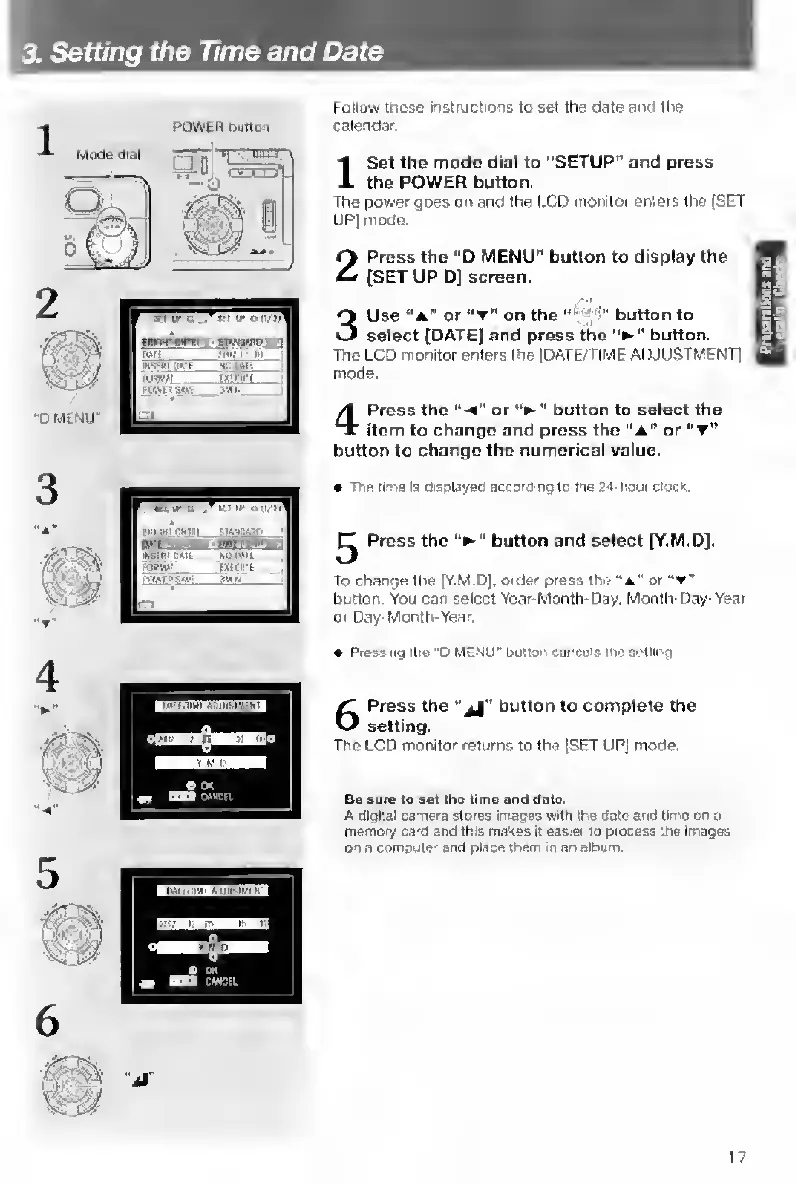
Follow
these
InstructfOfis
to
set
the
date
and
the
calendar
I
S
et
the
made
dial
to
‘'SETUP”
and
press
the
POWER
button.
The
povrer
goes
or*
and
the
LCD
monitor
enters
the
[SET
UP]
mode.
2
Press
the
”D
MENU”
button
to
display
the
[SET
UP
D]
screen.
3
Use
“a"
or
"T"
on
the
button
to
select
[DATE]
and
press
the
button.
The
LCD
monitor
enters
the
[DATE/TIMt
ADJUSTMENT)
mode.
4
Press
the
or
button
to
select
the
item
to
change
and
press
the
“A”
or
button
to
change
the
numerical
value.
The
tlma
la
diaplayed
accord'ng
tc
tie
24-hour
docK.
Press
the
button
and
select
[Y.M.D].
To
change
the
[Y.M.D].
order
press
the
"a"
or
“t"
button.
You
can
select
Year-Month-Day,
Month-Day-Year
or
Day-Month-Year,
«
Press
ng
the
"D
MENU'
butior
cancais
ine
sellli'o
6
Press
the
button
to
complete
the
setting.
Tho
LCD
monitor
returns
to
the
[SET
UP)
mode.
Ba
sure
to
set
Iho
time
ar>d
date.
A
digital
c^era
storea
images
with
the
dale
and
time
on
a
memory
card
and
this
makes
It
easier
to
process
the
Images
on
a
comouter
and
place
them
m
an
album.
17

Table of Contents

Other manuals for Contax TVS DIGITAL

Related product manuals