EasyManua.ls Logo

Contax TVS DIGITAL - Exposure Compensation

Contax TVS DIGITAL
109 pages
Print Icon
To Next Page IconTo Next Page
To Previous Page IconTo Previous Page
Loading...
4
.
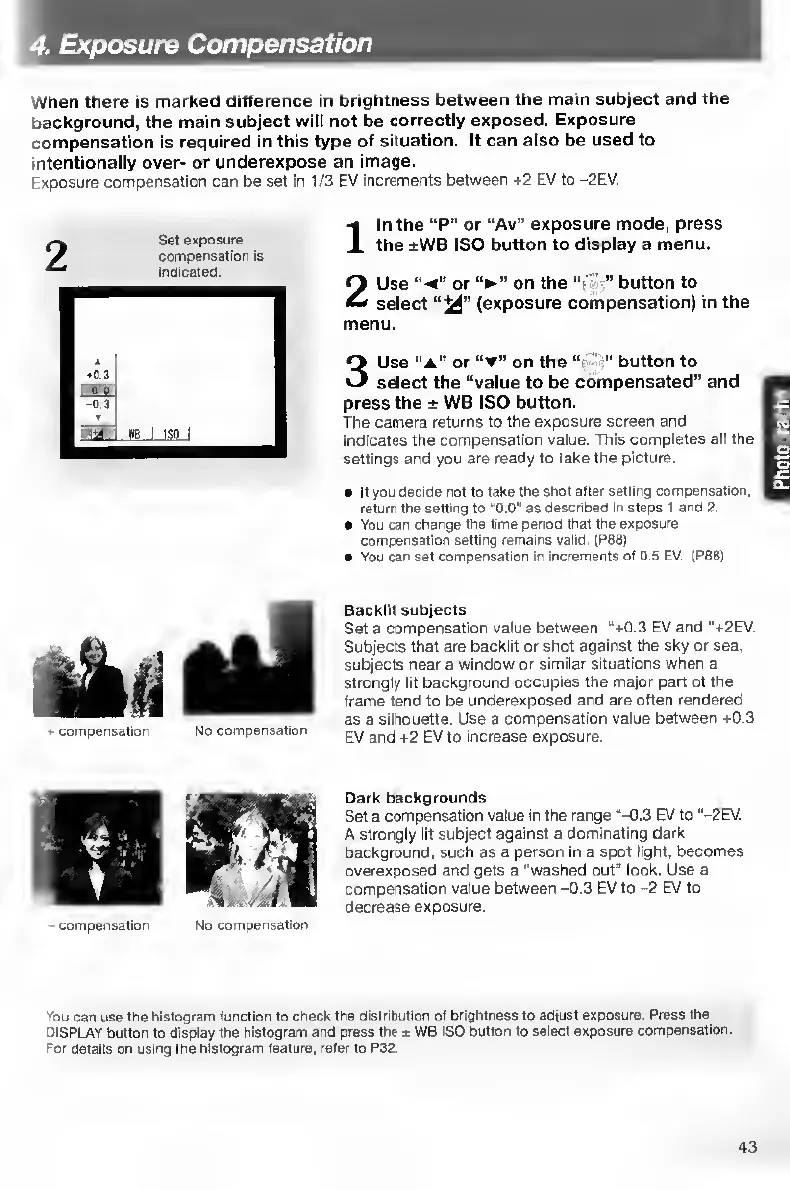
Exposure
Compensation
When
there
is
marked
difference
in
brightness
between
the
main
subject
and
the
background,
the
main
subject
will
not
be
correctly
exposed.
Exposure
compensation
is
required
in
this
type
of
situation.
It
can
also
be
used
to
intentionally
over-
or
underexpose
an
image.
Exposure
compensation
can
be
set
in
1/3
EV
increments
between
+2
EV
to
-2EV.
Set
exposure
compensation
is
Indicated.
I
l
n
the
“P”
or
“Av”
exposure
mode,
press
the
±WB
ISO
button
to
display
a
menu.
2
Use
or
on
the
"•
"
button
to
select
(exposure
compensation)
in
the
menu.
3
Use
“a"
or
on
the
•"
button
to
select
the
“value
to
be
compensated”
and
press
the
±
WB
ISO
button.
The
camera
returns
to
the
exposure
screen
and
indicates
the
compensation
value.
This
completes
all
the
settings
and
you
are
ready
to
take
the
picture.
If
you
decide
not
to
take
the
shot
after
setting
compensation,
return
the
setting
to
"0.0"
as
descnbed
in
steps
1
and
2.
e
You
can
change
the
time
period
that
the
exposure
compensation
setting
remains
valid.
fPSS)
You
can
set
compensation
in
increments
of
0 5
EV.
|P881
compensation
No
compensation
Backlit
subjects
Set
a
compensation
value
between
“+0.3
EV
and
‘‘+2EV.
Subjects
that
are
backlit
or
shot
against
the
sky
or
sea.
subjects
near
a
window
or
similar
situations
when
a
strongly
lit
background
occupies
the
major
part
of
the
frame
tend
to
be
underexposed
and
are
often
rendered
as
a
silhouette.
Use
a
compensation
value
between
+0.3
EV
and
+2
EV
to
increase
exposure.
No
compensation
Dark
backgrounds
Set
a
compensation
value
in
the
range
“-0.3
EV
to
“-2EV.
A
strongly
lit
subject
against
a
dominating
dark
background,
such
as
a
person
in
a
spot
light,
becomes
overexposed
and
gets
a
"washed
out"
look.
Use
a
compensation
value
between
-0.3
EV
to
-2
EV
to
decrease
exposure.
You
can
use
the
histogram
function
to
check
the
distribution
of
brightness
to
adjust
exposure.
Press
the
DISPLAY
button
to
display
the
histogram
and
press
the
*
WB
ISO
button
to
select
exposure
compensation.
Tor
details
on
using
the
histogram
feature,
refer
to
P32.
43

Table of Contents

Other manuals for Contax TVS DIGITAL

Related product manuals