EasyManua.ls Logo

Contax TVS DIGITAL - Loading and Charging the Battery Pack

Contax TVS DIGITAL
109 pages
Print Icon
To Next Page IconTo Next Page
To Previous Page IconTo Previous Page
Loading...
1.
Loading
and
Charging
the
Battery
Pack
1
2
RattS'V
pack
A'
mark
Camera
mark
Battery
pack
Better^'
stc^^r
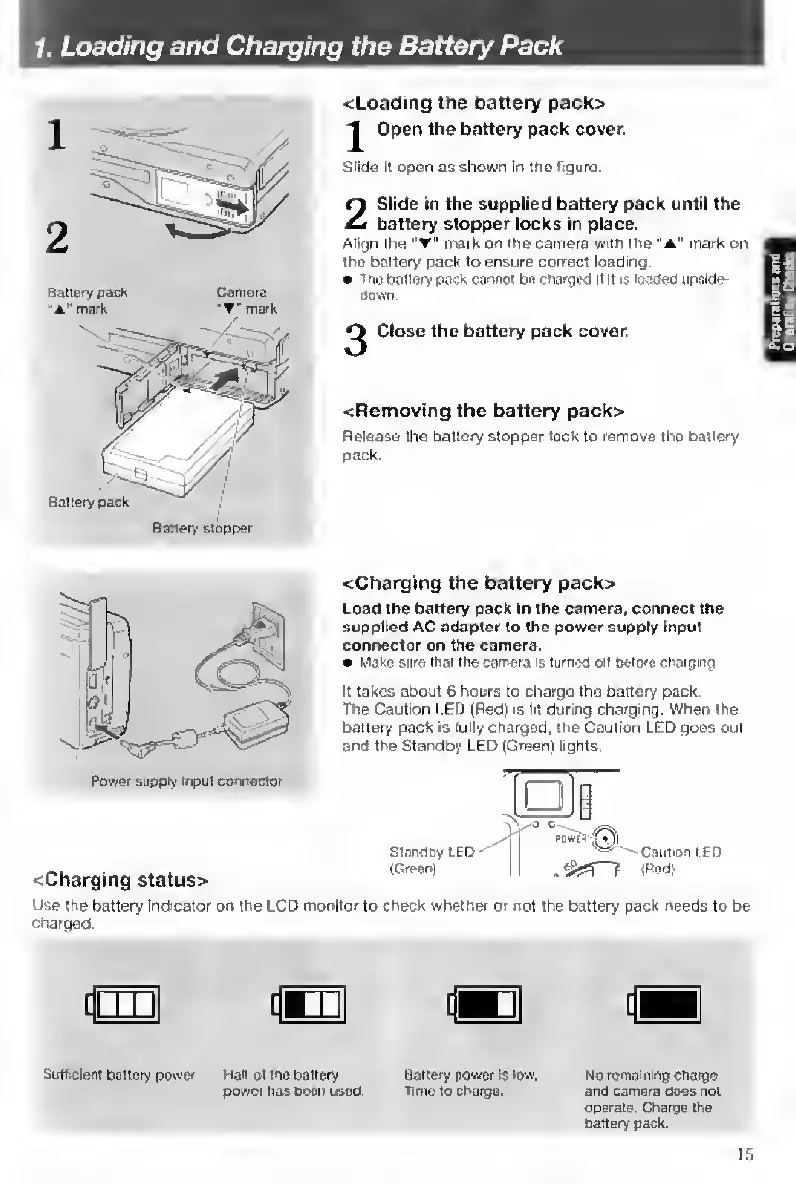
<Loading
the
battery
pack>
^
Open
the
battery
pack
cover.
Stide
i!
open
as
shown
In
itis
figure.
2
Slide
in
the
supplied
battery
pack
until
the
battery
stopper
locks
in
place.
Align
the
'
mark
on
the
camera
with
ihe
“A"
mark
on
the
battery
pack
to
ensure
correct
loading.
ln«
battery
pack
cannot
be
cnarged
it
>t
is
loaoed
upside-
Oown.
^
Close
the
battery
pack
cover.
<Removing
the
battery
pack>
Release
the
battery
stopper
lock
to
remove
the
banery
pack.
Power
supply
input
connector
<Charging
status>
<Charging
the
battery
pack>
Load
the
battery
pack
in
the
camera,
connect
the
supplied
AC
adapter
to
the
power
supply
Input
connector
on
the
camera.
Make
sure
that
the
camera
«turneC
off
Oetore
cnargmg
It
takes
about
6
hours
to
charge
the
battery
pack.
The
Caution
l.ED
(Red)
is
lit
dunng
charging.
When
the
battery
pack
is
fully
charged,
the
Caution
LED
goes
out
and
the
Standby
LED
(Green)
lights.
StarCOy
LED
(Greenl
Use
the
battery
indicatw
on
the
LCD
monitor
to
check
whether
or
not
the
battery
pack
nwds
to
be
•charged.
[jr
[pTi|
[{Bn|
Sufbcienr
battery
poiver
Heir
ot
me
battery
power
has
been
used.
Battery
power
ts
KM.
Time
to
charge.
No
remaining
chaige
and
camera
does
not
operate.
Charge
the
Cattery
pack.
15

Table of Contents

Other manuals for Contax TVS DIGITAL

Related product manuals