EasyManua.ls Logo

Contax TVS DIGITAL - Page 79

Contax TVS DIGITAL
109 pages
Print Icon
To Next Page IconTo Next Page
To Previous Page IconTo Previous Page
Loading...
5
SETTING
PRINT
BMIMW:
-li
.1
CD
SEniNG
PRINT
OS
SETTING
PRINT
CANCEL
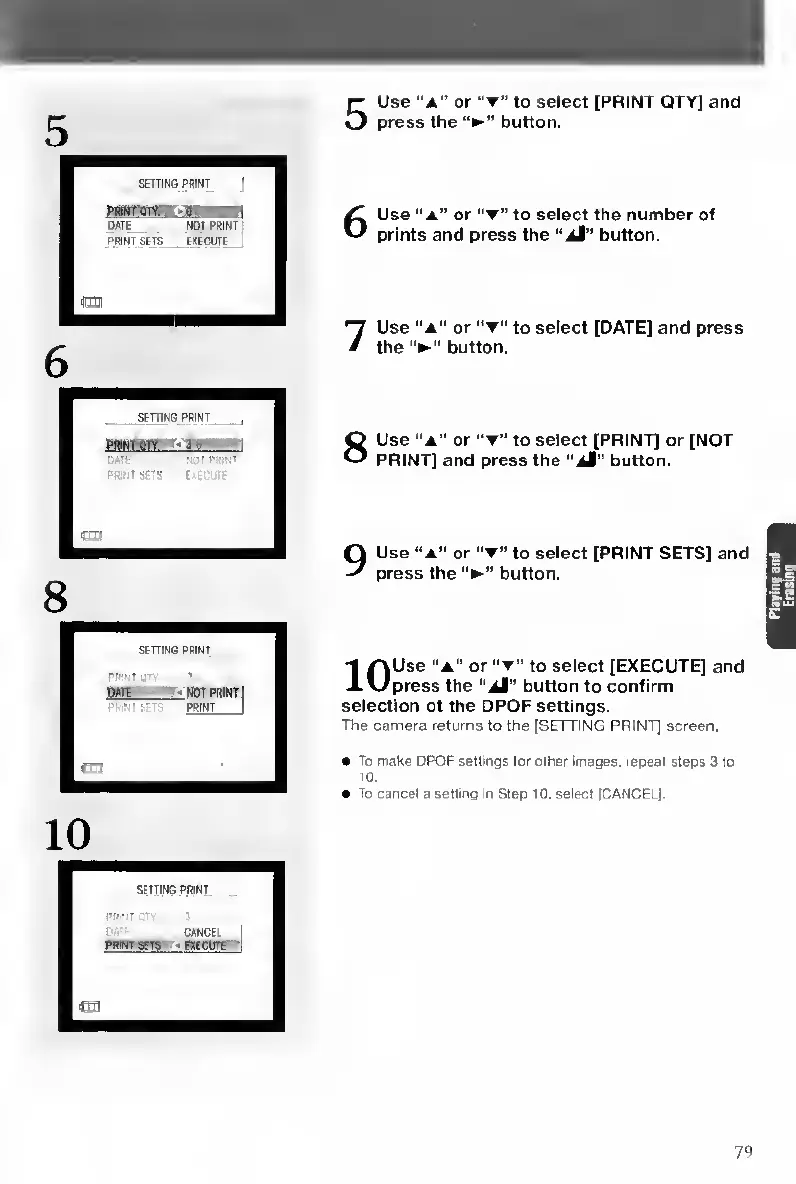
5
U
se
“a"
or
to
select
[PRINT
QTY]
and
press
the
button.
6
U
se
“a”
or
"t”
to
select
the
number
of
prints
and
press
the
“dl"
button.
7
U
se
“A”
or
to
select
[DATE]
and
press
the
button.
8
U
se
“A"
or
to
select
[PRINT]
or
[NOT
PRINT]
and
press
the
“jt"
button.
Use
“A"
or
“T”
to
select
[PRINT
SETS]
and
press
the
button.
1
^Use
"A”
or
to
select
[EXECUTE]
and
J.\Jpress
the
"jl"
button
to
confirm
selection
of
the
DPOF
settings.
The
camera
returns
to
the
[SETTING
PRINT]
screen.
To
make
DPOF
settings
tor
other
images,
repeal
steps
3
to
10
.
To
cancel
a
setting
in
Step
10,
select
[CANCEL].
PWnSETS

Table of Contents

Other manuals for Contax TVS DIGITAL

Related product manuals