EasyManua.ls Logo

Contax TVS DIGITAL - Page 80

Contax TVS DIGITAL
109 pages
Print Icon
To Next Page IconTo Next Page
To Previous Page IconTo Previous Page
Loading...
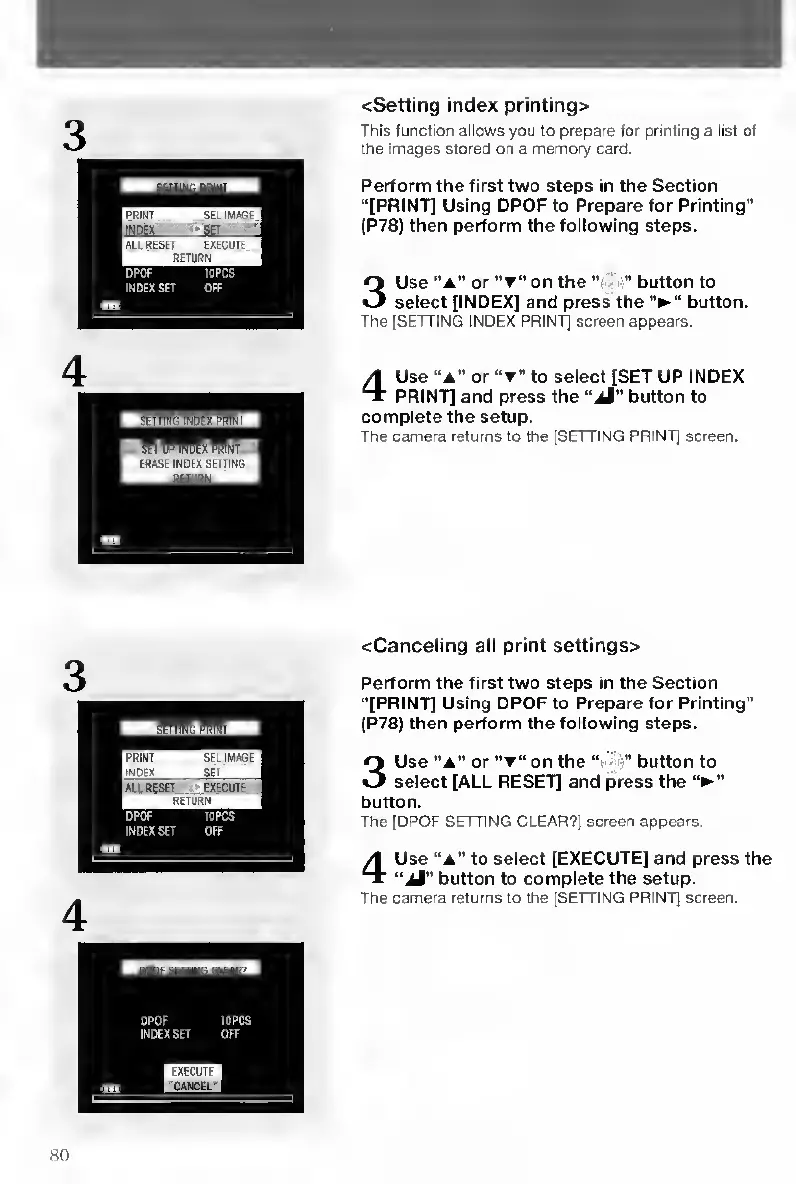
<Setting
index
printing>
This
function
allows
you
lo
prepare
for
printing
a
list
of
the
images
stored
on
a
memory
card.
Perform
the
first
two
steps
in
the
Section
“[PRINT]
Using
DPOF
to
Prepare
for
Printing”
(P78)
then
perform
the
following
steps.
3
Use
“a”
or
on
the
button
to
select
[INDEX]
and
press
the
button.
The
ISETTINQ
INDEX
PRINT]
screen
appears.
4
Use
“A”
or
“T"
to
select
[SET
UP
INDEX
PRINT]
and
press
the
“aM"
button
to
complete
the
setup.
The
camera
returns
to
the
[SETTING
PRINT]
screen.
<Canceljng
all
print
settings>
Perform
the
first
two
steps
in
the
Section
“[PRINT]
Using
DPOF
to
Prepare
for
Printing”
{P78)
then
perform
the
following
steps.
3
Use
“A”
or
“T"
on
the
button
to
select
[ALL
RESET]
and
press
the
‘V”
button.
The
[DPOF
SETTING
CLEAR?)
screen
appears.
4
Use
“a”
to
select
[EXECUTE]
and
press
the
“aA"
button
to
complete
the
setup.
The
camera
returns
to
the
[SETTING
PRINT]
screen.
80

Table of Contents

Other manuals for Contax TVS DIGITAL

Related product manuals