EasyManua.ls Logo

Contax TVS DIGITAL - Locking focus using the AFL button

Contax TVS DIGITAL
109 pages
Print Icon
To Next Page IconTo Next Page
To Previous Page IconTo Previous Page
Loading...
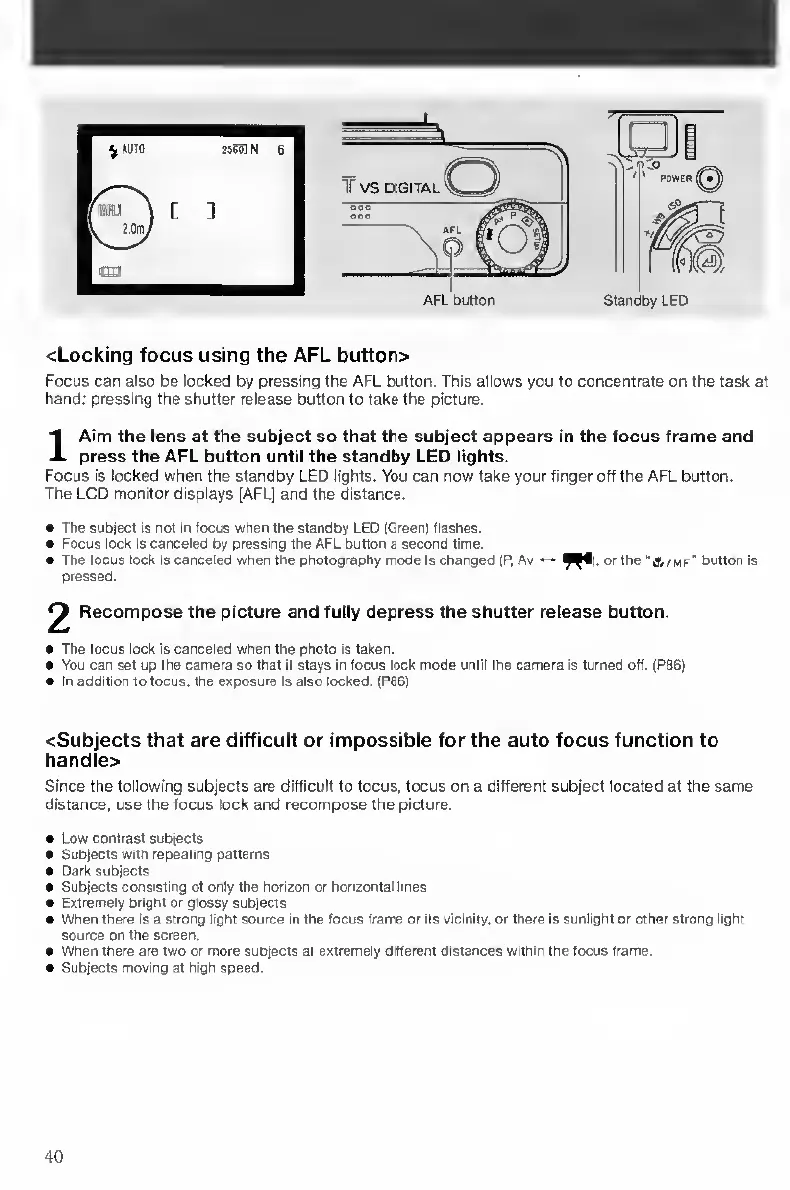
<Locking
focus
using
the
AFL
button>
Focus
can
also
be
locked
by
pressing
the
AFL
button.
This
allows
you
to
concentrate
on
the
task
at
hand:
pressing
the
shutter
release
button
to
take
the
picture.
I
A
im
the
lens
at
the
subject
so
that
the
subject
appears
in
the
focus
frame
and
press
the
AFL
button
until
the
standby
LED
lights.
Focus
Is
locked
when
the
standby
LED
lights.
You
can
now
take
your
finger
off
the
AFL
button.
The
LCD
monitor
displays
(AFL)
and
the
distance.
The
subject
is
not
in
focus
when
the
standby
LED
jGreen)
flashes.
Focus
lock
Is
canceleO
by
pressing
the
AFL
button
a
second
time.
The
focus
lock
IS
canceled
when
the
photography
mode
Is
changed
(P,
Av
•—
^^1,
or
the
'S/mf'
button
is
pressed.
2
Recompose
the
picture
and
fully
depress
the
shutter
release
button.
The
focus
lock
is
canceled
when
the
photo
Is
taken.
You
can
set
up
the
camera
so
that
It
stays
in
focus
lock
mode
until
the
camera
is
turned
off.
(P86)
In
addition
to
focus,
the
exposure
Is
also
locked.
(P66)
<Subjects
that
are
difficult
or
impossible
for
the
auto
focus
function
to
handle>
Since
the
following
subjects
are
difficult
to
focus,
focus
on
a
different
subject
located
at
the
same
distance,
use
the
focus
lock
and
recompose
the
picture.
Low
contrast
subjects
Subjects
with
repeating
patterns
Dark
subjects
Subjects
consisting
of
only
the
horizon
or
horizontal
lines
Extremely
bright
or
glossy
subjects
When
there
is
a
strong
light
source
in
the
focus
frame
or
Its
vicinity,
or
there
is
sunlight
or
other
strong
light
source
on
the
screen.
When
there
are
two
or
more
subjects
at
extremely
different
distances
within
the
focus
frame.
Subjects
moving
at
high
speed.
40

Table of Contents

Other manuals for Contax TVS DIGITAL

Related product manuals