EasyManua.ls Logo

Contax TVS DIGITAL - Page 47

Contax TVS DIGITAL
109 pages
Print Icon
To Next Page IconTo Next Page
To Previous Page IconTo Previous Page
Loading...
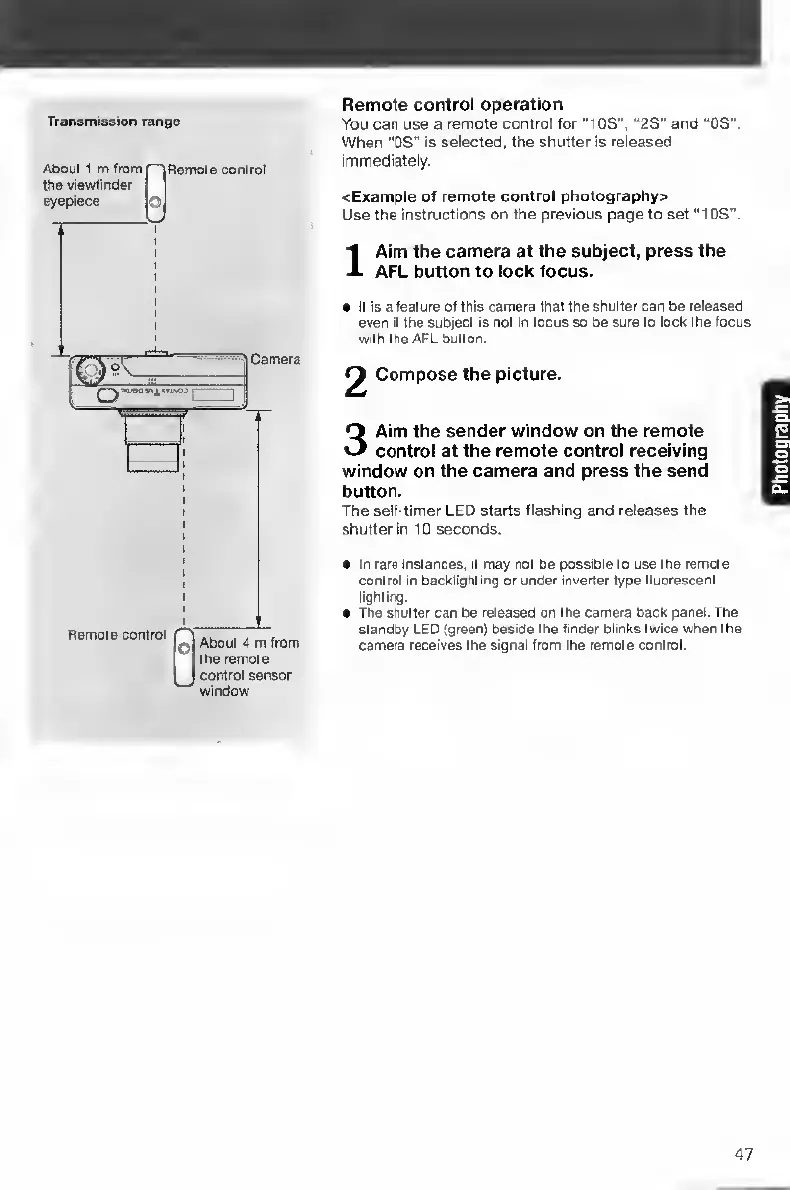
Transmission
range
Remote
control
operation
You
car
use
a
remote
control
for
“lOS",
“2S”
and
“OS".
When
“OS"
is
selected,
the
shutter
is
released
immediately.
<Example
of
remote
control
photography^
Use
the
instructions
on
the
previous
page
to
set
"IDS".
I
A
im
the
camera
at
the
subject,
press
the
AFL
button
to
lock
focus.
e
It
is
a
feature
of
this
camera
that
the
shutter
can
be
released
even
II
the
subject
Is
not
In
focus
so
be
sure
to
lock
the
focus
with
the
AFL
button.
Compose
the
picture.
3
Aim
the
sender
window
on
the
remote
control
at
the
remote
control
receiving
window
on
the
camera
and
press
the
send
button.
The
self-timer
LED
starts
flashing
and
releases
the
shutter
In
10
seconds.
In
rare
Instances,
it
may
not
be
possible
to
use
the
remote
control
in
backlignting
or
under
inverter
type
fluorescent
lighting.
The
shutter
can
be
released
on
the
camera
back
panel.
The
standby
LED
(green)
beside
the
finder
blinks
twice
when
the
camera
receives
the
signal
from
the
remote
control.
47

Table of Contents

Other manuals for Contax TVS DIGITAL

Related product manuals