EasyManua.ls Logo

Contax TVS DIGITAL - Page 93

Contax TVS DIGITAL
109 pages
Print Icon
To Next Page IconTo Next Page
To Previous Page IconTo Previous Page
Loading...
5.
Setting
a
Start
Screen
2
You
can
select
one
of
the
following
three
screens
as
the
start
screen.
!
CONTAX
screen.(factory
default)
2
User
customized
screen
....
an
image
stored
on
a
memory
card
can
be
used
as
the
start
screen
3
OFF
screen.no
start
screen
I
S
et
the
mode
dial
to
“SETUP”
and
turn
on
the
camera.
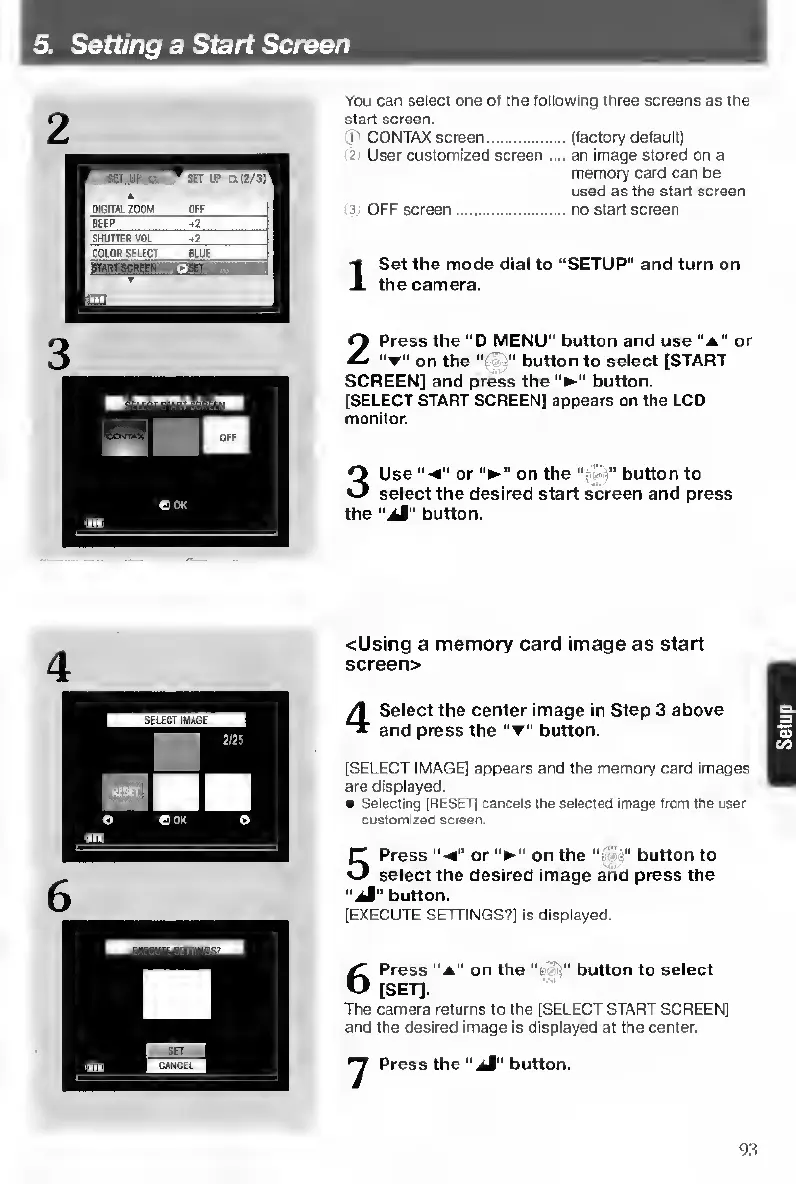
2
Press
the
“D
MENU”
button
and
use
“a"
or
on
the
“r'
"
button
to
select
[START
SCREEN]
and
press
the
button.
[SELECT
START
SCREEN]
appears
on
the
LCD
monKor.
3
Use
or
on
the
"•
button
to
select
the
desired
start
screen
and
press
the
"aJ”
button.
<Using
a
memory
card
image
as
start
screen>
4
S
elect
the
center
image
in
Step
3
above
and
press
the
"t”
button.
[SELECT
IMAGE]
appears
and
the
memory
card
images
are
displayed.
Selecting
(RESET)
cancels
the
selected
image
from
the
user
customized
screen.
5
P
ress
or
on
the
button
to
select
the
desired
image
and
press
the
“jS"
button.
[EXECUTE
SETTINGS?]
is
displayed.
5
Press
"a”
on
the
button
to
select
[SET].
The
camera
returns
to
the
[SELECT
START
SCREEN]
and
the
desired
image
is
displayed
at
the
center.
•y
Press
the
“aJ"
button.
93

Table of Contents

Other manuals for Contax TVS DIGITAL

Related product manuals