EasyManua.ls Logo

Contax TVS DIGITAL - Page 91

Contax TVS DIGITAL
109 pages
Print Icon
To Next Page IconTo Next Page
To Previous Page IconTo Previous Page
Loading...
3.
Setup
Menu
Contents
13.
VIDEO
OUT
The
video
output
of
the
camera
can
be
set
to
the
NTSC
or
PAL
system.
The
TV
oolor
system
varies
by
country.
When
you
are
traveling,
set
the
camera
to
the
TV
system
of
the
country
you
are
in.
The
NTSC
system
is
used
in
Japan
and
America.
14.
FILE
NO.
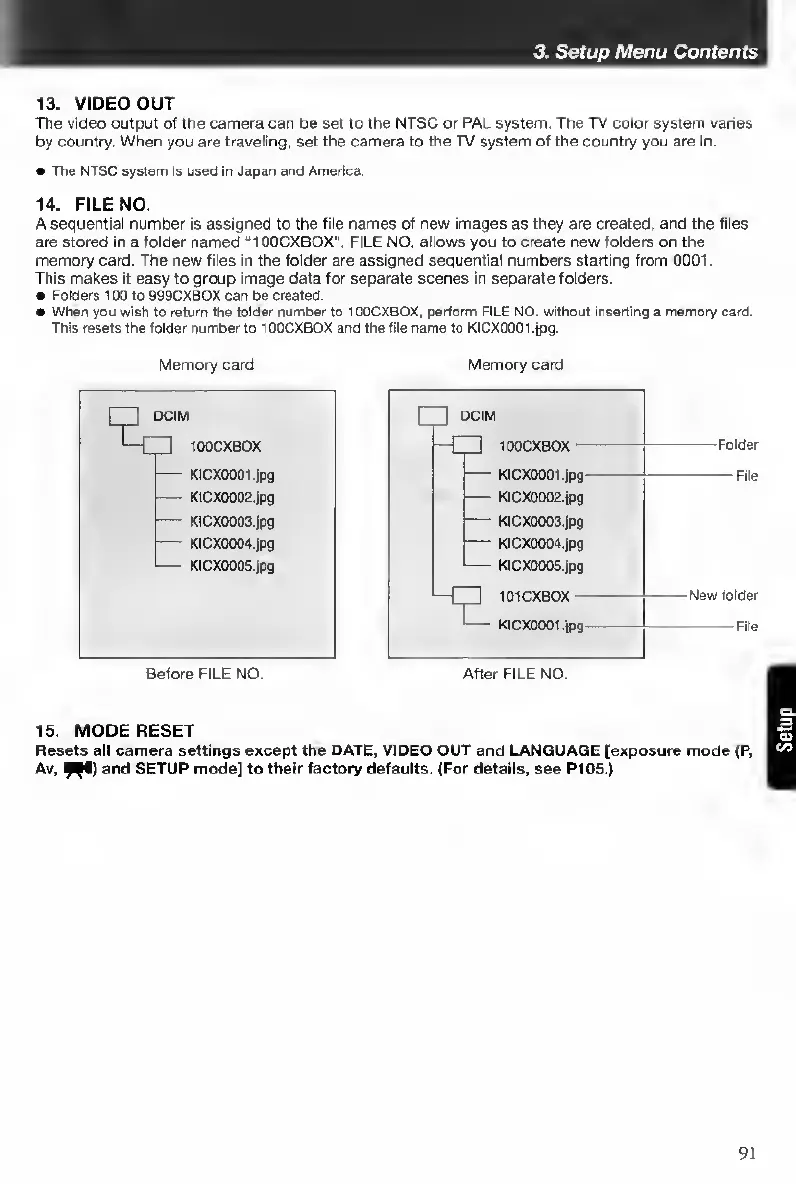
A
sequential
number
is
assigned
to
the
file
names
of
new
images
as
they
are
created,
and
the
tiles
are
stored
in
a
folder
named
“1OOCXBOX".
FILE
NO.
allows
you
to
create
new
folders
on
the
memory
card.
The
new
files
in
the
folder
are
assigned
sequential
numbers
starting
from
0001.
This
makes
it
easy
to
group
image
data
for
separate
scenes
in
separate
folders.
Folders
100
to
999CXBOX
can
be
created.
When
you
wish
to
return
the
folder
number
to
100CXBOX,
perform
FILE
NO.
without
inserting
a
memory
oard.
This
resets
the
folder
number
to
10OCXBOX
and
the
file
name
to
KlCX000t.jpg.
Memory
card
Memory
card
Before
FILE
NO.
After
FILE
NO.
15.
M
ODE
RESET
Resets
all
camera
settings
except
the
DATE,
VIDEO
OUT
and
LANGUAGE
[exposure
mode
(P,
Av.
9
^
and
SETUP
mode]
to
their
factory
defaults.
(For
details,
see
P105.)
91

Table of Contents

Other manuals for Contax TVS DIGITAL

Related product manuals