EasyManua.ls Logo

Contax TVS DIGITAL - Page 55

Contax TVS DIGITAL
109 pages
Print Icon
To Next Page IconTo Next Page
To Previous Page IconTo Previous Page
Loading...
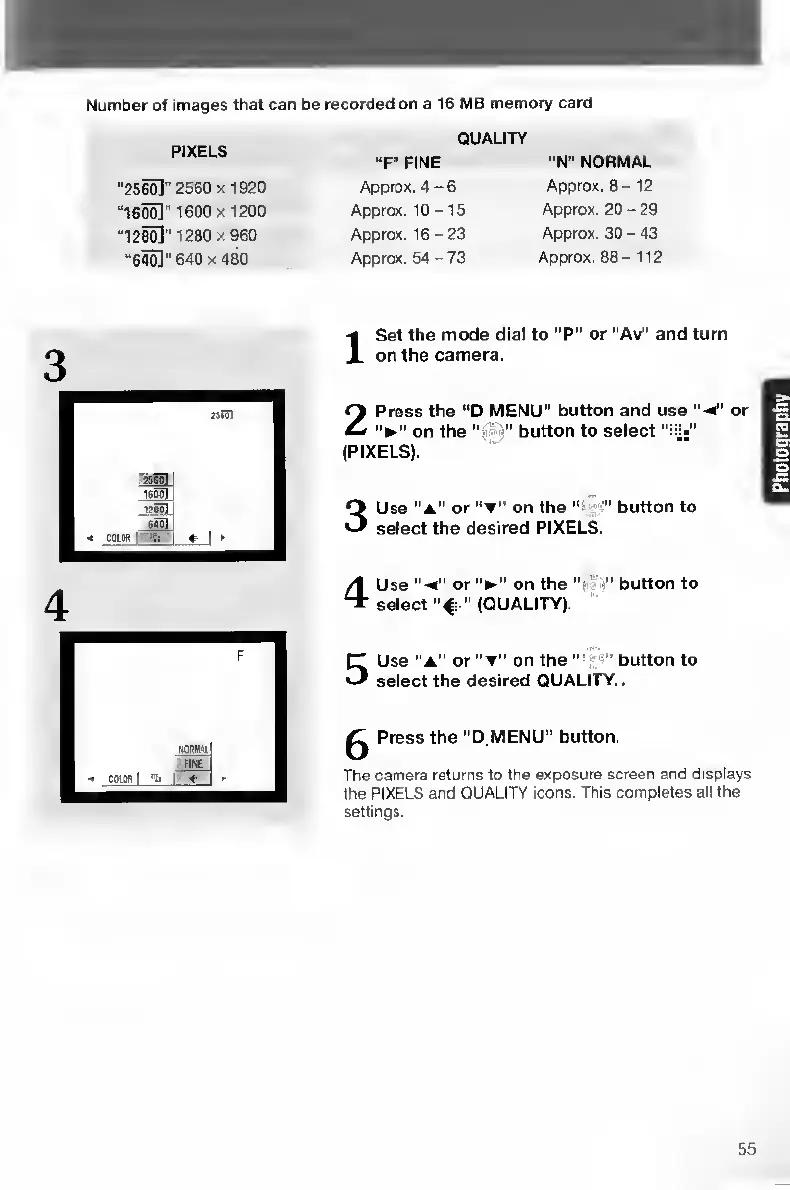
Number
of
images
that
can
be
recorded
on
a
16
MB
memory
card
PIXELS
QUALITY
“F”
FINE
“N"
NORMAL
“25^"
2560x1920
Approx.
4-6
Approx.
8-12
“1600]"
1600
X
1200
Approx.
10
-15
Approx.
20
-
29
“1260]'1280x960
Approx.
16-23
Approx.
30
-
43
“640]"
640
X
480
Approx.
54
-
73
Approx.
88
-112
I
S
et
the
mode
dial
to
“P”
or
“Av”
and
turn
on
the
camera.
2
P
ress
the
“D
MENU"
button
and
use
"-
4
or
on
the
“a'i
j”
button
to
select
(PIXELS).
3
U
se
“a”
or
on
the
"
,
button
to
select
the
desired
PIXELS.
4
U
se
or
on
the
button
to
select
“4
(QUALITY).
5
U
se
"A”
or
on
the
“•'
button
to
select
the
desired
QUALITY.
^
Press
the
“D
MENU”
button.
The
camera
returns
to
the
exposure
screen
and
displays
the
PIXELS
and
QUALITY
icons.
This
completes
all
the
settings.
55

Table of Contents

Other manuals for Contax TVS DIGITAL

Related product manuals