About this task
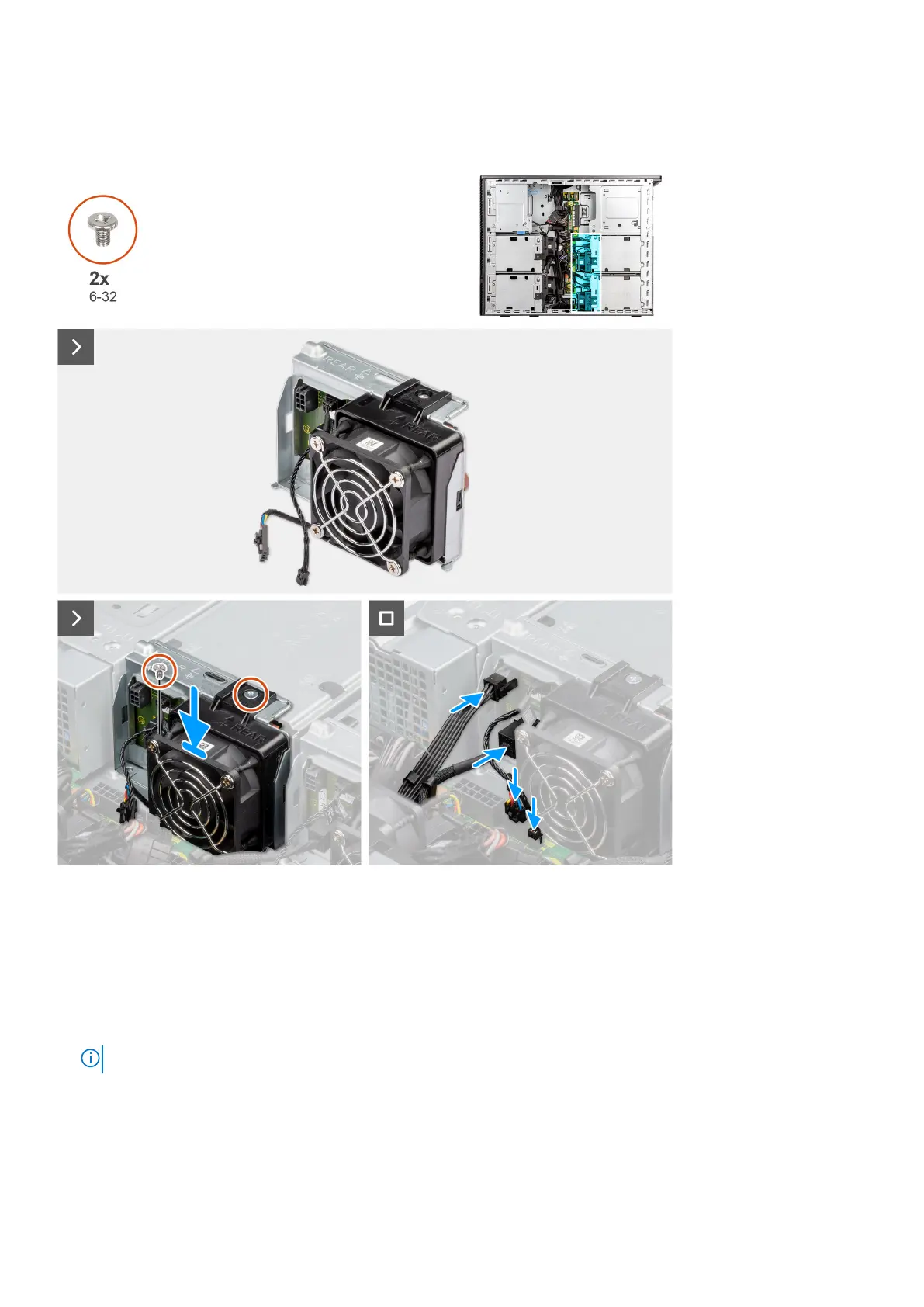
The following images indicate the location of the rear SATA/SAS module and provide a visual representation of the installation
procedure.
Steps
1. Align the screw holes on the rear SATA/SAS module with the screw holes on the flex4.
2. Place the rear SATA/SAS module into the slot in the flex4.
3. Install the two screws (6-32) to secure the rear SATA/SAS module to the flex4.
4. Connect the data cable to the connector on the SATA/SAS board.
5. Connect the power cable to the connector on the SATA/SAS board.
6. Connect the thermal-sensor cables and fan-controller cables to the connectors on the power-distribution board.
NOTE: Follow the same procedure from step 1 to step 6, to install the SATA/SAS module in flex3.
Next steps
1. Install the right-side cover.
2. Install the rear 3.5-inch hard-drive assembly.
3. Install the rear 2.5-inch hard-drive assembly.
Removing and installing components
103













 To Next Page