OperationModel 2500 151
© 2015-2017 Distek, Inc. All Rights Reserved
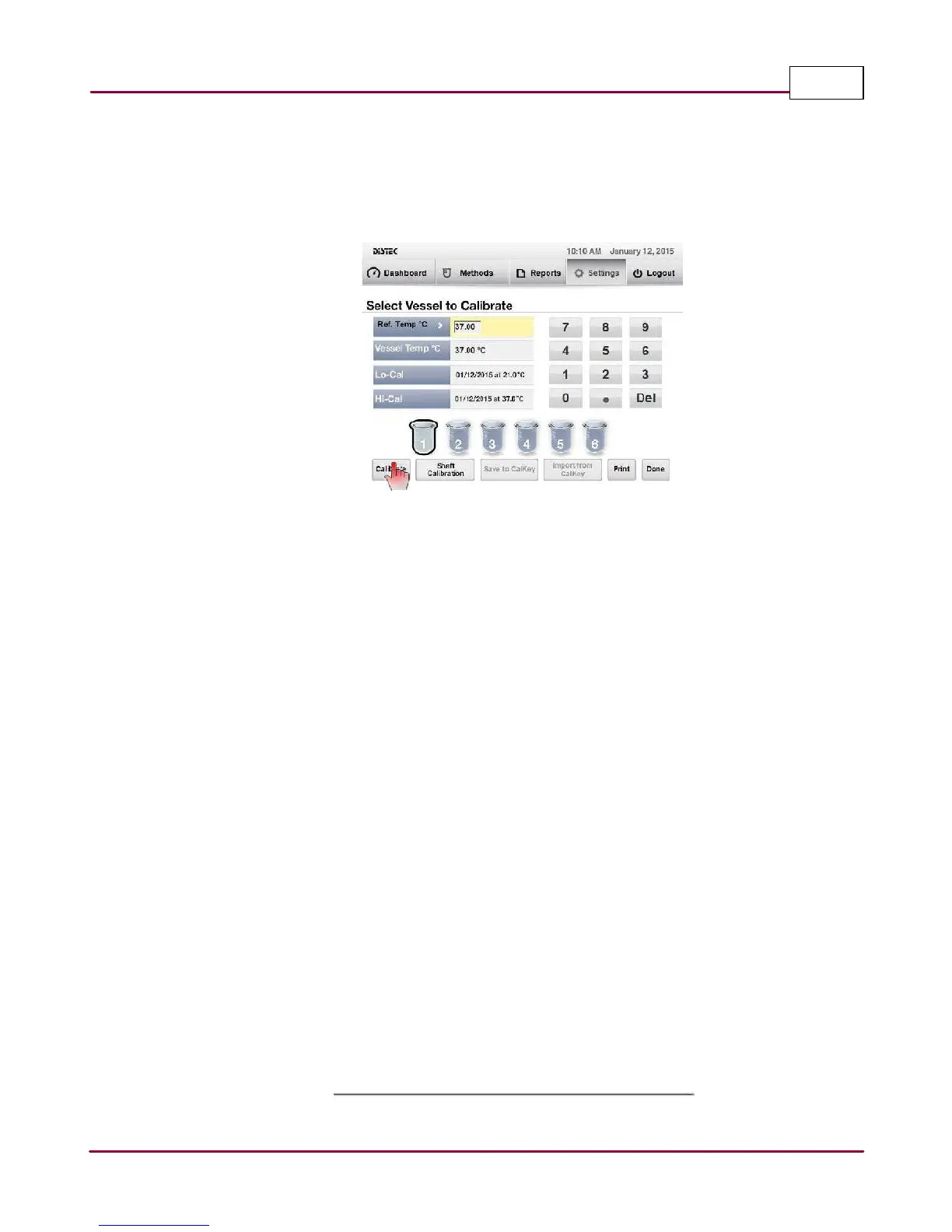
4 Once the temperature has equilibrated, using the number pad, enter in the reference
temperature into the
Ref. Tem p. °C
parameter
then quickly select
Ca libra te
to start vessel
1 calibration as shown.
Select Calibrate to calibrate vessel 1
5 Observe that the
V essel Tem p °C
closely matches (±0.05°C) the reference current
temperature reading and that the
Lo-C a l
parameter is updated. Repeat steps 4 and 5 if it
does not meet the criteria.
6 Once satisfied with the result, continue the calibration by selecting vessel position 2 and
repeat steps 3 to 5.
7 Repeat the above steps for the remaining vessel positions.
8 Once the Lo-Cal is complete, exit the shaft calibration screen by selecting
Done
.
9 Set the bath temperature to 41°C and wait for the vessel temperature to equilibrate.
10 Repeat steps 1 to 5 to start the
Hi-Ca l
calibration.
11 Observe that the
V essel Tem p °C
closely matches (±0.05°C) the reference current
temperature reading and that the
Hi-Ca l
parameter is updated. Repeat steps 4 to 11 if it
does not meet the criteria.
12 Repeat the above steps for the remaining vessel positions.
13 Once the Hi-Cal is complete, exit the shaft calibration screen by selecting
Done
.



 To Next Page