Graphic User Interface (GUI)Model 2500 59
© 2015-2017 Distek, Inc. All Rights Reserved
4.5 Methods
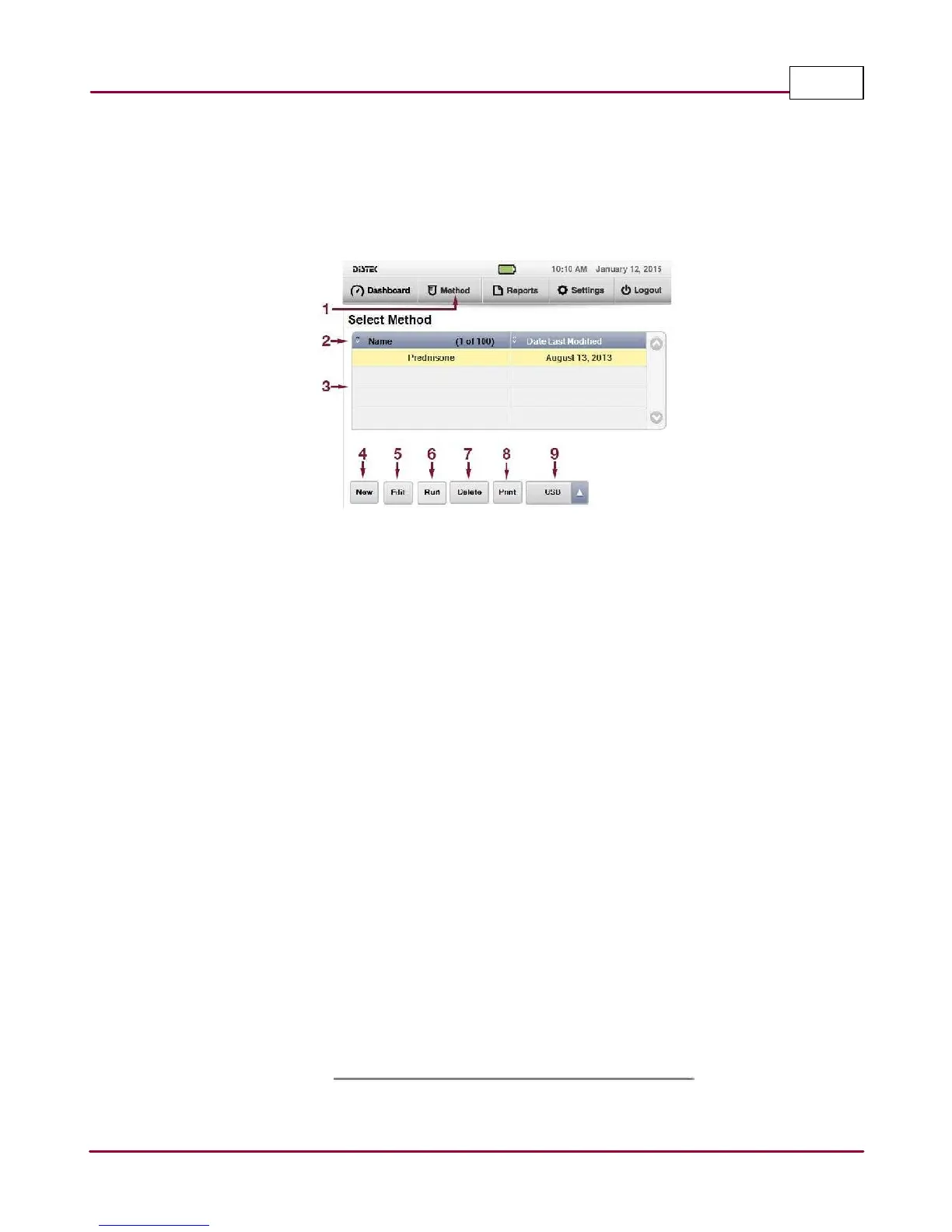
This menu tab describes how to create, save and run a method for future dissolution sessions.
By simply loading your method, all the setup parameters for a particular test will be stored in the
system. A library of up to 100 methods facilitates routine dissolution tests.
1 Methods: Menu tab to create, edit, save and run a method.
2 Method Count: Records the number of programmed methods.
3 Method Table: List the methods stored into the instrument.
4 New: When selected, prompts the user to create a new method.
5 View: When selected, user can view or edit the parameters of an existing method.
6 Run: After selecting a desired method, user can execute a test run.
7 Delete: After selecting the desired method, user who has a manager privilege can delete
the method.
8 Print: After selecting the desired method, user can print the method.
9 USB: The end-user is able to Import or Export using a USB flash drive.



 To Next Page