Graphic User Interface (GUI)Model 2500 54
© 2015-2017 Distek, Inc. All Rights Reserved
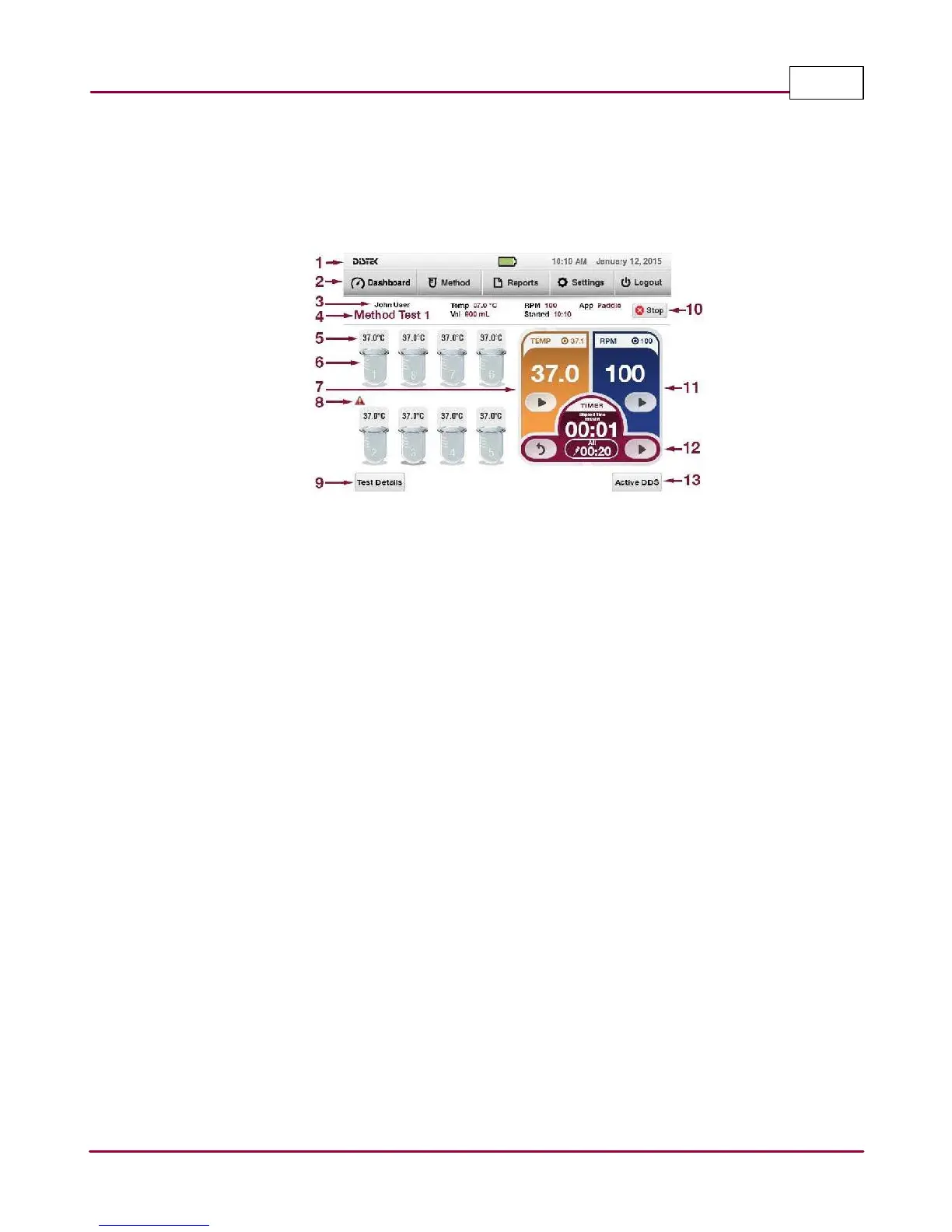
4.2 2500 RTD Dashboard
This is the main display screen of the Model 2500RTD instrument. It gives you access to available
menus. Below is a brief description of the function of each item.
2500 RTD Dashboard Screen
1 Title Bar: Shows the Distek logo, current time and date.
2 Menu Tabs: Used to navigate throughout the software.
3 User Login Name: Displays who is logged in to the instrument.
4 Method Name (or Manual): Shows the selected Method when running; otherwise, shows
a manual run.
5 Temperature Display: Displays the current vessel temperature.
6 Vessel Position: Shows the position of the vessels based on the vessel layout.
7 Temperature Display/Control: Control and displays current temperature and setting.
8 Instrument Validation Icon: When enabled, it reminds the operator if the instrument is
due for calibration.
9 Test Details Button: Used to view the temperature and rpm details and prints the test
information.
10 Stop Button: Aborts the test.



 To Next Page