Graphic User Interface (GUI)Model 2500 60
© 2015-2017 Distek, Inc. All Rights Reserved
4.6 Reports
This menu tab will display all completed and aborted tests, whether the test was run using a
method or it was run manually. By selecting a test from the list, the user will be able to view the
report summary or print the entire test to a connected printer. The total number of recent
reports are displayed in the left column (e.g. 1 of 100).
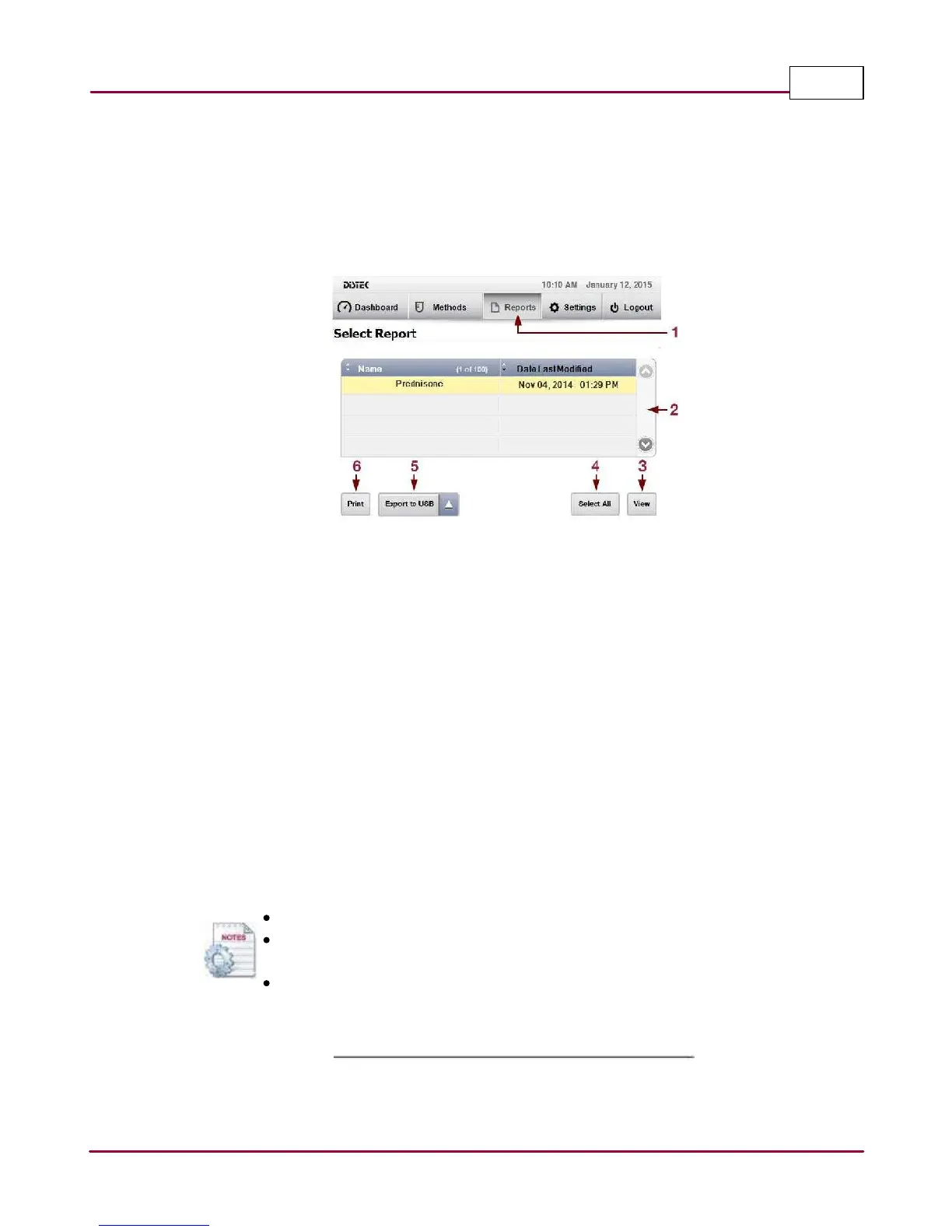
Reports Display Screen
1 Reports: Menu tab to view completed and aborted reports.
2 Test Run Table: Lists the test runs stored on the instrument. End-user can view and print a
single report or select multiple reports to be exported.
3 View: After selecting the desired report, user can view a summary of the test.
4 Select All: The end-user is able to select all reports to be exported using a USB flash drive.
5 Export to USB: The end-user is able to export the report(s) either in PDF or CSV (Excel)
format into a USB flash drive.
6 Print: After selecting the desired report, user can print the test.
A library of up to 100 reports is stored in the instrument.
Once the number of reports reaches the maximum amount, the oldest report
will be over-written.
The exported reports are converted automatically to CSV files.



 To Next Page