Graphic User Interface (GUI)Model 2500 51
© 2015-2017 Distek, Inc. All Rights Reserved
4 Graphic User Interface (GUI)
Dashboard
Methods
Reports
Settings
Logout
On-Screen Keyboard
The graphical user interface (GUI) is a type of interface that allows the user to interact using
images to control the instrument. It represents the information and actions available to a user
through graphical icons and visual indicators. This makes controlling the instrument more
intuitive. The software is organized into "tabs" that control the various functions of the
instrument.
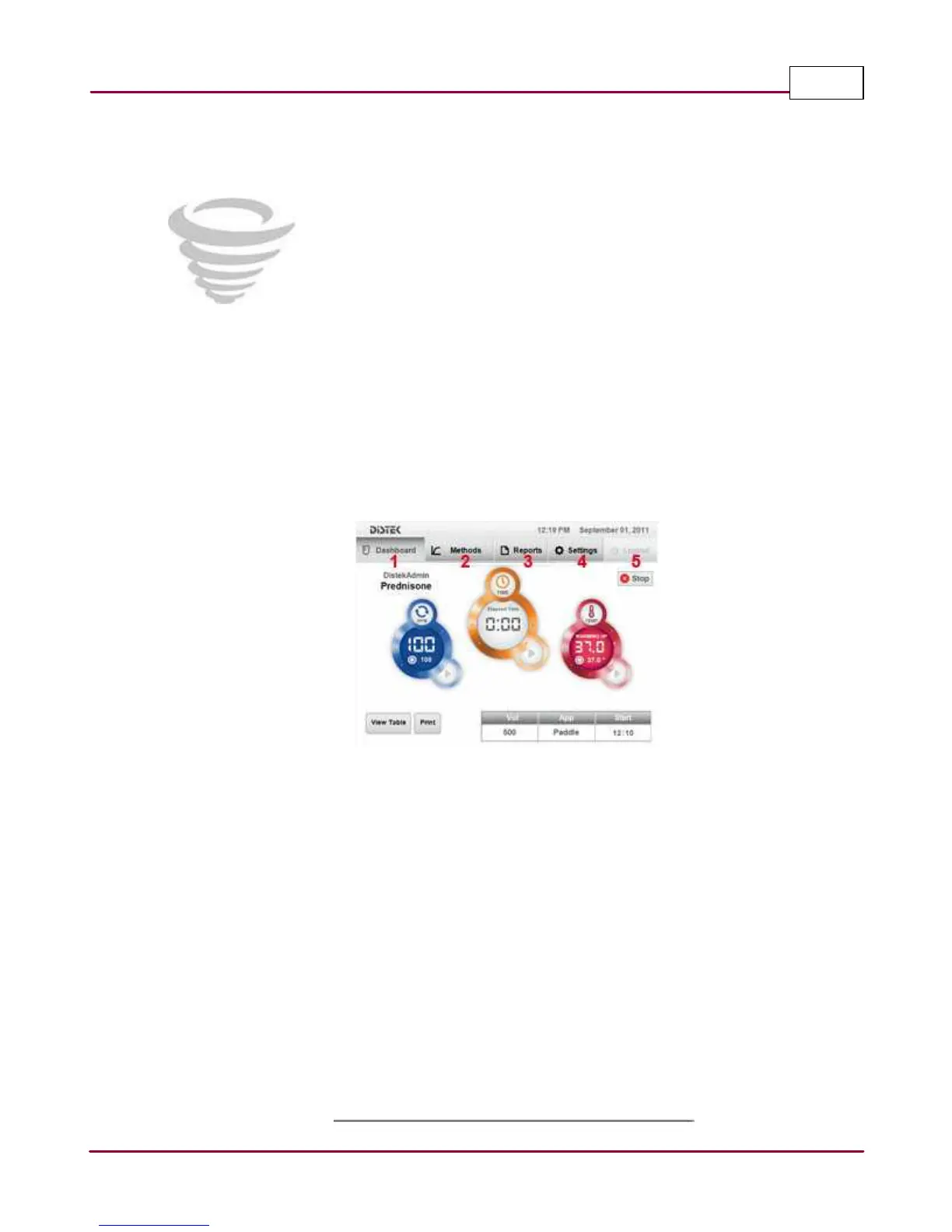
2500 Graphic User Interface (GUI)
1 Dashboard: This is the main screen of the instrument. It shows the user the status of the
instrument and if it is running a test or idle.
2 Methods: This screen displays additional module information during a test. It provides
information about the test temperature, RPM, elapsed time and sampling time. It is only
active or available when there is a test running; otherwise, it stays grayed out.
3 Reports: This screen displays a listing of all the test runs that were completed and aborted.
When a report is selected, it can then either be viewed or printed.
4 Settings: This screen displays all the different general settings of the instrument. Creating
methods, shaft control, creating different user level, system settings and the help section
are found in the Settings tab.
5 Logout: This screen is used to log the user out from the instrument GUI.



 To Next Page